EN-1
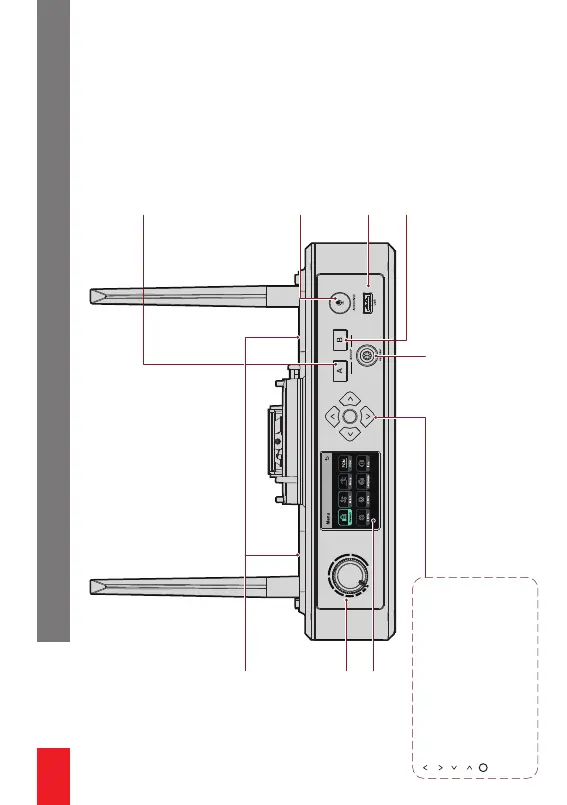
NP-F Batte Slot
USB Inteace
Volume Knob
Display
0B10 Headset Inteace
B Button
UP Arrow Button
DOWN Arrow Button
LEFT Arrow Button
RIGHT Arrow Button
Menu/Conrmation Button
Press and hold the button to enter
the menu inteace/Press the button
for conrmation.
A Button
OFF: The wired headset user is not in
group A. In this case, the user cannot
hear or talk with the other headset users
in group A.
ON in orange: The wired headset user is
in group A. In this case, the user can
hear and talk with the other headset
users in group A.
ANNOUNCE Button
Press and hold the button to mute all
remote headsets in the system. In this
case, the indicator turns ON in orange.
OFF: The wired headset user is not in
group B. In this case, the user cannot
hear or talk with the other headset
users in group B.
ON in orange: The wired headset user
is in group B. In this case, the user can
hear and talk with the other headset
users in group B.
Inteaces
NP-F Batte Slot
Volume Knob
Display
UP Arrow Button
DOWN Arrow Button
LEFT Arrow Button
RIGHT Arrow Button
Menu/Conrmation Button
• Press and hold the button to enter the menu
inteace/Press the button for conrmation.
0B10 Headset Inteace
A Button
• OFF: The wired headset user is not in group A.
In this case, the user cannot hear or talk with
the other headset users in group A.
• ON in orange: The wired headset user is in
group A. In this case, the user can hear and talk
with the other headset users in group A.
ANNOUNCE Button
• Press and hold the button to mute all remote
headsets in the system. In this case, the indica-
tor turns ON in orange.
USB Inteace
B Button
• OFF: The wired headset user is not in group B.
In this case, the user cannot hear or talk with
the other headset users in group B.
• ON in orange: The wired headset user is in
group B. In this case, the user can hear and talk
with the other headset users in group B.


 To Next Page