Need help?
Do you have a question about the Holmes HCM730 and is the answer not in the manual?
Notices regarding humidifier placement, surfaces, and cord usage.
Explanation of the humidifier's cool mist operation.
Steps to follow before the humidifier's first use.
Step-by-step guide for refilling the water tank.
Details on setting and using the digital humidistat.
Instructions for operating the humidifier's settings and functions.
Information on the 24-hour auto shut-off timer feature.
Steps and guidance for replacing the humidifier's filters.
Routine cleaning procedures to perform every day.
Procedures for weekly cleaning and descaling.
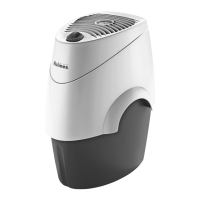
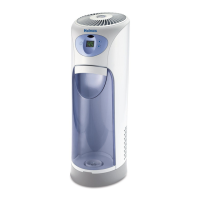
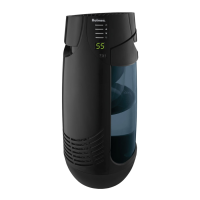
The Holmes Cool Mist Tower Humidifier (HCM730) is designed to add moisture to dry indoor air, providing a more comfortable and healthier environment. This appliance utilizes a cool, invisible mist humidification system, drawing dry air through a rear air intake grill. The air then passes through a moisture-laden wick filter, which captures minerals and sediment from the water. The resulting moist air is then released back into the room from the top air grill. It's important to note that the mist produced by this system is invisible, so it's normal not to see it. The recommended humidity level for optimal comfort and health is between 40% and 50%, as levels below 20% can be unhealthy and uncomfortable.
For proper and safe operation, the humidifier should always be placed on a firm, flat, and level surface, ideally on a moisture-resistant mat or pad. It should never be placed on rugs, carpets, or finished floors that could be damaged by water or moisture. To ensure the best results, position the humidifier about 4 inches (10 cm) away from a wall and avoid placing the moisture outlet directly facing a wall, as this could cause damage, particularly to wallpaper. It's also crucial to avoid placing the humidifier under overhanging surfaces. The appliance should be plugged directly into a 120V AC electrical outlet, and the cord should be kept out of heavy traffic areas and never placed under rugs or near heat registers to prevent fire hazards.
The humidifier is equipped with a digital humidistat control, allowing users to set their desired comfort level between 30% and 60% humidity using up/down buttons. The selected humidity level will be displayed on the unit. For the most accurate reading, it's recommended to run the humidifier for one hour before checking the humidistat. Once the room humidity rises above the set level, the humidifier will automatically stop and will restart when the humidity drops below the preset level.
Operating the humidifier is straightforward. After ensuring the unit is switched OFF and disconnected from the electrical outlet, the water tank needs to be filled. To do this, remove the tank from the housing by grabbing its handle, turn it upside down, and twist off the tank cap counter-clockwise. Fill the tank with cool, fresh tap water, avoiding warm water as it may cause leaking. Once filled, replace the cap by aligning the arrows and twisting to the lock position, ensuring it's closed firmly. Then, carry the full tank to the humidifier and place it into the housing, using the locating tabs to align it evenly with the base. Push the top of the tank into place until a click is heard, indicating it's locked correctly. The tank holds 1.2 gallons of water and will immediately begin to empty into the base, which may produce a "gurgling noise" that is completely normal. Finally, plug the power cord into a 120V AC electrical outlet.
After allowing up to 30 minutes for the filter to fully absorb water and for the unit to reach maximum moisture output, press the Power Button to turn the humidifier on. It will start on the High setting, indicated by "3" on the display, which will then revert to showing the room humidity after two seconds. Subsequent presses of the Power Button will cycle through Medium ("2"), Low ("1"), and Off ("0F") settings. To turn the humidifier off at any setting, press and hold the Power Button for three seconds until "OF" illuminates on the display.
The humidifier also features a 24-Hour Auto Shut-off Timer. To use this, press the Timer Button, and "0" will appear on the display. Use the up/down buttons to select a desired time interval from 0 to 24 hours for the humidifier to automatically shut off. The selected hour will be displayed. Users can check the remaining time by pressing the Timer Button again. To cancel the timer, press the Timer Button and then the down button until "0" is displayed. If the water tank becomes empty, the fan will continue to run to help dry the humidifier. In this case, the unit should be shut off, unplugged, and refilled according to the instructions.
Regular maintenance is crucial for the humidifier's efficient operation and to prevent the growth of micro-organisms, algae, or bacteria. Daily maintenance involves ensuring the unit is OFF and unplugged, then removing the housing and tank. The base should be carried to a sink, the wick removed, and any remaining water drained. Both the base and tank should be thoroughly rinsed to remove sediment or dirt, then wiped clean and dry with a cloth or paper towel. The filters should be reinserted into the wick holder, ensuring the rivet attaches to the holder, and the wick holder locked back into place. The housing is then replaced and locked, and the tank refilled with cool tap water. The tray is dishwasher safe (TOP RACK ONLY) for easy cleaning.
Weekly maintenance includes the daily steps, with an added focus on scale removal and disinfection. To remove scale, partially fill the base with 8 ounces of undiluted white vinegar and let it stand for 20 minutes, while cleaning interior surfaces with a soft brush. Wipe the base with a vinegar-dampened cloth to remove scale. Rinse thoroughly with clean warm water before disinfecting. For disinfection, fill the tank halfway with water and half a tablespoon of chlorine bleach. Let the solution stand for 20 minutes, swishing it every few minutes to wet all surfaces. After 20 minutes, empty the tank and rinse with warm water until no bleach smell is detected. Dry with a clean cloth or paper towel. Finally, place the filter back into the tank, refill the water tank, and turn the unit on.
The wick filter plays a critical role in the humidification process and needs regular replacement. The FilterCheck® Indicator helps monitor the filter's condition. A brand new filter will register in the "GOOD" section. Over time, waterborne minerals and sediment become trapped in the filter, especially with harder water, reducing its effectiveness. When the needle moves into the "CHANGE" section, it indicates that the filter is no longer providing the proper amount of moisture and needs to be replaced to maintain stated performance levels. After 30 minutes of use, the FilterCheck® Indicator will accurately reflect the filter's condition.
To replace the filter, first turn off and unplug the unit. Remove the tank from the housing. Unlock the housing from the base by turning the lock knob to the unlocked position, then lift the housing straight up and set it aside. Unlock the wick holder from the base, remove the old wicks from the wick holder, and then follow the weekly cleaning instructions. Insert new filters into the wick holder, lock it back onto the base, replace and lock the housing, and then refill the tank. It will take about 30 minutes for the new filter to fully absorb water and for the humidifier to reach maximum output. Replacement filters (model HWF100) can be purchased from local retailers, by calling 1-800-546-5437, or by visiting www.holmesproducts.com. It is recommended to have a replacement filter on hand for uninterrupted use.
Troubleshooting common issues is also covered. If the unit doesn't turn on, check if it's plugged in and if the outlet is functioning. Minimal mist output could be due to the cool mist being invisible, or the filter not having absorbed water; operating on High (3) setting and waiting 30 minutes for the filter to absorb water should resolve this. A brown filter indicates absorbed minerals, requiring filter replacement. If the FilterCheck® Indicator isn't working, allow the humidifier to run continuously for 30 minutes for it to register the filter condition. If the humidifier continuously displays 21%, it means the humidity at the humidifier is at or below 21%, and continued operation will raise room humidity. Conversely, if it continuously displays 90%, the humidity is too high, and the humidifier should be stopped.
The run time of the humidifier is influenced by several variables, including air exchange, room construction, temperature, humidity levels, occupant movement, and home furnishings. To remove film on the water tank, refer to the daily maintenance instructions, as regular cleaning is recommended. To extend run time, operate the unit on the lowest setting. If the unit has electronics, setting it to a desired humidity level will allow it to cycle on and off, extending run time. Additionally, filling the tank completely, letting the water empty into the base until bubbling stops, and then refilling the tank again ensures maximum water capacity and extends run time.
When storing the humidifier for an extended period, dispose of the filters and do not leave them in the unit. Clean, rinse, and thoroughly dry the humidifier as directed in weekly maintenance, ensuring no water remains in the unit, as this could render it inoperable for the next season. Store the humidifier in its original carton in a cool, dry place, and order a replacement filter for the next year's use.
 General
| Humidifier Type | Cool Mist |
|---|---|
| Tank Capacity | 1.5 gallons |
| Run Time | Up to 24 hours |
| Power | 120 watts |
| Settings | 2 |
| Filter | Wicking Filter |

 To Next Page