MAN-02099 Revision 003, December 2014
Quick Start Guide
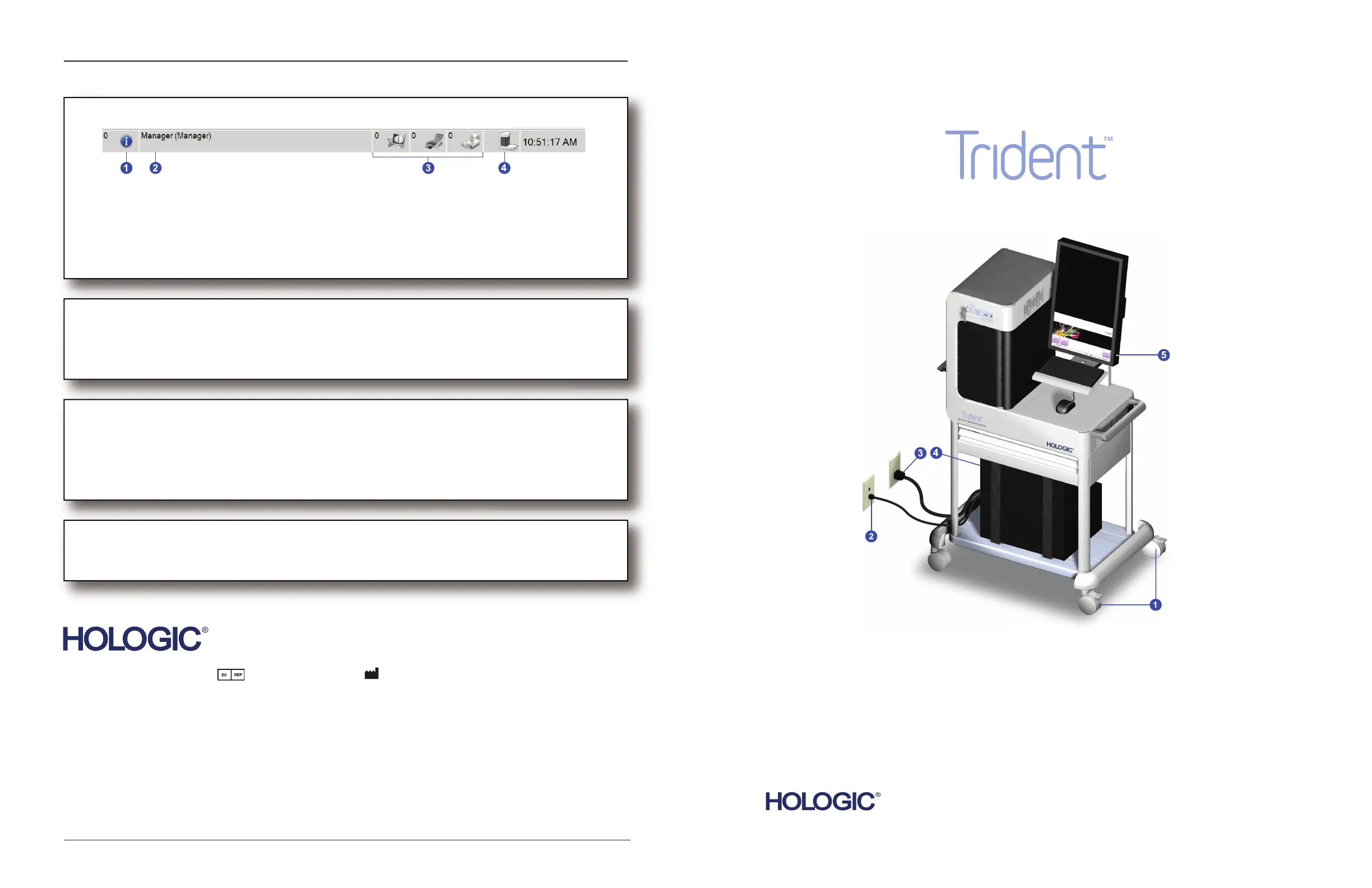
THE TASKBAR
1. Manage system alarm messages.
2. Access screens for Admin functions, logging out, editing user settings, and printing the patient list.
3. View job information and manage queues for the destination devices.
4. View system messages, clear alarms and faults, set system defaults, and view system information.
SYSTEM SHUTDOWN
1. Select the Log out button in the Select Patient screen.
2. Select the Shutdown button in the Log In screen.
SYSTEM CARE
General Cleaning Instructions (Refer to the Instructions for Use for full details.)
1. Apply a cleaning solution to a lint-free cloth. Do not spray or ow the liquid on any part of the unit.
2. Wipe the unit with the cloth.
3. Clean the Keyboard surfaces with a CRT wipe.
SYSTEM CALIBRATION
When the system displays a message to perform the calibration procedure, follow the on-screen prompts to
complete the procedure.
MAN-02099
Specimen Radiography System
1. Lock the Casters.
2. Connect to the network.
3. Connect to power.
4. Press the Computer ON button.
5. Select the Log In button.
Quick Start Guide
Refer to the User Guide for safety information and complete user instructions.
Refer to the corporate website for more facilities worldwide.
© Copyright Hologic 2014. All rights reserved. Printed in USA. This manual was originally written in English.
Hologic and the Hologic Logo are trademarks or registered trademarks of Hologic, Inc. Other trademarks registered or used by Hologic and its divisions and subsidiaries in the
United States and other countries include: Affirm, ATEC, C-View, Dimensions, DSM, Eviva, FAST Paddle, Hologic Connect, HTC, M-IV, MultiCare, Selenia, Smart Paddle,
StereoLoc, TechMate, and Trident. Microsoft and Windows are trademarks or registered trademarks of Microsoft Corporation in the United States and other countries. Any other
product and company names mentioned herein are the trademarks or registered trademarks of their respective owners.
Europe
(EU Representative)
Hologic NV
Leuvensesteenweg 250A
1800 Vilvoorde, Belgium
Tel: +32.2.711.4680
Fax: +32.2.725.2087
Corporate Headquarters
35 Crosby Drive,
Bedford, MA 01730-1401 USA
Tel: +1.781.999.7300
Sales: +1.781.999.7453
Fax: +1.781.280.0668
www.hologic.com
Manufacturer
36-37 Apple Ridge Road
Danbury, CT 06810 USA














 To Next Page