12
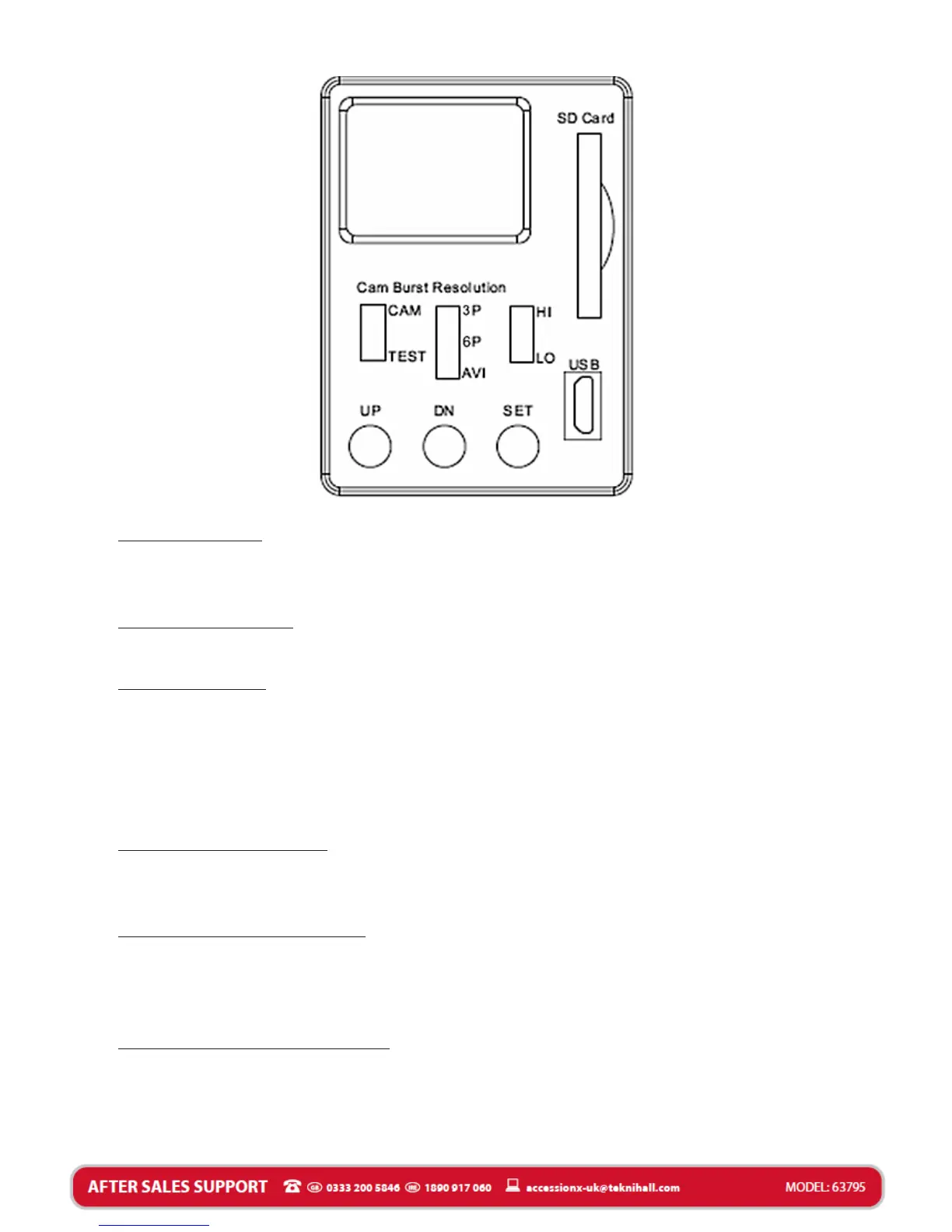
LCD display:
Icon display showing settings and captured image/video
quantity. Refer to LCD details later in this manual.
Camera switch:
Switch between capture mode (CAM) and Test mode (TEST).
Burst switch:
Use this switch to switch between still images and video.
Depending on what you set the burst switch to, the Security
light will capture pictures/video when motion is detected. You
can set it to 3 pictures (3P), 6 pictures (6P) or video recording
(AVI).
Resolution switch:
To set the still image resolution and Video resolution. You can
choose between High resolution (HI) and Low resolution (LO)
SD memory card slot:
To install a SD memory card, please ensure card is unlocked.
Insert the card firmly. Press again to release and remove. SD
card is needed for the Security Light to capture video/pictures.
SET/UP/DOWN button:
Use these three buttons to program the camera parameters as
Date/Time/Video recording time/Image and video capturing
interval time.


 To Next Page