MPORTANT, RETAIN FOR FUTURE REFERENCE: READ CAREFULLY.
Please read these instructions carefully prior to installation. Failure to follow any of these instruc-
tions could void product warranties. Test Rite assumes no responsibility for claims arising out
of improper or careless installation or handling of its products.
Do not return to the store before calling ACS. For questions regarding this product or warranty,
please contact American Customer Service at 1-855-232-6427; serving in English, Spanish
and French, Monday through Friday, 8am to 8pm Eastern Time. Outside of business hours you
can reach us by e-mail at acs@americancustomerservice.com and we will reply to you on the
next business day.
5 YEAR LIMITED WARRANTY
This device complies with Part 15 of the FCC Rules. Operation is subject to the following two
conditions: (1) This device may not cause harmful interference, and (2) This device must
accept any interference received, including interference that may cause undesired operation.
Warning: Changes or modification to this unit not expressly approved by the party responsible
for compliance could void the user’s authority to operate the equipment. NOTE: This
equipment has been tested and found to comply with the limited for Class B digital device,
pursuant to Part 15 of the FCC Rules. Their limits are designed to provide reasonable protec-
tion against harmful interference in a residential installation. This equipment generates, uses
and can radiate radio frequency energy and, if not installed and used in accordance with the
instructions, may cause harmful interference to radio communications. However, there is no
guarantee that interference will not occur in a particular installation. If the equipment does
cause harmful interference to radio or television reception, which can be determined by turning
the equipment off and on, the user is encouraged to try to correct the interference by one or
more of the following measures:
n Reorient or relocate the receiving antenna.
n Increase the separation between the equipment and the receiver.
n Connect the equipment into an outlet on a circuit different from that to which the receiver is
connected.
n Consult the dealer or an experienced radio/TV technician for help.
ISED Information
CAN ICES-005(B)/NMB-005(B)
WHAT IS COVERED
This product is guaranteed to be free of factory defective parts and workmanship for a period
of 5 years from date of purchase. Purchase receipt is required for all warranty claims.
WHAT IS NOT COVERED
This guarantee does not include repair service, adjustment and calibration due to misuse,
abuse or negligence, or LEDS. Unauthorized service or modification of the product or of any
furnished component will void this warranty in unauthorized service, or return shipping
charges. This warranty is not extended to other equipment and components that a customer
uses in conjunction with this product.
FCC INFORMATION
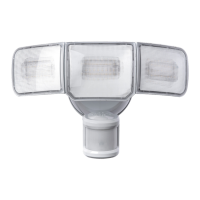
TRIPLE HEAD
LED MOTION SENSOR
SECURITY LIGHT
ITM. / ART. 1600041
Model. MK-SC0108
ES00879G
security
TM
MC
MR
Made in Cambodia
Fabriqué en Cambodge
Hecho en Camboya
12



 To Next Page
 General