EasyManua.ls Logo

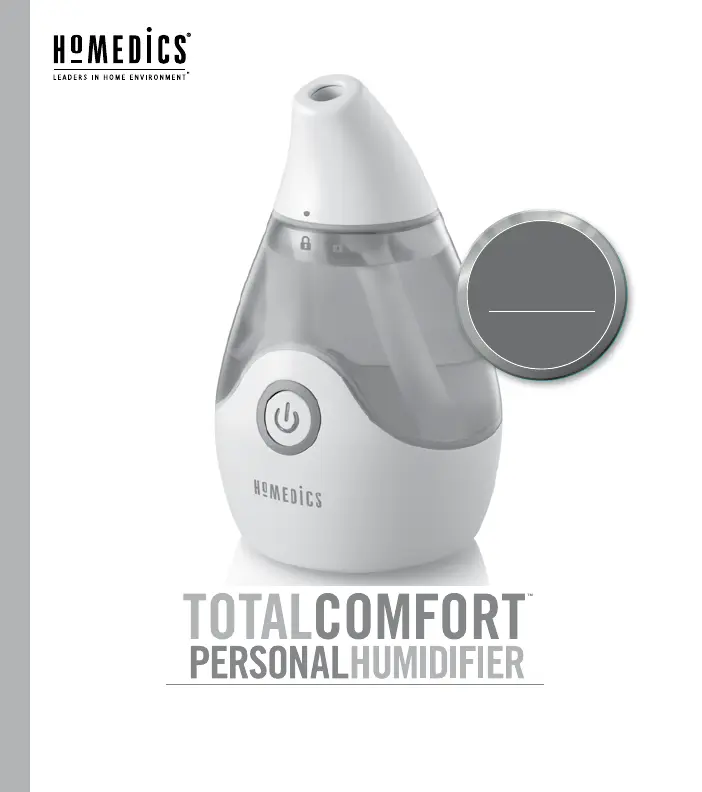
HoMedics TOTALCOMFORT - User Manual

HoMedics TOTALCOMFORT
30 pages
Print Icon
To Next Page IconTo Next Page
Loading...
INSTRUCTION MANUAL AND WARRANTY INFORMATION
UHE-CM15
www.homedics.com/register
Your valuable input regarding this
product will help us create the
products you will want in the future.
PLEASE TAKE A
MOMENT NOW
REGISTER YOUR PRODUCT AT:
TWO YEAR LIMITED WARRANTY

Other manuals for HoMedics TOTALCOMFORT

Questions and Answers

  • G
    georgearnoldAug 15, 2025
    Why is there no mist coming from my HoMedics Humidifier?
    • K
      Keith KellerAug 15, 2025
      There are several reasons why your HoMedics Humidifier might not be producing mist: it might not be plugged in (plug it in); it might not be turned on (turn the power/adjustable mist knob to the right to turn the unit on); there might be no power at the outlet (check circuits and fuses or try a different outlet); the water level might be low (refill the tank); or the transducer/ultrasonic membrane may need cleaning (follow the cleaning instructions in the manual).
  • D
    Denise ThomasAug 18, 2025
    What to do if my HoMedics Humidifier is making too much noise?
    • M
      Michael EstradaAug 18, 2025
      Excessive noise from your HoMedics Humidifier can be caused by the unit not being level (place the unit on a flat, even surface) or a low water level (check the water level; refill the tank if the water is low).
  • J
    Justin MuellerAug 21, 2025
    What to do if my HoMedics TOTALCOMFORT Humidifier has no mist?
    • J
      Jordan LongAug 22, 2025
      If your HoMedics Humidifier isn't producing mist, the wick may need replacing or isn't properly soaked. Replace the wick to resolve this issue.
  • M
    Marissa YoungAug 25, 2025
    How to fix HoMedics TOTALCOMFORT Humidifier if the power light is off?
    • I
      Isaac PatelAug 26, 2025
      If the power light on your HoMedics Humidifier is off, try the following: - Ensure the unit is properly plugged in. - Press the POWER button to turn the humidifier on. - Check the circuits and fuses, and try a different outlet.
  • M
    Matthew MartinezAug 28, 2025
    How to reduce excessive noise from HoMedics Humidifier?
    • J
      Jerry RyanAug 28, 2025
      If your HoMedics Humidifier is making excessive noise: 1. Place the unit on a flat, even surface. 2. Check the water level and refill the reservoir if it's low. 3. Remove the wick, soak it for 5 minutes until saturated, and then replace it.
  • Z
    zsmithAug 31, 2025
    Why is my HoMedics Humidifier creating white dust?
    • C
      Connor WestAug 31, 2025
      If you notice white dust accumulating from your HoMedics Humidifier, it is likely due to using hard water. Switch to distilled water to resolve this issue.
  • J
    Joseph PalmerSep 3, 2025
    Why does my HoMedics TOTALCOMFORT smell?
    • S
      Sherry LutzSep 4, 2025
      If your HoMedics Humidifier has a peculiar odor, it could be because the unit is new (remove the tank cap and let the tank air out in a cool, dry place for 12 hours); the tank or water is dirty (empty the old water, clean the tank, and fill with clean water); or there is old water in the reservoir (pour out any remaining water).
  • N
    Nathan KhanSep 7, 2025
    Why is there white dust coming from my HoMedics TOTALCOMFORT?
    • K
      Kevin HodgesSep 7, 2025
      If you notice white dust accumulating from your HoMedics Humidifier, it's likely due to hard water. Try using filtered, distilled, or bottled water instead.
  • C
    Cheryl SosaSep 12, 2025
    How to get rid of peculiar odor from HoMedics TOTALCOMFORT?
    • D
      Donna FarleySep 12, 2025
      If your HoMedics Humidifier has a peculiar odor: - Let the product air out before filling it. - Empty any water, then clean and refill the tank. - Replace the wick.

Summary

Important Safeguards

DANGER - Electric Shock Precautions

Safety rules to mitigate the risk of electric shock when operating the humidifier.

WARNING - Personal Injury Precautions

Safety guidelines to prevent burns, electric shock, or other physical injuries during use.

Unique Features and Specifications

Ultrasonic Technology and Wick

Details on ultrasonic mist technology and included humidifier wicks.

Power Adapter, Capacity, and Run Time

Specifications for the power adapter, tank capacity, and humidifier run time.

How to Use

Power Button Operation

Guide on using the power button to turn the unit on and off.

How to Fill

Mist Spout Handling

Instructions for safely removing and reattaching the mist spout.

Wick Soaking

Procedure for soaking the wick before first use for optimal performance.

Filling the Water Tank

Steps for filling the tank with water to the maximum line.

Connecting and Powering On

How to plug in the unit and activate it.

How to Change Wick

Wick Replacement Procedure

Step-by-step guide to replace the humidifier wick.

Purchasing Replacement Wicks

Information on where to buy new wicks for the unit.

Water Type Recommendations

Advice on using distilled water for better performance in hard water areas.

Cleaning and Care

Cleaning the Water Tank

Daily and weekly maintenance procedures for the humidifier's water tank.

Cleaning the Ultrasonic Membrane

Safe and effective methods for cleaning the ultrasonic membrane.

Cleaning the Unit Exterior

Instructions for cleaning the external surfaces of the humidifier.

Troubleshooting

FCC Disclaimer

Adapter Compliance

FCC compliance statement regarding the device's adapter.

Device Compliance

FCC compliance statement for the humidifier unit itself.

Two Year Limited Warranty

Warranty Coverage Details

Information on what the warranty covers and its limitations.

Warranty Service Process

Steps to follow to obtain service under the warranty.

Warranty Contact Information

Contact details for customer service for warranty claims.

HoMedics TOTALCOMFORT Specifications

General IconGeneral
TypeUltrasonic
RuntimeUp to 65 hours
Mist OutputAdjustable
SettingsVariable mist control
Power SourceAC Power
FeaturesAuto shut-off, night light, essential oil tray

Related product manuals