EasyManua.ls Logo

HOMEGRID Stack'd Series - Set the Module Address Set DIP Switches

Default Icon
10 pages
Print Icon
To Next Page IconTo Next Page
To Previous Page IconTo Previous Page
Loading...
9
Parallel Installation
Battery outputs/inverters should be connected to a BUS bar that is rated for total system in compliance
with NEC. Ensure that the inverter’s battery breaker is in OFF position while performing parallel install.
*Follow initial install procedure above for each individual Stack*
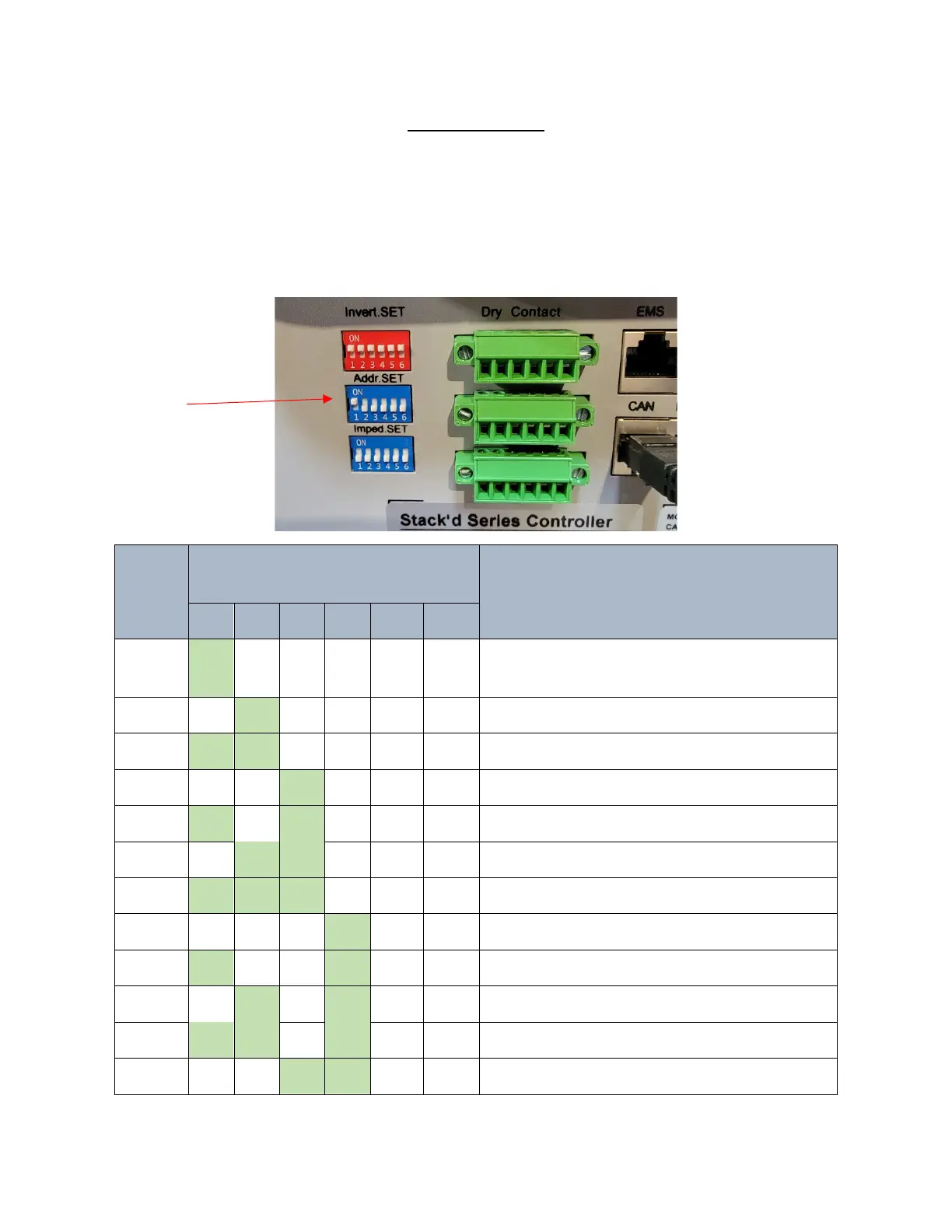
Set Master address to 1, and each successive Slave to 2 ~ 15. Addresses must be set before controllers
are turned on for changes to take effect. See below for switch settings:
Address
Coding
Master Address Dial Code Switch
Position
Definition
#1
#2
#3
#4
#5
#6
1 ON OFF OFF OFF NG NG
The host computer can monitor the operation of
other systems by setting the main package

2
OFF
ON
OFF
OFF
NG
NG
Set to Pack2
3
ON
ON
OFF
OFF
NG
NG
Set to Pack3
4
OFF
OFF
ON
OFF
NG
NG
Set to Pack4
5
ON
OFF
ON
OFF
NG
NG
Set to Pack 5
6
OFF
ON
ON
OFF
NG
NG
Set to Pack 6
7
ON
ON
ON
OFF
NG
NG
Set to Pack 7
8
OFF
OFF
OFF
ON
NG
NG
Set to Pack 8
9
ON
OFF
OFF
ON
NG
NG
Set to Pack 9
10
OFF
ON
OFF
ON
NG
NG
Set to Pack10
11
ON
ON
OFF
ON
NG
NG
Set to Pack 11
12
OFF
OFF
ON
ON
NG
NG
Set to Pack 12

Other manuals for HOMEGRID Stack'd Series