10
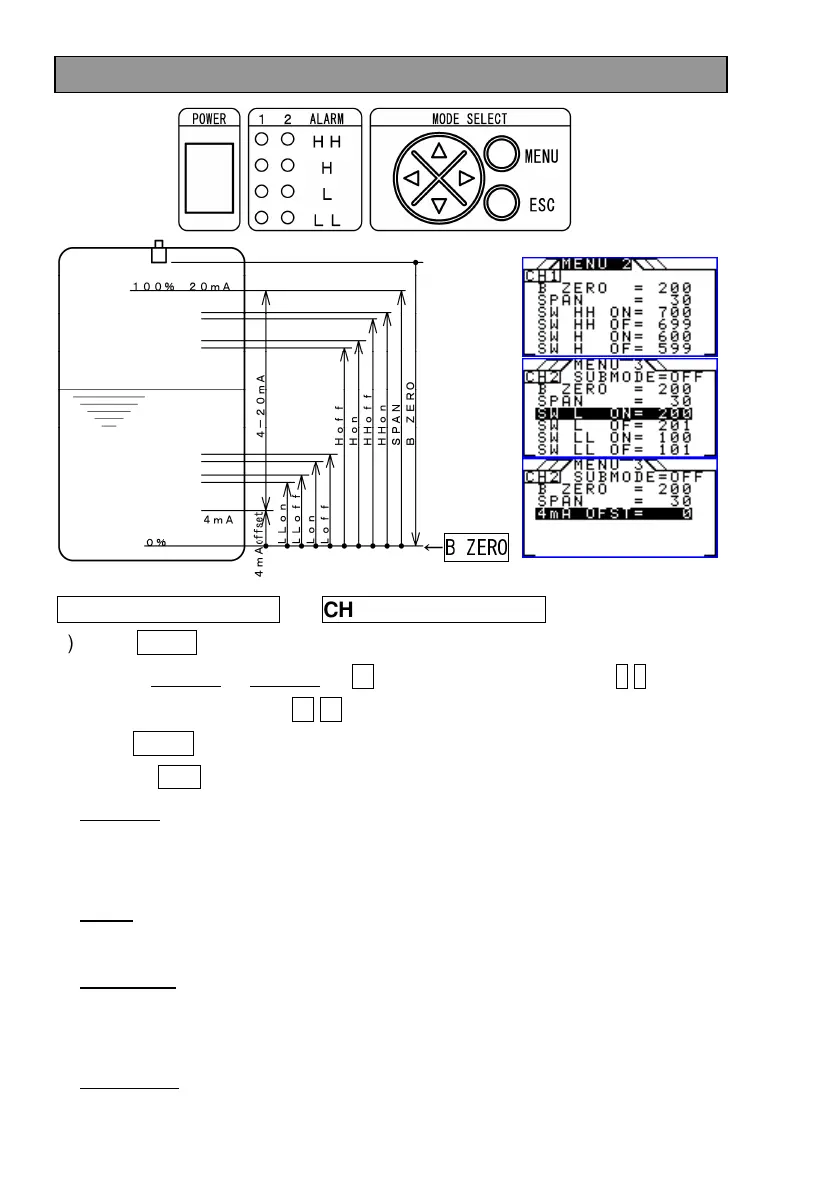
Settings to match the tank
CH1 settings (MENU2)
CH2 settings (MENU3)
1) Press MENU key to display MENU.
2) Display MENU2 or MENU3 by → key and select the item by ↑ ↓ keys and
change the setting by ← → keys.
Press MENU key to fix the setting and exit MENU.
To press ESC key not to change the setting and exit MENU.
3) B ZERO: Distance from the sensor surface to the tank bottom
This does not necessarily have to be the distance to the tank bottom as it is
the distance to 0%.
4) SPAN: Setting of the distance for 0 - 100%
Set the distance from the tank bottom which is set by B ZERO to 100%.
5) SW HH-LL: Setting of the alarm switch level
Set the level for SW HH - LL.
Be aware of the relationship of ON and OFF.
5) 4mA OFST: Setting of 4mA offset
←B ZERO


 To Next Page
 Loading...