227
Audio System Basic Operation
To use the audio system function, the ignition switch must be in ACCESSORY (q or
ON
(w
*1
.
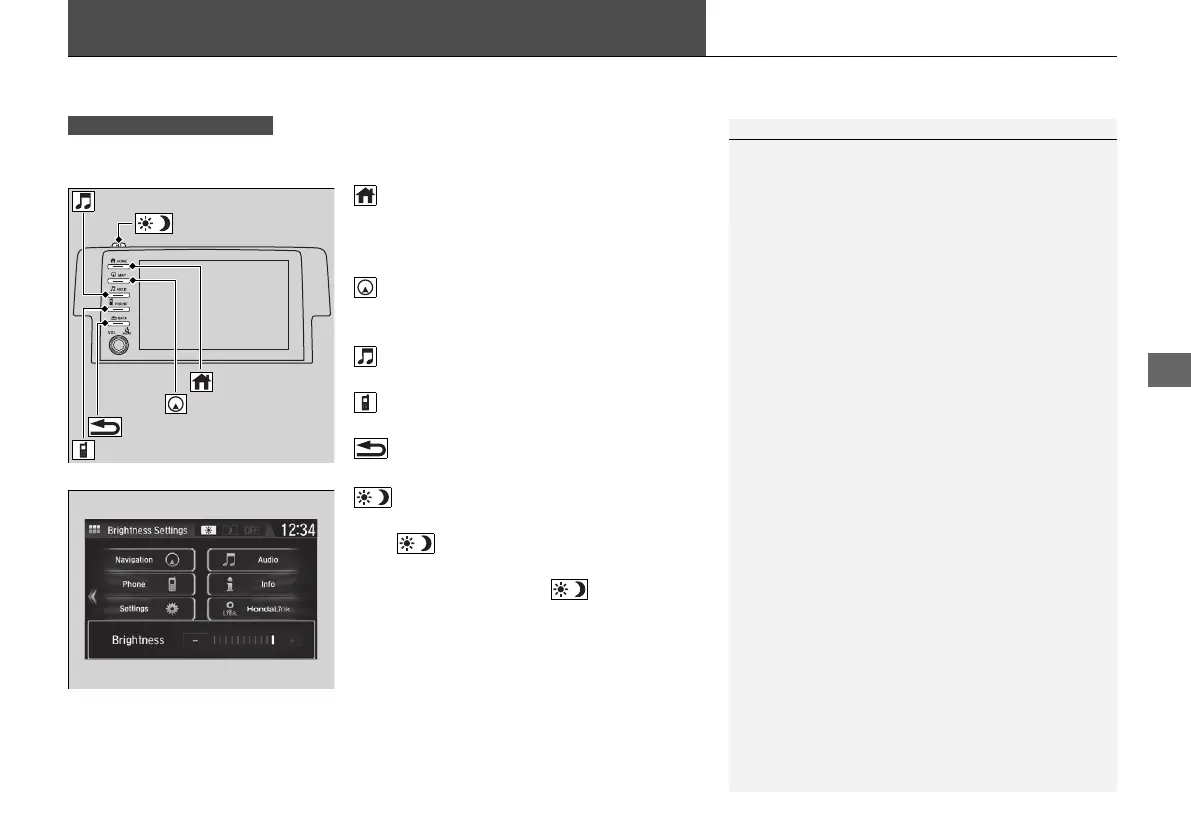
(Home) button: Press to go to the home
screen.
2 Using the audio/information screen
P. 229
(Map) button
*
: Press to display the map
screen.
2 Refer to the Navigation System Manual
(Audio) button: Press to display the
audio screen.
(Phone) button: Press to display the
phone screen.
(Back) button: Press to go back to the
previous screen.
(Day/Night) button: Press to change
the audio/information screen brightness.
Press once and select
(- or (+ to make
an adjustment.
u Each time you press , the mode
switches between daytime, nighttime
and off.
*1: Models with the smart entry system have an ENGINE START/STOP button instead of an
ignition switch.
1Audio System Basic Operation
Audio Menu Items
2 Station List P. 257, 258
2 Music Search List P. 269, 278, 281
2 Scan P. 258, 259, 267, 279
2 Play Mode P. 270, 279
Models with Display Audio
(Day/Night) Button
(Home) Button
(Back) Button
(Phone) Button
(Audio) Button
(Map) Button
*
* Not available on all models
21 CIVIC 4D HCM_HMIN_J (KA KL KC)-31TBA6500.book 227 ページ 2020年8月25日 火曜日 午後2時6分















 To Next Page