364
uuAudio System Basic OperationuPlaying Social Playlist
Playing Social Playlist
The Honda CabinControl® smartphone app allows users to share audio files from
their devices to Social Playlist.
Unfortunately, the driver cannot select the audio files from the audio/information
screen. The driver can play in order of their choice only if they individually select each
song in the queue. The driver cannot rearrange the order of the playlist.
2 Wi-Fi Connection P. 371
1Playing Social Playlist
For more information, check the Honda
CabinControl smartphone app instruction manual.
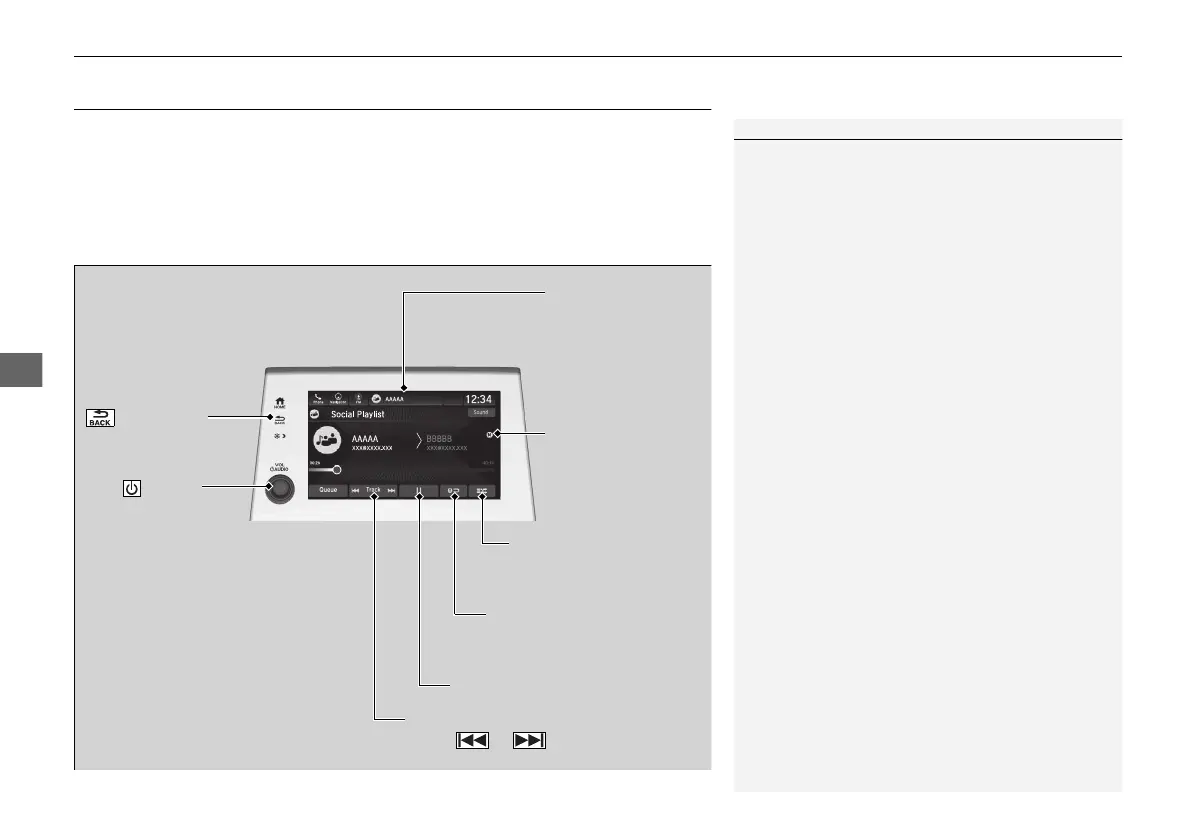
(Back) Icon
Select to go back to
the previous display.
Track Icons
Select or to change files.
VOL/ AUDIO
(Volume/Power)
Knob
Push to turn the
audio system on
and off.
Turn to adjust
the volume.
Audio/Information
Screen
Play/Pause Icon
Repeat Icon
Selec
t to repeat the current
file.
Random Icon
Select to play all files in
random order.
Remove Icon
Select to remove
the file from the
playlist.
21 US ODYSSEY-31THR6310.book 364 ページ 2020年6月17日 水曜日 午後2時46分













 To Next Page