708
Battery
Checking the Battery
The condition of the battery is monitored by a
sensor located on the negative terminal of the
battery. If there is a problem with this sensor,
the driver information interface will display a
warning message. If this happens, have your
vehicle inspected by a dealer.
Check the battery terminals for corrosion
monthly.
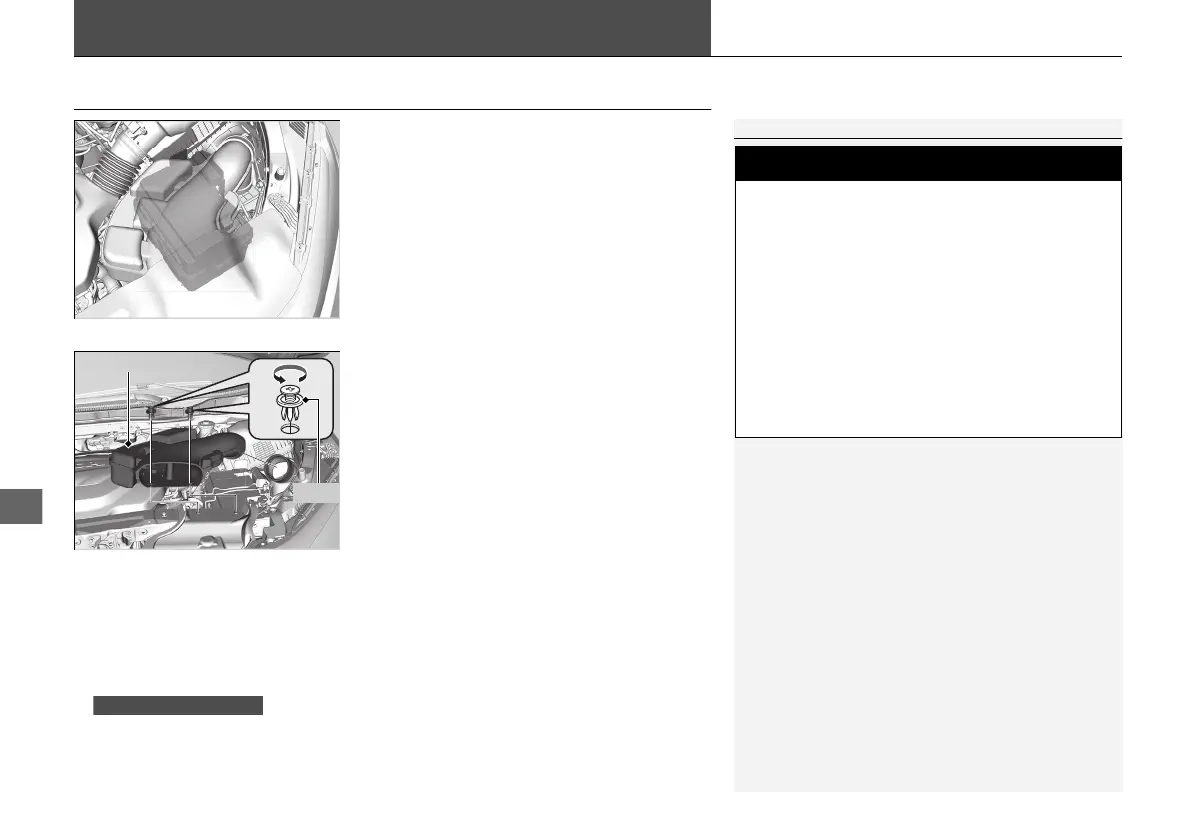
To access the battery terminals:
1. Remove the engine compartment cover.
2 Engine Compartment Cover P. 677
2. Remove the clips using a Phillips-head
screwdriver, then remove the air intake
duct.
If your vehicle’s battery is disconnected or goes dead:
• The audio system is disabled.
2 Reactivating the audio system P. 280
• The clock resets.
2 Clock P. 154
•
The immobilizer system needs to be reset.
2 Immobilizer System Indicator P. 98
1Battery
WARNING: Battery post, terminals,
and related accessories contain lead
and lead compounds.
Wash your hands after handling.
When you find corrosion, clean the battery terminals
by applying a baking powder and water solution.
Clean the terminals with a damp towel. Cloth/towel
dry the battery. Coat the terminals with grease to
help prevent future corrosion.
When replacing the battery, the replacement must be
of the same specifications.
Consult a dealer for more information.
The battery gives off explosive hydrogen
gas during normal operation.
A spark or flame can cause the battery to
explode with enough force to kill or
seriously hurt you.
When conducting any battery
maintenance, wear protective clothing and
a face shield, or have a skilled technician do
it.
21 US ODYSSEY-31THR6310.book 708 ページ 2020年6月17日 水曜日 午後2時46分













 To Next Page