© 2003 American Honda Motor Co., Inc - All Rights Reserved. AII 25876 (0308) 3 of 8
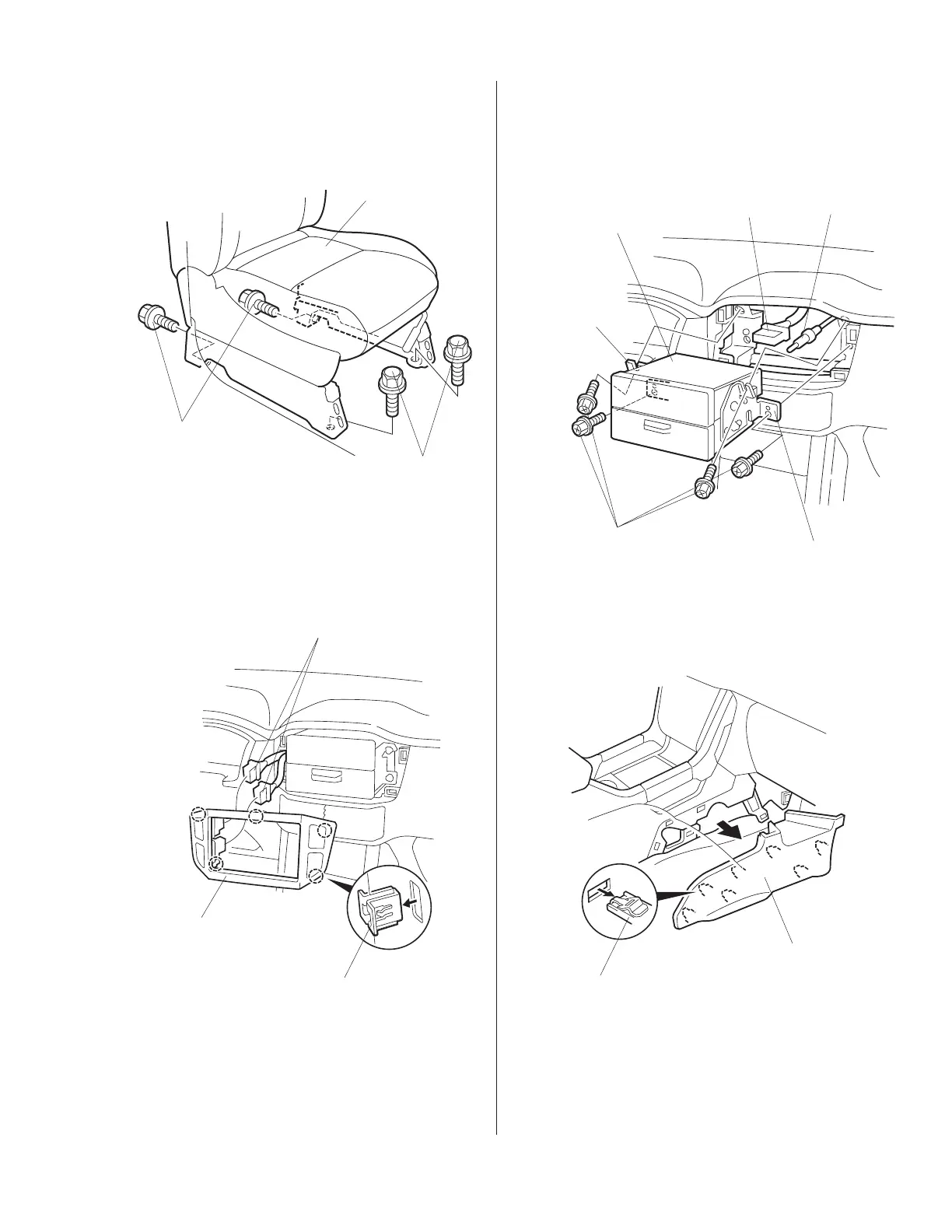
5. Remove the four bolts that secure the passenger’s
seat side mounting brackets to the floor. Tilt the
passenger’s seat back and out of the way.
7. Remove the four bolts that fasten the audio
brackets. Pull the audio unit out toward you,
unplug the vehicle connector and the antenna lead
and remove the audio unit.
8. Pry up on the seven clips, and remove the
passenger’s center console lower cover.
PASSENGER’S SEAT
BOLT
BOLT
VEHICLE
CONNECTOR
CLIPS (5)
AUDIO PANEL
AUDIO UNIT
VEHICLE
CONNECTOR
ANTENNA
LEAD
AUDIO
BRACKET
AUDIO
BRACKET
BOLT
(Reuse.)
CLIPS (7)
PASSENGER’S
CENTER CONSOLE
LOWER COVER
6. Using a flat-tip screwdriver wrapped with a shop
towel, gently pry out on the audio panel to remove
the five clips. Unplug the vehicle connectors and
remove the audio panel.
www.collegehillshonda.com













 To Next Page