The device described in the manual is a Smart Entry Remote for a vehicle, designed to control various functions such as locking/unlocking doors, opening the trunk, and interacting with the vehicle's power system.
Function Description
The Smart Entry Remote serves as the primary interface for keyless access and control of the vehicle. Its core functions include:
- Locking and Unlocking Doors: The remote allows users to lock and unlock the vehicle's doors. This can be done directly using buttons on the remote or through a "smart entry" system where the vehicle detects the remote's presence.
- Trunk Release: Users can open the vehicle's trunk using a dedicated button on the remote.
- Panic Alarm: A panic button on the remote activates the vehicle's alarm system for security purposes.
- Engine Start (Remote): The remote has a button that can be used to remotely start the engine.
- Vehicle Power System Interaction: In cases of low remote battery, the remote can still be used to activate the vehicle's power system by touching it to the POWER button inside the vehicle.
Usage Features
The Smart Entry Remote offers several convenient usage features:
1. Direct Remote Operation:
- Lock button: Locks the vehicle doors.
- Unlock button: Unlocks the vehicle doors.
- Trunk release button: Unlocks and opens the trunk. This button needs to be pressed for approximately one second to unlock and open the trunk.
- Engine button (Remote Start): Used to remotely start the engine. This button needs to be pressed for approximately 10 seconds to turn on the power system for up to 10 minutes.
- Panic button: Activates the panic alarm. This button needs to be pressed for approximately 30 seconds to sound the panic alarm. Any button press on the remote transmitter will cancel panic mode.
2. Smart Entry System:
This system allows for keyless operation when the remote is carried by the user.
- Unlocking/Locking Doors and Fuel Fill Door: When the smart entry remote is within approximately 32 inches (80 cm) of the outside door handle, the user can:
- To unlock: Grab the driver's door handle (when the vehicle is off) to unlock the driver's door and fuel fill door. Grabbing the front passenger's door handle will unlock all doors.
- To lock: Touch the door lock sensor on the front door (when the vehicle is off). The doors will not lock if the smart entry remote is detected inside the vehicle.
- Unlocking the Trunk: The trunk can be opened by pressing the trunk release button, which is accessible within approximately 32 inches (80 cm) radius from the button itself.
3. Walk Away Auto Lock:
This feature automatically locks the vehicle doors when the user walks away with the smart entry remote. The conditions for activation are:
- The smart entry remote is within a range of 5 feet (1.5 m) from the vehicle.
- All doors and the hood are closed.
- There is no additional remote transmitter inside the vehicle.
The process involves carrying the remote, exiting the vehicle, closing all doors, and walking at least 5 feet (1.5 m) away. The system provides audible beeps and flashing lights to confirm locking.
4. Customization:
The manual indicates that door locking and unlocking settings can be customized. For models with Color Audio or Display Audio, the "Walk Away Auto Lock" feature can be turned on by navigating through the vehicle's settings menu:
- For Color Audio: Press MENU/CLOCK button > Settings > Vehicle > Door/Window Setup > Walk Away Auto Lock > On.
- For Display Audio: From the audio/information screen, select Settings > Vehicle > Door/Window Setup > Walk Away Auto Lock > ON.
Maintenance Features
1. Smart Entry Remote Battery Strength:
The manual describes a procedure for operating the vehicle when the remote's battery is low.
- Indication: If the beeper sounds, the message "To Start, Hold Remote Near Start Button" appears on the driver information interface, and the POWER button flashes, while the READY indicator does not come on.
- Procedure:
- Touch the center of the vehicle's POWER button with the "H" logo on the smart entry remote (buttons facing you) while the POWER button is flashing.
- Press the brake pedal and then press the vehicle's POWER button within 10 seconds after the beeper sounds. The POWER button will change from flashing to on, indicating the power system is activated.
2. Battery Replacement:
While not explicitly detailed in the provided excerpts, the need for a procedure to address low battery strength implies that the battery in the smart entry remote is replaceable. The "Built-in Key" shown in the diagram suggests that the remote can be opened, likely to access and replace the battery.
Important Technical Specifications
- Smart Entry Range: Approximately 32 inches (80 cm) radius for locking/unlocking doors and fuel fill door, and for opening the trunk via the trunk release button.
- Walk Away Auto Lock Range: The smart entry remote must be within 5 feet (1.5 m) of the vehicle for the system to activate. The user must walk at least 5 feet (1.5 m) away for the doors to lock.
The device is designed for user convenience, offering both direct button control and a smart entry system for hands-free operation, along with security features like the panic alarm and automatic locking. It also provides clear instructions for dealing with a low remote battery, ensuring continued vehicle access and operation.

 Need help?
 General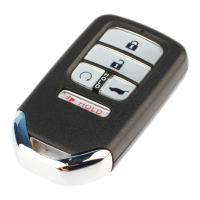

 To Next Page