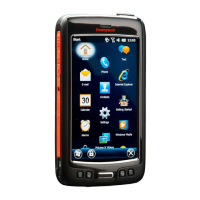
IntroductiontoHoneywell6500DolphinHandheld
‐ HowtouseHoneywell6500
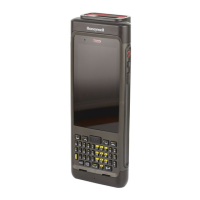
o Turnon:Press(nothold)bluebuttonatbottomofkeypad,press“Z”keytotherightofit(hasthe
powersymbolnexttoit)
o Turnoff:Hold(notpress)bluebuttonandsimultaneouslyholddown
the“Z”keyuntilhandheld
turnsoff
o Reset:Usestylustopressdownonthesmall,whiteresetbutton(totheleftofthe“SCAN”button)
toperformaWarmReboot(donotholddownresetbutton!)
o Wakehandheldupfromsleep:Pressanykey(Iusuallypress
the“SCAN”buttonsinceit’sthelargest)
o Touchscreen:Usethestylus>betterthanyourfingers
Storestylusononeofthetwostylussleeves(attachedtothewrist strap) onthebackofthe
handheld
o Batterylifeandcharging:
Howtoreadbatteryindicator:Topright
ofthescreen,nexttothetime.
4bars=fullbattery;1bar=lowbattery
Electricplug=handheldneedstobechargedimmediately
Tochargehandhelds,placeindockingstationandmakesuretheredlightatthetopofthe
handheldturnson.
Oncechargingisdone,redlightwillturnintoagreenlight.
Makesurehandheldsareplacedintheirdocksattheendofeachworkdayorwhenevernot
inuse.
‐ OverviewofWindowsOperatingSystemlayout
o MainScreen‐>Click“”(WindowsIcon)inBottomLeft
ofscreentopulluptheStartMenu/listof
applications
o StartMenu‐>UsestylustoscrollthroughStartMenutogothroughvariousapplications
‐ Typingwiththehandheld
o Keypadlayout:
Numbers,punctuation,andcontrols(backspace,space,shift,tab,etc.)areinwhiteonthe
top
halfofthekeypad
Lettersandsymbolsareinblackonthebottomhalfofthekeypad
o Practicetyping:
Pressthe“”(Windowsbutton)onthescreenor“Bluebutton”+“U”onthekeypadto
bringupthehandheld’s StartMenu
Scrolldownmenuto
findthe“Notes”application,clickonittoopen
Click“”(Newdocumentbutton)onthebottomofthescreentobringupblankdocument
Typeoutyourfullnametogetusedtotypingonthehandheld’s keypad
Typeout“12881‐5G”asorderfulfillment
willsometimesrequiremanualentryofitem
numbers:
Toaccesshyphen“‐“,press,nothold,bluebuttonatthebottomthen“F”onkeypad
Onceyou’redonepracticing,click“OK”atbottomrightofscreen,bringupyourfile(should
say“Note1orNote#”,clickonyourfilename
andholddownuntilamenupopsup.Click
deletetodeleteyourpracticenote,click“Yes”onpopuptoconfirm”.ExitNotesbyclicking
the“X”inthebottomrightofthescreen.
‐ Scanningwiththehandheld
Pressthe“”(Windowsbutton)onthescreenor
“Bluebutton”+“U”onthekeypadto
bringupthehandheld’s StartMenu
Findthe“Demos”folder,clickonittoopen
Select“ScanDemo”
Press“SCAN”buttononkeypadtotriggerthelaser‐scanner,youshouldseeacross‐hairs,
thisisthecenterofthe
laser‐scanner

 Need help?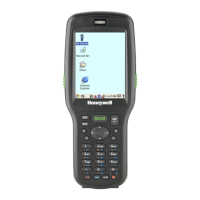



 To Next Page
 General