EasyManua.ls Logo

Honeywell 8812309S - User Manual

Honeywell 8812309S
28 pages
Print Icon
To Next Page IconTo Next Page
Loading...
User Guide
ENGLISH
Square Faceplate Digital Bluetooth Deadbolt
Model 8812309S
8812409S
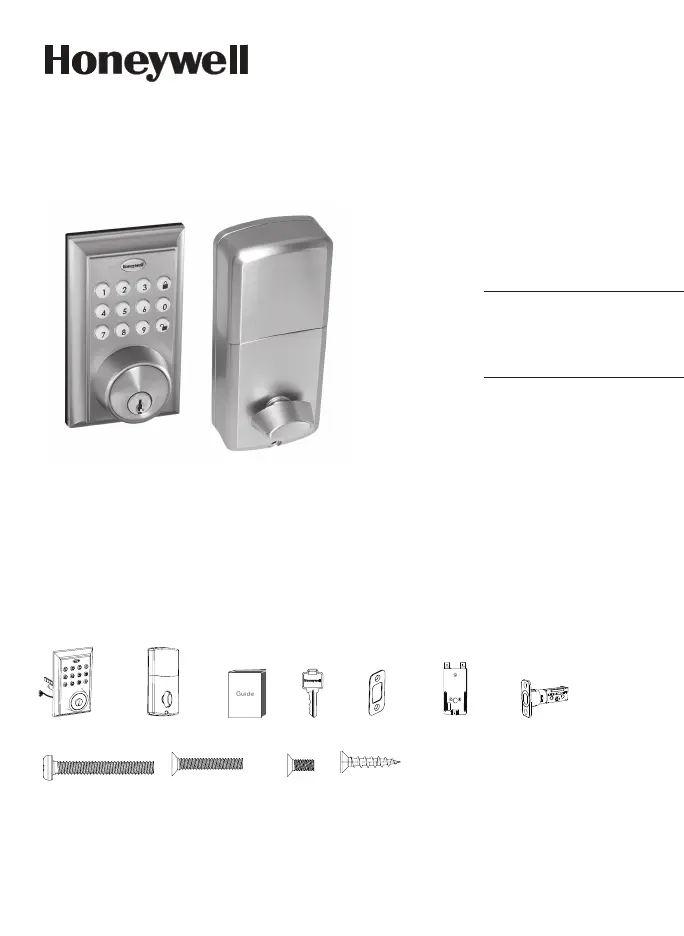
Package Includes:
1 - Exterior Faceplate
1 - Interior Faceplate
1 - User Guide
2 - Keys
1 - Strike Plate
1 - Mounting Plate
1 - Deadbolt Latch
1 - 1 3/8” Screws
2 - 5/16” Screws
2 - 1 “ Screws
5 - 3/4” Screws
Read this manual carefully before installing and operating!
Please carefully check the above list to confirm all items have been received. If any items are
missing, please contact Consumer Assistance. ( See page for contact information)
3/4” Screws1” Screws 5/16” Screws1 3/8” Screws
Mounting Plate
Deadbolt Latch
Exterior Faceplate Interior Faceplate User Guide Keys
Strike plate

Questions and Answers

  • P
    Pamela MurrayAug 16, 2025
    How to reset a forgotten password for Honeywell 8812309S Door locks?
    • B
      boothangelaAug 16, 2025
      To regain access to your Honeywell Door Locks, on the home screen, select the 'Forgot Password' option. Then, choose the account type you registered with and follow the on-screen instructions to create a new password.
  • S
    Sara MullinsAug 19, 2025
    Why is the keypad not working on my Honeywell Door Lock?
    • M
      Michele YuSep 12, 2025
      If your Honeywell Door Lock's keypad isn't working, it may be overridden by the application. Check if the app has been connected to the lock. Open the app and check the lock's settings to view or change the administrator code.
  • M
    matthewanthonyAug 22, 2025
    Why is the default keypad passcode not working on my Honeywell Door Lock?
    • A
      Adam ValdezAug 22, 2025
      If the default keypad passcode on your Honeywell Door Lock isn't working, and you've connected to the lock with the app, the default passcode is no longer valid. The app generates a new passcode, which you should change.
  • M
    Michael DavilaAug 25, 2025
    What to do if my Honeywell Door Lock will not function electronically?
    • H
      Hailey SmithAug 26, 2025
      If your Honeywell Door Lock will not function electronically: * Check that all batteries are fresh, high-quality alkaline batteries. * Verify the proper polarity (+ -) of all batteries. * Ensure that the control wire is attached to the interior assembly.
  • J
    Julie MartinAug 28, 2025
    What to do if the deadbolt latch on my Honeywell Door Lock is not locking in inclement weather?
    • A
      Arthur DaltonAug 28, 2025
      If the deadbolt latch on your Honeywell Door Lock is not locking in inclement weather, try pushing or pulling the door to direct the bolt. You may also need to readjust the latch for smoother operation.
  • A
    Anna PatrickAug 31, 2025
    What to do if the app is unable to connect to my Honeywell Door Lock?
    • D
      Dominique GibsonAug 31, 2025
      If the app is unable to connect to your Honeywell Door Lock, make sure Bluetooth is turned on and that the lock is activated. Activate the lock by pressing a keypad button on the physical lock until you see the icon to add the lock. For compatibility issues, iPhone 5 and later models, and most Android devices are compatible. You may contact customer assistance regarding compatibility issues.
  • D
    Destiny FranklinSep 3, 2025
    What to do if my Honeywell Door Lock gives an error signal?
    • R
      Robert GreenSep 3, 2025
      If the Honeywell Door Lock is giving an error signal when opening or locking, and the latch won't fully extend or retract when the door is closed, unlock the door using the key or interior knob. While the door is open, check that the deadbolt latch operates smoothly. Also, ensure proper alignment of the strike plate; adjust it as needed to avoid binding against the deadbolt latch.
  • C
    colemanchristopherSep 6, 2025
    Why won't eKeys send after using my Honeywell Door Lock?
    • J
      Jacqueline McgeeSep 6, 2025
      If eKeys will not send after using the app with your Honeywell Door Lock: * Ensure that whoever is receiving the eKey has a registered account, and their information is input correctly. * Make sure you are connected to WiFi, and that your smart device is updated. * Only registered users of the App can receive eKeys.
  • J
    Jody JonesSep 9, 2025
    Why is the deadbolt latch sticking on my Honeywell Door Lock?
    • B
      bleeSep 9, 2025
      If the deadbolt latch on your Honeywell Door Lock is sticking, the installation screws may be too tight. Remove the interior assembly, slightly loosen the mounting plate screws, lock and unlock using the key, and then reattach the control wire and interior assembly.
  • A
    Andrew PhillipsSep 12, 2025
    How to fix a Honeywell Door Lock with the latch working backward?
    • N
      Nicole GreenSep 12, 2025
      If the latch on your Honeywell Door Lock is working backward, remove the interior assembly and move the direction switch to the opposite direction. Check that your switch is set in the correct position for a left or right-handed door. If correct, rotate the interior knob and reinstall the interior assembly. Retest while holding the interior assembly in place.

Honeywell 8812309S Specifications

General IconGeneral
BrandHoneywell
Model8812309S
ColorSilver
FinishSatin Nickel
HandingReversible
KeywayKW1
Number of Keys Included2
Adjustable LatchYes
MaterialMetal
Backset2-3/8 inches or 2-3/4 inches
Door Thickness1-3/8 inches to 1-3/4 inches

Related product manuals