EasyManua.ls Logo

Honeywell CL20AE - User Manual

Honeywell CL20AE
40 pages
Print Icon
To Next Page IconTo Next Page
Loading...
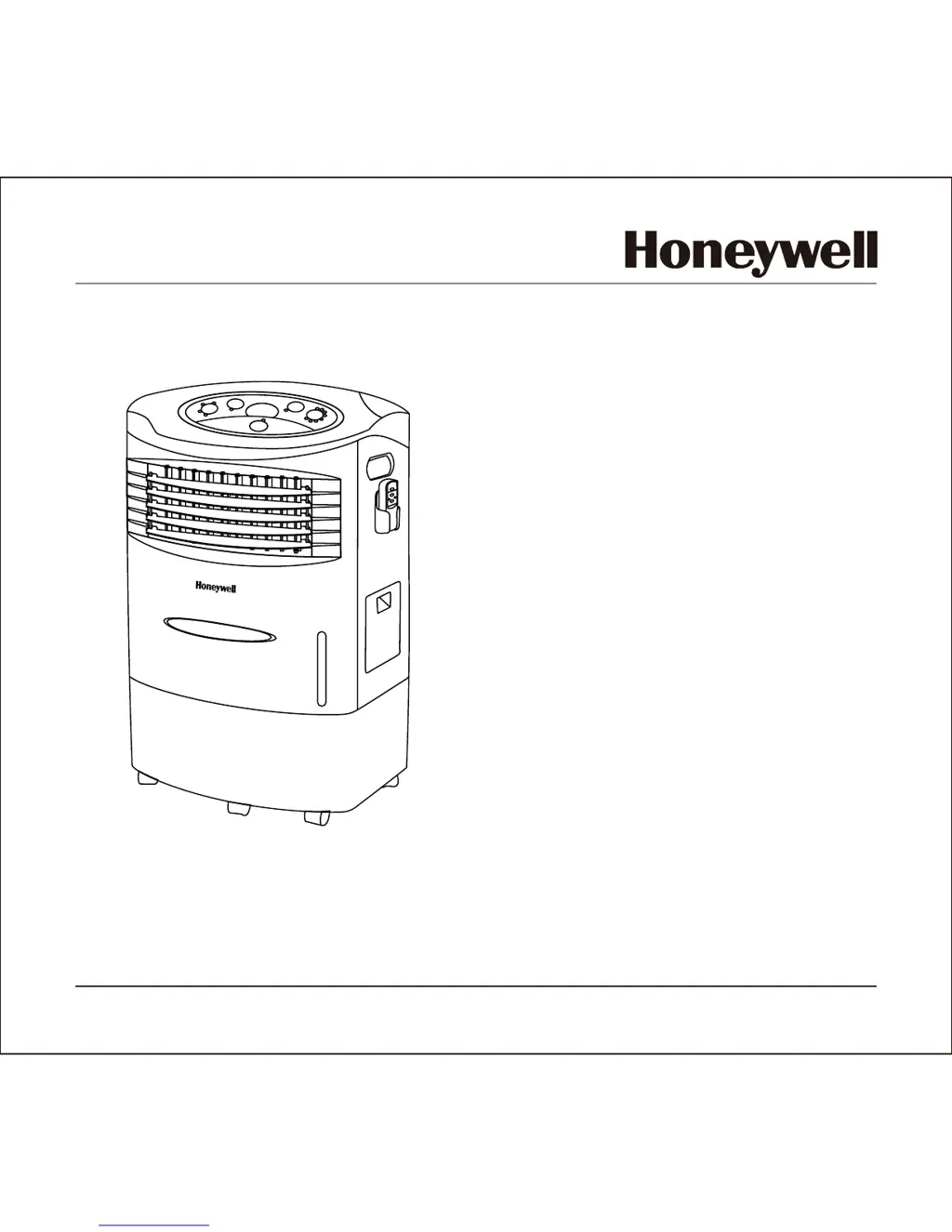
OWNER’S MANUAL
Read and save these instructions before use
使用者操作手冊
在使用該產品前請詳讀本操作手冊
Model: CL20AE
機型: CL20AE
Power rating: 230 Watts
Voltage rating: 110 Volt AC, 60Hz
消耗功率: 230 Watts
使用電壓: 110 Volt AC, 60Hz
For product inquiries or support, visit www.honeywellaircoolers.com
有關產品查詢及資訊,請上www.honeywellaircoolers.com網站
Portable Evaporative Air Cooler
for Indoor Use
移動式冷卻器(水冷器)
建議室內使用
Customer Support: 0800-888-753
消費者服務: 0800-888-753
Made in P.R.C.
中國製造

Other manuals for Honeywell CL20AE

Questions and Answers

Summary

Thank You

User Tips

Energy Efficiency and Operation Principle

Explains the energy-efficient, no-compressor evaporative cooling mechanism.

Optimal Usage Conditions and Humidification

Recommends humidity levels, ventilation, and dual use for humidifying dry air.

Initial Odor Note

Advises that the Honeycomb Cooling Media may have an initial odor that dissipates.

Safety Rules

Electrical and Cord Safety

Check voltage, handle cords carefully, avoid damaged cords, and unplug before maintenance.

Operational Safety and Warnings

Inspect unit, avoid flammable areas, ensure water for cool mode, and do not attempt self-repair.

Usage and Environmental Safety

Avoid blocking vents, inserting objects, operating without media, or using in wet/damp locations.

User Responsibility and Handling

Not for unsupervised use by persons with reduced capabilities; use side handles for moving.

Parts Description

Control Panel and Airflow Components

Identification of control panel, side handles, and louvers for unit operation.

Exterior Panels and Ornamentation

Details on left/right side panels and the front cover ornament.

Functional Components: Power, Water, and Mobility

Description of power cord, casters, water level indicator, fill door, and drain plug.

Use and Operation

Control Panel Functions

Overview of the control panel buttons for speed, swing, mode, power, and timer.

Key Operational Buttons

How to use Power, Speed (Low to Sleep), and Mode/Cool buttons for basic operation.

Swing and Timer Settings

Instructions for activating automatic louvers (Swing) and setting the timer for automatic shut-off.

Cooling and Humidifying Modes

Explanation of the water regulator for cooling performance and room humidity adjustment.

Remote Control Usage

Guide to remote control functions, battery installation, and proper signal transmission.

Water Filling Procedure

Steps to refill the water tank, check levels, and the importance of adequate water for pump operation.

Cleaning and Maintenance

General Cleaning and Storage

Safety advice for cleaning the exterior, avoiding chemicals, and proper storage when not in use.

Water Tank Maintenance

Procedure for draining and cleaning the water tank to maintain unit performance and hygiene.

Filter Cleaning and Replacement

Instructions for cleaning or replacing the carbon/dust filter and recommended maintenance frequency.

Troubleshooting Guide

Airflow and Cooling Problems

Solutions for issues like no air discharge, unit noise, or poor cooling performance.

Odor and Unit Responsiveness

Troubleshooting steps for odors and when the unit or remote control is not responding.

Technical Specifications

Product Model and Performance Specs

Key specifications including model number, voltage, wattage, and tank capacity.

Dimensions and Electrical Diagram

Physical dimensions and the electrical wiring diagram for technical reference.

Summary

Thank You

User Tips

Energy Efficiency and Operation Principle

Explains the energy-efficient, no-compressor evaporative cooling mechanism.

Optimal Usage Conditions and Humidification

Recommends humidity levels, ventilation, and dual use for humidifying dry air.

Initial Odor Note

Advises that the Honeycomb Cooling Media may have an initial odor that dissipates.

Safety Rules

Electrical and Cord Safety

Check voltage, handle cords carefully, avoid damaged cords, and unplug before maintenance.

Operational Safety and Warnings

Inspect unit, avoid flammable areas, ensure water for cool mode, and do not attempt self-repair.

Usage and Environmental Safety

Avoid blocking vents, inserting objects, operating without media, or using in wet/damp locations.

User Responsibility and Handling

Not for unsupervised use by persons with reduced capabilities; use side handles for moving.

Parts Description

Control Panel and Airflow Components

Identification of control panel, side handles, and louvers for unit operation.

Exterior Panels and Ornamentation

Details on left/right side panels and the front cover ornament.

Functional Components: Power, Water, and Mobility

Description of power cord, casters, water level indicator, fill door, and drain plug.

Use and Operation

Control Panel Functions

Overview of the control panel buttons for speed, swing, mode, power, and timer.

Key Operational Buttons

How to use Power, Speed (Low to Sleep), and Mode/Cool buttons for basic operation.

Swing and Timer Settings

Instructions for activating automatic louvers (Swing) and setting the timer for automatic shut-off.

Cooling and Humidifying Modes

Explanation of the water regulator for cooling performance and room humidity adjustment.

Remote Control Usage

Guide to remote control functions, battery installation, and proper signal transmission.

Water Filling Procedure

Steps to refill the water tank, check levels, and the importance of adequate water for pump operation.

Cleaning and Maintenance

General Cleaning and Storage

Safety advice for cleaning the exterior, avoiding chemicals, and proper storage when not in use.

Water Tank Maintenance

Procedure for draining and cleaning the water tank to maintain unit performance and hygiene.

Filter Cleaning and Replacement

Instructions for cleaning or replacing the carbon/dust filter and recommended maintenance frequency.

Troubleshooting Guide

Airflow and Cooling Problems

Solutions for issues like no air discharge, unit noise, or poor cooling performance.

Odor and Unit Responsiveness

Troubleshooting steps for odors and when the unit or remote control is not responding.

Technical Specifications

Product Model and Performance Specs

Key specifications including model number, voltage, wattage, and tank capacity.

Dimensions and Electrical Diagram

Physical dimensions and the electrical wiring diagram for technical reference.

Honeywell CL20AE Specifications

General IconGeneral
BrandHoneywell
ModelCL20AE
CategoryAir Conditioner
LanguageEnglish

Related product manuals