EasyManua.ls Logo

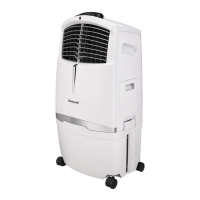
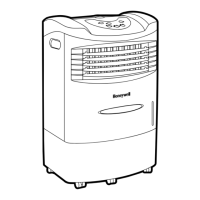
Honeywell CL30XC - User Manual

Honeywell CL30XC
42 pages
Print Icon
To Next Page IconTo Next Page
Loading...
移動式冷卻器(水冷器)
建議室內使用
使用者操作說明書
在使用該產品前請詳讀本操作手冊
機型: CL30XC
消費者專線:0800-888-753 中國製造
消耗功率:200W(瓦)
使用電壓:110V~, 60Hz
有關產品查詢及資訊,請上www.honeywellaircoolers.com網站
OWNER’S MANUAL
Read and save these instructions before use
Model: CL30XC
Power rating: 200 Watts
Voltage rating: 110 Volt AC, 60Hz
For product inquiries or support, visit www.honeywellaircoolers.com
Portable Evaporative Air Cooler
for Indoor Use
Customer Service : 0800-888-753 Made in P.R.C.

Other manuals for Honeywell CL30XC

Questions and Answers

  • K
    Kelly HarrisJul 26, 2025
    Why is my Honeywell Air Conditioner not cooling?
    • M
      Melissa SmithJul 26, 2025
      Your Honeywell Air Conditioner might not be cooling because the pump isn't on. Check the water level and turn on the pump by pressing the COOL button on the control panel. Alternatively, the water pump may be damaged and need replacement according to the procedure 2.2.
  • J
    Justin BeckJul 30, 2025
    How to fix abnormal noise inside my Honeywell Air Conditioner?
    • R
      Ryan LesterJul 30, 2025
      If you hear abnormal noise inside your Honeywell Air Conditioner, it could be due to the water pump not having enough water. Turn off the product, add water, and then turn it on again. It may also be a motor or blower problem; in that case, turn off and unplug the product or change the main motor according to the procedure 2.4.
  • K
    kristakimAug 4, 2025
    What to do if my Honeywell Air Conditioner remote control is not working?
    • J
      Jesus AdamsAug 4, 2025
      If your Honeywell Air Conditioner's remote control isn't working, make sure that the signal path is clear. Also, check the battery; it may be missing or low.
  • P
    Pamela MartinAug 7, 2025
    Why Honeywell CL30XC Air Conditioner humidity output minimal to none?
    • T
      Terrance GibsonAug 7, 2025
      If your Honeywell Air Conditioner's humidity output is minimal to none, it might be because the water level in the tank is too low. Turn off the unit and refill the water tank with clean water. Another reason may be the water pump is damaged. In this case, replace the water pump according to the procedure 2.2. Also, check if the dust filter is dirty or has residue; if so, clean or replace it.
  • P
    paulmontgomeryAug 12, 2025
    What to do if my Honeywell CL30XC Air Conditioner smells musty?
    • K
      Kenneth SmithAug 12, 2025
      If your Honeywell Air Conditioner has a musty or unpleasant odor, the water in the tank may be stale or stagnant. Drain, flush, and clean the water tank. Alternatively, the media may be mildewed or clogged, requiring replacement according to the procedure 2.1.
  • J
    Jennifer SmithAug 16, 2025
    Why Honeywell Air Conditioner unit does not throw warm air?
    • K
      Kevin SparksAug 17, 2025
      If your Honeywell Air Conditioner isn't throwing warm air, check if the HEAT function is ON. Press the HEAT button and check the control panel indicator. If the control panel does not show the LED icon for heat, possibly the PCB or heater element may be damaged.
  • T
    Thomas BishopAug 20, 2025
    Why is the water yellowish in my Honeywell CL30XC?
    • B
      Brendan MonroeAug 20, 2025
      If the water in your Honeywell Air Conditioner is yellowish when you first use it, this is natural. It's due to color fastness from the honeycomb filter and will clear up after several uses.

Summary

OWNERS MANUAL

QUICK START GUIDE

Initial Setup Steps

Steps for filling water, plugging in, and turning on the air cooler.

Optimal Placement for Cooling

Guidance on positioning the cooler near open doors or windows for ventilation.

Starting Operation

Instructions on turning on the unit and adjusting fan speed for comfort.

THANK YOU

Indoor Cooler Placement Advice

Recommendations for placing the cooler indoors for effective cross-ventilation.

Evaporative Cooler vs. Air Conditioner

Clarification that this product is an evaporative cooler, not a refrigerated air conditioner.

USER TIPS

Energy Efficient, No Compressor

Explanation of the unit's energy-efficient, compressor-less cooling mechanism.

Humidity and Ventilation Guidelines

Guidance on optimal relative humidity levels and ventilation for effective cooling.

Humidification Mode Operation

Instructions for using the cooler to humidify dry air by closing windows and doors.

SAFETY

Electrical and Operational Safety Precautions

Essential safety guidelines for operating, maintaining, and handling the air cooler.

General and Environmental Safety Guidelines

Comprehensive safety instructions for usage, handling, storage, and user capabilities.

PARTS DESCRIPTION

Component Identification

Detailed list and identification of all parts and components of the air cooler.

Accessories: Remote Control

Information regarding the included remote control and battery requirements.

USE & OPERATION

Control Panel Overview

Description of the air cooler's control panel and its various buttons.

Display Screen Icons

Explanation of the icons displayed on the unit's screen for different functions.

Function Buttons: Power, Speed, Cool

Detailed explanation of the 'Power', 'Speed', and 'Cool' function buttons.

Function Buttons: Swing, Ionizer, Sleep, Timer

Operation of Swing, Ionizer, Sleep, and Timer functions for enhanced usability.

Remote Control Operation

Instructions for operating the air cooler using the remote control.

Room Cooling and Humidifying Adjustment

Guidance on adjusting the Water Regulator for desired cooling and humidifying effects.

Low Water Alarm Function

Explanation of the low water sensor, alarm, and how to reset it.

Filling with Water and Ice

Step-by-step instructions for filling the water tank and adding ice cubes for better cooling.

CLEANING & MAINTENANCE

Honeycomb Cooling Media Maintenance

Guidelines for cleaning and maintaining the Honeycomb Cooling Media for optimal performance.

General Cleaning and Storage Precautions

Safety warnings and instructions for cleaning the unit and storing it when not in use.

Water Tank Draining and Cleaning

Detailed steps for draining, cleaning, and refilling the water tank.

Filter and Honeycomb Media Cleaning

Procedure for cleaning the carbon filter and Honeycomb Cooling Media.

TROUBLESHOOTING GUIDE

Common Problems and Solutions

Troubleshooting common issues such as no air discharge, noise, and odors.

Unit Does Not Respond

Troubleshooting steps for when the unit fails to respond to controls or remote.

TECHNICAL SPECIFICATIONS

Product Specifications

Technical details including model number, voltage, power, dimensions, and weight.

ELECTRICAL WIRING DIAGRAM

Honeywell CL30XC Specifications

General IconGeneral
Noise level- dB
Product colorSilver
Package depth395 mm
Package width502 mm
Package height885 mm
Package weight13800 g
Weight and Dimensions IconWeight and Dimensions
Depth352 mm
Width458 mm
Height856 mm
Weight11300 g

Related product manuals