Need help?
Do you have a question about the Honeywell EK205-M and is the answer not in the manual?
Overview of the manual's purpose and compliance requirements.
Contact details for technical assistance, repairs, and support services.
Information on available spare parts and accessories for the device.
Best practices for secure password management to protect the network.
Recommendations for network traffic restriction and firewall configuration.
Overview of key safety aspects for safe and fault-free operation.
Defines the device's designed purpose and risks of misuse.
Details required qualifications and responsibilities for personnel.
Highlights specific risks like battery handling and flammable substances.
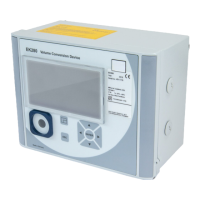
Provides basic physical and environmental specifications of the device.
Details about basic and modem battery supply and external power options.
Technical parameters for the optical serial communication interface.
Technical parameters for RS232 and RS485 serial communication.
Specifications for the built-in 2G GSM/GPRS modem.
Specifies environmental and operational conditions for the device.
Describes methods for installing the device on meters, pipelines, or walls.
Covers connecting gas meters, sensors, power, and outputs.
Outlines the process for setting operating parameters and configuring the device.
Guide for establishing communication using the optical interface and enSuite.
Configuration and operation of the internal 2G modem for data transfer.
Step-by-step instructions for installing and unlocking the SIM card.
Information on connecting RS232 and RS485 interfaces.
Explains the front panel display, keys, and basic navigation.
Interpretation of status symbols displayed on the device screen.
Lists and explains error codes encountered during value input.
Details the information displayed in different tabs of the device register.
Critical safety warnings and precautions for performing maintenance work.
Procedures for replacing basic device and modem batteries safely.
Safety instructions for personnel involved in fault rectification.
Identifies and explains various fault and status messages from the device.
Comprehensive list of spare parts and accessories with order numbers.
Documentation of ATEX and IECEx certifications for the device.
 General
| Type | Media Converter |
|---|---|
| Model | EK205-M |
| Manufacturer | Honeywell |
| Connector | SC |
| Distance | 2 km |
| Weight | 200g |
| Interface | 10/100Base-TX to 100Base-FX |
| Fiber Type | Multimode |
| Humidity | 5% to 95% (non-condensing) |
| Certifications | CE, FCC |

 To Next Page