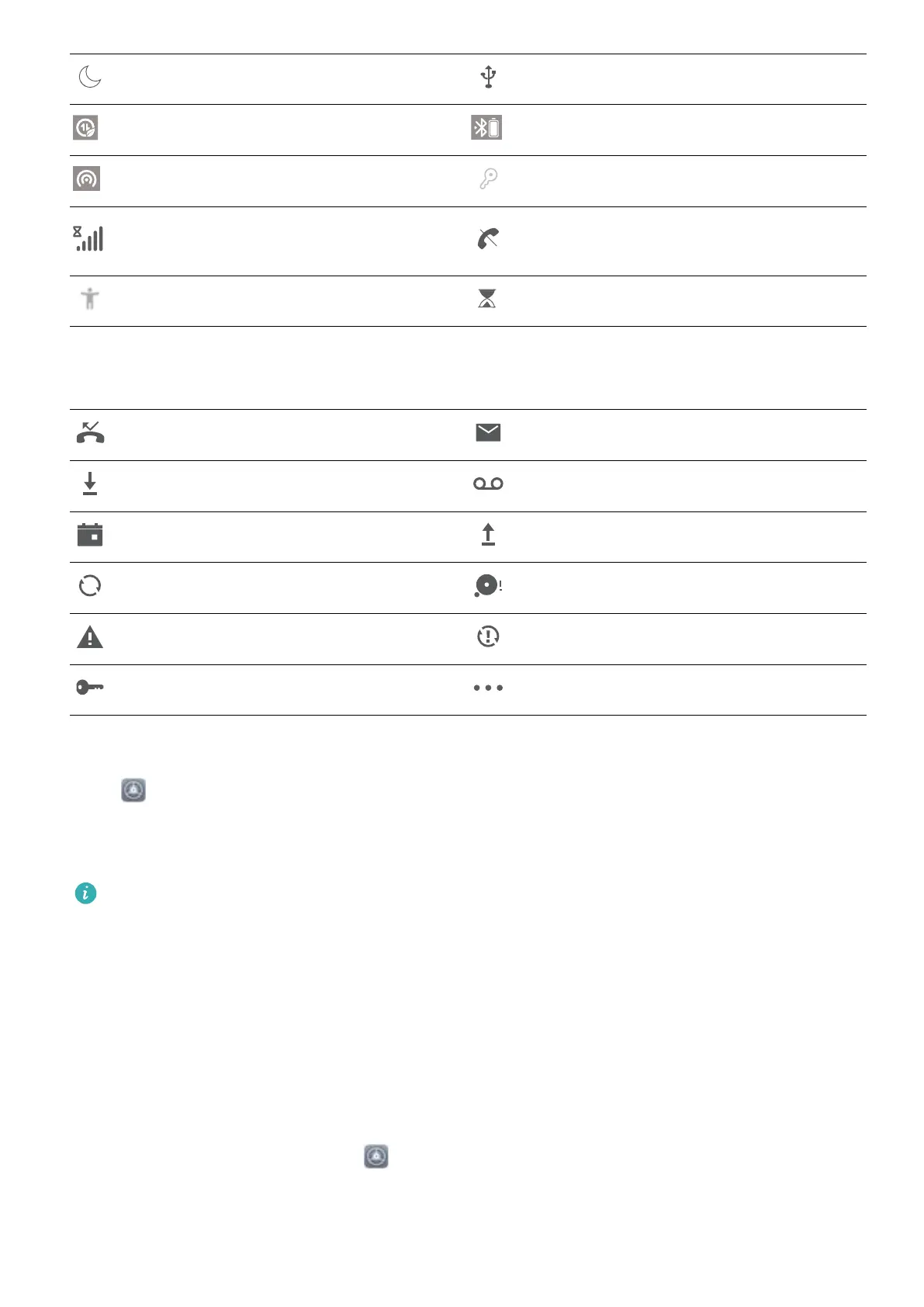
Do not disturb mode enabled USB cable connected
Data saving mode enabled Bluetooth power
Hotspot enabled Optimiser reminder
Unstable signal
Can't connect a call on current
network
Select-to-speak enabled Screen time management enabled
Notication icons: When there is a new message, notication or reminder on your device, the
relevant icon will be displayed in the status bar.
Missed calls New emails
Downloading data New voicemails
Events reminder Uploading data
Synchronising data Memory full
Sign-in or synchronisation problem Synchronisation failed
VPN connected More notications
Disable App Notications
Open Settings and touch Notications. From here you can:
l Block notications from an app: Select the app, then disable Allow notications.
l Block notications from multiple apps: Touch Batch management, then disable All.
To block
notications from an app, you can also swipe down from the status bar to open the
notication panel, touch and hold an app notication, then disable Allow notications.
Set a Lock Screen Password to Protect Your Privacy
Your Phone stores a lot of sensitive information, such as personal photos, contact information,
banking apps (for example, Alipay). Set a lock screen password so that a password is required each
time you unlock your Phone. A lock screen password helps to protect your private information if your
Phone is lost or accessed by an unauthorised user.
Set a lock screen password: Open
Settings, go to Security & privacy > Lock screen
password, and set the type of lock screen password you prefer.
l Set a PIN: A PIN number is a sequence of digits. Entering a PIN to unlock your Phone is quick and
simple. For better security, use a long sequence of random numbers as your PIN. Go to Set lock
Home Screen
7



 To Next Page