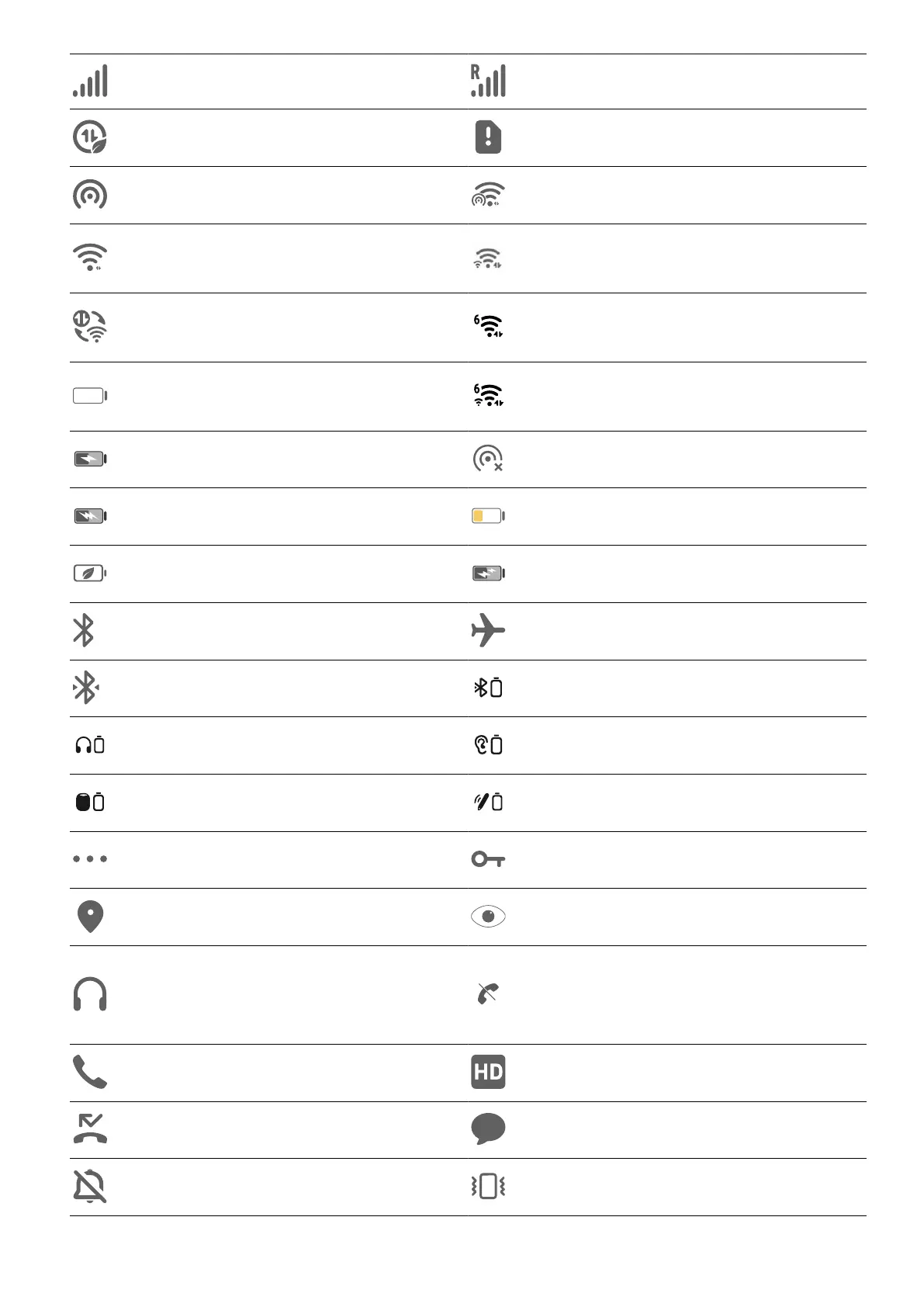
Full signal Roaming
Data saver enabled No SIM card
Hotspot enabled Connected to hotspot
Connected to Wi-Fi network
Connected to both 2.4 GHz and
5 GHz Wi-Fi networks
Automatic network switching
through Wi-Fi+
Connected to Wi-Fi 6 network
No
Connected to both 2.4 GHz and
5 GHz Wi-Fi 6 networks
Charging Hotspot disconnected
SuperCharge low
Power Saving mode enabled Quick charge
Bluetooth enabled Airplane mode enabled
Connected to Bluetooth device Other Bluetooth device
Bluetooth headset Bluetooth hearing aids
Bluetooth speaker Bluetooth stylus
More information Connected to VPN network
Positioning enabled Eye enabled
Connected to earbuds
Unable to connect to the voice
channel. Unable to answer or
make calls
Ongoing call VoLTE enabled
Missed call New message
Mute Vibration mode
Get Familiar
14















 To Next Page