EasyManua.ls Logo

Hootoo HT-BS012 - User Manual

Hootoo HT-BS012
12 pages
Print Icon
To Next Page IconTo Next Page
Loading...
MODEL: HT-BS012
Barcode Scanner
User Guide
EUROPE
E-mail:
support.uk@hootoo.com (UK)
support.de@hootoo.com (DE)
support.fr@hootoo.com (FR)
support.es@hootoo.com (ES)
support.it@hootoo.com (IT)
EU Importer: ZBT International Trading GmbH
Address: Halstenbeker Weg 98C, 25462 Rellingen, Deutschland
NORTH AMERICA
E-mail: support.ca@hootoo.com (CA)
support@hootoo.com (US)
Tel: 1-888-456-8468 (Monday-Friday: 9:00 – 17:00 PST)
US Distributor: SUNVALLEYTEK INTERNATIONAL INC.
Address: 46724 Lakeview Blvd, Fremont, CA 94538
Manufacturer: Shenzhen NearbyExpress Technology
Development Co.,Ltd.
Address: 333 Bulong Road, Shenzhen, China, 518129
MANUFACTURER
ASIA PACIFIC
E-mail: support.jp@hootoo.com (JP)
JP Importer: 株式会社SUNVALLEY
Address: JAPAN 104-0032東京都中央区八丁堀3丁目18-6
PMO京橋東9F
MADE IN CHINA
HT-BS012_V1.6
www.hootoo.com

Questions and Answers

Summary

Know Your Barcode Scanner

Whats in the Box

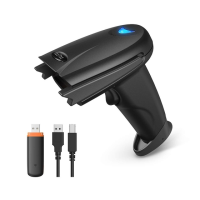
Lists the included accessories for the HooToo barcode scanner.

Product Diagram

Illustrates the different parts and components of the barcode scanner.

Specifications

Scanning Angle

Defines the rotation and oblique angles for scanning.

Decoding Ability

Lists the barcode symbologies the scanner can decode.

Receiver Mode

Specifies the modes for connecting the scanner receiver.

Scan Aiming

Provides guidance on how to aim the scanner for optimal reads.

Get Started

Power On; Off

Instructions for turning the barcode scanner on and off.

Charge the Barcode Scanner

Steps for charging the scanner's battery using a USB cable.

LED Indicator & Beeper

Explains the function of LED indicators and beep sounds for scanner status.

Pair the Scanner with a Device

Wired Connection

Details on connecting the scanner to a computer using a USB cable.

Wireless Connection

Steps for connecting the scanner wirelessly using a USB receiver.

Return to default

Instructions to reset scanner settings to their default configuration.

Set Your Barcode Scanner

Normal Mode

Standard mode for direct data transmission to the host.

Inventory Mode

Mode for storing scanned data in memory for later transfer.

Transfer Data

Procedure to transfer scanned data from inventory mode.

Clear Data

Command to erase stored data from inventory mode.

Transfer Speed Setting

Options to adjust data transfer speed in inventory mode.

Set Sleep Time

Sleep Time 10 Seconds

Sets the scanner to sleep after 10 seconds of inactivity.

Sleep Time 20 Seconds

Sets the scanner to sleep after 20 seconds of inactivity.

Sleep Time 5 minutes

Sets the scanner to sleep after 5 minutes of inactivity.

Sleep Time 30 minutes

Sets the scanner to sleep after 30 minutes of inactivity.

Sleep Time 30 Seconds

Sets the scanner to sleep after 30 seconds of inactivity.

Sleep Time 60 Seconds

Sets the scanner to sleep after 60 seconds of inactivity.

Sleep Time 2 Minutes

Sets the scanner to sleep after 2 minutes of inactivity.

Sleep Time 10 Minutes

Sets the scanner to sleep after 10 minutes of inactivity.

Sleep Time 20 Minutes

Sets the scanner to sleep after 20 minutes of inactivity.

Stay Powering On

Disables automatic sleep mode, keeping the scanner always on.

Set Power Off Timer

Turn Off in 10 Seconds

Configures the scanner to automatically power off after 10 seconds.

Turn Off in 15 Minutes

Configures the scanner to automatically power off after 15 minutes.

Shut Down

Command to manually shut down the scanner.

Scanner Sound Setting

Tone 0

Sets the scanner's beep volume to the lowest level or off.

Tone 1

Sets the scanner's beep volume to a higher level.

Same Code Delay Time Setting

Same code delay time 0 sec

Sets minimum delay between decoding identical codes to 0 seconds.

Same code delay time 1 sec

Sets minimum delay between decoding identical codes to 1 second.

Same code delay time 2 sec

Sets minimum delay between decoding identical codes to 2 seconds.

Same code delay time infinite

Sets minimum delay between decoding identical codes to infinite.

Scanner Reading Setting

Continuous Scan

Enables continuous scanning mode for rapid barcode capture.

Single Scan

Enables single scan mode, requiring trigger pull for each read.

Automatic Off

Disables automatic scanning mode.

Automatic On

Enables automatic scanning mode.

Code Suffix; Prefix Setting

CR

Appends a Carriage Return character as a suffix.

LF

Appends a Line Feed character as a suffix.

CR+LF

Appends Carriage Return and Line Feed as a suffix.

Disable

Disables suffix/prefix settings.

Preamble - STX

Adds Start of Text character as a prefix.

Code ID Table

USB Receiver Setting

USB Virtual Serial

Configures the scanner to operate as a USB virtual serial device.

USB HID

Configures the scanner to operate as a USB Human Interface Device.

USB HID Fast (WINDOWS)

Optimized USB HID mode for Windows operating systems.

USB HID Slow (APPLE)

Optimized USB HID mode for Apple operating systems.

Language Setting

UNITED STATES

Sets the scanner's language to English for the United States.

FRANCE

Sets the scanner's language to French.

SERBIA; YUGOSLAVIA

Sets the scanner's language for Serbia / Yugoslavia.

BELGIUM

Sets the scanner's language for Belgium.

GERMANY

Sets the scanner's language to German.

SLOVENIA

Sets the scanner's language for Slovenia.

BRAZIL

Sets the scanner's language for Brazil.

PORTUGAL

Sets the scanner's language for Portugal.

SPAIN

Sets the scanner's language to Spanish.

ITALY

Sets the scanner's language to Italian.

UNIVERSAL

Sets the scanner to a universal language setting.

Code Symbol On; Off

CODE11

Enables or disables the CODE11 barcode symbology.

CODE128

Enables or disables the CODE128 barcode symbology.

CODE 39

Enables or disables the CODE 39 barcode symbology.

FULL ASCII Enable

Enables full ASCII character support for CODE 39.

FULL ASCII Disable

Disables full ASCII character support for CODE 39.

CODE 93

Enables or disables the CODE 93 barcode symbology.

CODABAR

Enables or disables the CODABAR barcode symbology.

Interleaved 2 of 5

Enables or disables the Interleaved 2 of 5 barcode symbology.

Industrial 2 of 5

Enables or disables the Industrial 2 of 5 barcode symbology.

UPC-A

Enables or disables the UPC-A barcode symbology.

UPC-E

Enables or disables the UPC-E barcode symbology.

EAN - 13

Enables or disables the EAN-13 barcode symbology.

EAN - 8

Enables or disables the EAN-8 barcode symbology.

CODE32

Enables or disables the CODE32 barcode symbology.

CODE32 Check Digit

Controls the check digit for CODE32 symbology.

Troubleshooting

Summary

Know Your Barcode Scanner

Whats in the Box

Lists the included accessories for the HooToo barcode scanner.

Product Diagram

Illustrates the different parts and components of the barcode scanner.

Specifications

Scanning Angle

Defines the rotation and oblique angles for scanning.

Decoding Ability

Lists the barcode symbologies the scanner can decode.

Receiver Mode

Specifies the modes for connecting the scanner receiver.

Scan Aiming

Provides guidance on how to aim the scanner for optimal reads.

Get Started

Power On; Off

Instructions for turning the barcode scanner on and off.

Charge the Barcode Scanner

Steps for charging the scanner's battery using a USB cable.

LED Indicator & Beeper

Explains the function of LED indicators and beep sounds for scanner status.

Pair the Scanner with a Device

Wired Connection

Details on connecting the scanner to a computer using a USB cable.

Wireless Connection

Steps for connecting the scanner wirelessly using a USB receiver.

Return to default

Instructions to reset scanner settings to their default configuration.

Set Your Barcode Scanner

Normal Mode

Standard mode for direct data transmission to the host.

Inventory Mode

Mode for storing scanned data in memory for later transfer.

Transfer Data

Procedure to transfer scanned data from inventory mode.

Clear Data

Command to erase stored data from inventory mode.

Transfer Speed Setting

Options to adjust data transfer speed in inventory mode.

Set Sleep Time

Sleep Time 10 Seconds

Sets the scanner to sleep after 10 seconds of inactivity.

Sleep Time 20 Seconds

Sets the scanner to sleep after 20 seconds of inactivity.

Sleep Time 5 minutes

Sets the scanner to sleep after 5 minutes of inactivity.

Sleep Time 30 minutes

Sets the scanner to sleep after 30 minutes of inactivity.

Sleep Time 30 Seconds

Sets the scanner to sleep after 30 seconds of inactivity.

Sleep Time 60 Seconds

Sets the scanner to sleep after 60 seconds of inactivity.

Sleep Time 2 Minutes

Sets the scanner to sleep after 2 minutes of inactivity.

Sleep Time 10 Minutes

Sets the scanner to sleep after 10 minutes of inactivity.

Sleep Time 20 Minutes

Sets the scanner to sleep after 20 minutes of inactivity.

Stay Powering On

Disables automatic sleep mode, keeping the scanner always on.

Set Power Off Timer

Turn Off in 10 Seconds

Configures the scanner to automatically power off after 10 seconds.

Turn Off in 15 Minutes

Configures the scanner to automatically power off after 15 minutes.

Shut Down

Command to manually shut down the scanner.

Scanner Sound Setting

Tone 0

Sets the scanner's beep volume to the lowest level or off.

Tone 1

Sets the scanner's beep volume to a higher level.

Same Code Delay Time Setting

Same code delay time 0 sec

Sets minimum delay between decoding identical codes to 0 seconds.

Same code delay time 1 sec

Sets minimum delay between decoding identical codes to 1 second.

Same code delay time 2 sec

Sets minimum delay between decoding identical codes to 2 seconds.

Same code delay time infinite

Sets minimum delay between decoding identical codes to infinite.

Scanner Reading Setting

Continuous Scan

Enables continuous scanning mode for rapid barcode capture.

Single Scan

Enables single scan mode, requiring trigger pull for each read.

Automatic Off

Disables automatic scanning mode.

Automatic On

Enables automatic scanning mode.

Code Suffix; Prefix Setting

CR

Appends a Carriage Return character as a suffix.

LF

Appends a Line Feed character as a suffix.

CR+LF

Appends Carriage Return and Line Feed as a suffix.

Disable

Disables suffix/prefix settings.

Preamble - STX

Adds Start of Text character as a prefix.

Code ID Table

USB Receiver Setting

USB Virtual Serial

Configures the scanner to operate as a USB virtual serial device.

USB HID

Configures the scanner to operate as a USB Human Interface Device.

USB HID Fast (WINDOWS)

Optimized USB HID mode for Windows operating systems.

USB HID Slow (APPLE)

Optimized USB HID mode for Apple operating systems.

Language Setting

UNITED STATES

Sets the scanner's language to English for the United States.

FRANCE

Sets the scanner's language to French.

SERBIA; YUGOSLAVIA

Sets the scanner's language for Serbia / Yugoslavia.

BELGIUM

Sets the scanner's language for Belgium.

GERMANY

Sets the scanner's language to German.

SLOVENIA

Sets the scanner's language for Slovenia.

BRAZIL

Sets the scanner's language for Brazil.

PORTUGAL

Sets the scanner's language for Portugal.

SPAIN

Sets the scanner's language to Spanish.

ITALY

Sets the scanner's language to Italian.

UNIVERSAL

Sets the scanner to a universal language setting.

Code Symbol On; Off

CODE11

Enables or disables the CODE11 barcode symbology.

CODE128

Enables or disables the CODE128 barcode symbology.

CODE 39

Enables or disables the CODE 39 barcode symbology.

FULL ASCII Enable

Enables full ASCII character support for CODE 39.

FULL ASCII Disable

Disables full ASCII character support for CODE 39.

CODE 93

Enables or disables the CODE 93 barcode symbology.

CODABAR

Enables or disables the CODABAR barcode symbology.

Interleaved 2 of 5

Enables or disables the Interleaved 2 of 5 barcode symbology.

Industrial 2 of 5

Enables or disables the Industrial 2 of 5 barcode symbology.

UPC-A

Enables or disables the UPC-A barcode symbology.

UPC-E

Enables or disables the UPC-E barcode symbology.

EAN - 13

Enables or disables the EAN-13 barcode symbology.

EAN - 8

Enables or disables the EAN-8 barcode symbology.

CODE32

Enables or disables the CODE32 barcode symbology.

CODE32 Check Digit

Controls the check digit for CODE32 symbology.

Troubleshooting

Overview

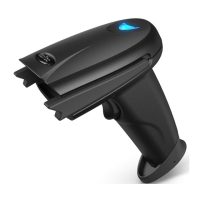
The HooToo HT-BS012 is a 2.4GHz wireless barcode scanner designed for efficient and ergonomic scanning. It can be used as a hand-held scanner or hands-free in a stand, ensuring comfort during extended use.

Function Description:

The HT-BS012 barcode scanner is capable of reading general one-dimensional barcodes. It supports both wired and wireless connections to a host device. In wireless mode, it connects via a 2.4GHz wireless receiver, offering two primary operational modes: Normal Mode and Inventory Mode.

In Normal Mode, scanned barcodes are immediately transmitted to the connected receiver and displayed on the PC or host. A prompt sound indicates successful registration.

In Inventory Mode, the scanner operates without a continuous connection to a host. Scanned codes are stored in the scanner's built-in 16MB flash memory. Users can later transfer the stored data to their PC or host by scanning the "Transfer Data" code. The "Total Number of Data Entry" code allows users to check how many data entries are stored. After data transfer, the "Clear Data" code can be used to clear the inventory data. Transfer speed in Inventory Mode can be set to Fast or Standard.

The scanner supports various settings to customize its operation, including:

  • Sleep Timer: Configurable sleep times (10, 20, 30, 60 seconds; 5 minutes; 2 minutes; 10, 20 minutes) or "Stay Powering On."
  • Power Off Timer: Options to turn off in 10 or 15 seconds, or manually shut down.
  • Scanner Sound Setting: Adjustable beeper volume (Lower, Medium, High) and the option to turn the beeper sound off.
  • Same Code Delay Time Setting: Sets the minimum delay between decoding identical codes (0, 1, 2 seconds, or infinite).
  • Reading Setting: Allows selection between Continuous Scan, Single Scan, Automatic Off, and Automatic On modes. When in automatic mode, the sleep time is fixed at 15 minutes.
  • Code Suffix / Prefix Setting: Options to add CR (Carriage Return), LF (Line Feed), CR+LF, disable, or add Preamble - STX (Start of Text) or Postamble - ETX (End of Text). It also allows adding or disabling Code ID as a prefix.
  • Language Setting: Supports various keyboard layouts including United States, France, Serbia/Yugoslavia, Belgium, Germany, Slovenia, Brazil, Portugal, Spain, Italy, and Universal.
  • Code Symbol On / Off: Enables or disables specific barcode symbologies, including Code 11, Code 128, Code 39 (with Full ASCII enable/disable), Code 93, Codabar, Interleaved 2 of 5, Industrial 2 of 5, UPC-A, UPC-E, EAN-13, EAN-8, Code 32 (with Code 32 Check Digit on/off).

Important Technical Specifications:

  • Communication Distance: 7 to 10 m / 22.9 to 32.8 ft (wireless).
  • Communication Protocol: 2.4GHz Wireless and Wired.
  • Compatibility: MAC OS, Windows, Linux etc.
  • Data Memory: 16MB Flash.
  • Scanning Type: Single / Continuous / Automatic Scan.
  • Source: LED (622nm - 628nm).
  • Max Scanning Speed: 200 times / second.
  • Decoding Accuracy: 3.3mil.
  • Depth of Focus:
    • 3.3mil: 2mm - 100mm
    • 10mil: 2mm - 350mm
    • 15mil: 5mm - 500mm
    • 30mil: 10mm - 600mm
  • Processor: 32-bit Decoder.
  • Print Contrast: Minimum reflectivity of 30%.
  • Working Current: Decoding: 40mA, Working: 20mA, Standby: 5mA, Shutdown: 1.8uA.
  • Battery: 750mAh.
  • Charging Input: 5V 500mA.
  • Charging Time: 1.5 hours.
  • Service Time: 30 hours.
  • Scan Mode: Wired / Wireless.
  • Prompting Mode: Buzzer, LED Light.
  • Error Rate: 1/5000000.
  • Scanning Angle: Rotation Angle: ±42°, Oblique Angle: ±65°, Deflecting Angle: ±65°.
  • Decoding Ability: UPC-A, UPC-E, EAN-8, EAN-13, Code 128, Code 39, Code 39 Full ASCII, Codabar / NW7, Code 93, Code 11, MSI, Interleaved 25, Industrial 25, ISBN, ISSN, China Post etc. (General one-dimensional codes).
  • Receiver Mode: USB HID, USB Virtual Serial (requires driver installation and setup code), SPP.

Usage Features:

  • Power On/Off: Pressing the trigger turns on the scanner and activates the laser. The scanner automatically shuts off after 30 seconds of inactivity, or can be manually shut down by scanning a specific barcode.
  • Charging: Connect the scanner to any USB power adapter using the included USB cable. The LED light flashes red and blue alternately during charging.
  • LED Indicator & Beeper: Provides visual and auditory feedback for various states such as power status (over 30% battery, lower than 30%, lower than 20%, drained), pairing status, transmission errors, code scanned and uploaded, and code scanned and saved in inventory mode.
  • Wired Connection: Plug the data cable into the scanner and the host computer. The PC will automatically install the necessary drivers.
  • Wireless Connection: Disable wired mode and plug the 2.4GHz wireless receiver into the host device.
  • Scan Aiming: Do not hold the scanner directly over the barcode; aim at an angle for optimal scanning.

Maintenance Features:

  • Cleaning: Regularly clean the scanning window for better accuracy.
    • Keep the window away from abrasive materials.
    • Remove dirt particles with a damp cloth.
    • Wipe the window with a tissue moistened with ammonia/water.
    • Do not spray water or other cleaning liquids directly onto the window.
  • Troubleshooting: The manual provides a comprehensive troubleshooting guide for common issues such as no power, loose cables, incorrect programming for barcode type or host type, unreadable barcodes, incorrect scanning angle/distance, and out-of-condition laser head. Solutions include checking connections, programming the scanner correctly, ensuring barcode quality, adjusting scanning technique, and contacting support for replacement if needed.

Compliance:

  • FCC Statement: The device complies with Part 15 of the FCC Rules, ensuring it does not cause harmful interference and accepts any interference received. Users are advised to avoid unauthorized modifications.
  • FCC Radiation Exposure Statement: The equipment complies with FCC radiation exposure limits for an uncontrolled environment, with a minimum distance of 20cm between the radiator and the body.
  • WEEE Compliance: Indicates that the product and its electronic accessories should not be disposed of with household waste but should be recycled responsibly to promote sustainable reuse of materials.

Hootoo HT-BS012 Specifications

General IconGeneral
BrandHootoo
ModelHT-BS012
CategoryBarcode Reader
LanguageEnglish

Related product manuals