Need help?
Do you have a question about the Hootoo ht-tm04 tripmate elite and is the answer not in the manual?
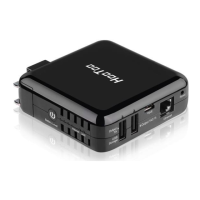
Provides a general overview of the TripMate Elite's capabilities and functions.
Details the key functionalities: personal cloud, travel router, and external battery pack.
Illustrates the physical ports, buttons, and indicators of the TripMate Elite device.
Guides users on how to establish a wireless connection to the TripMate Elite device.
Explains how to set up and use the device as a personal cloud for media sharing.
Details how to configure the TripMate Elite to function as a travel router.
Instructions on changing the administrative login password for the device.
Shows how to view details and manage connected USB storage devices.
Covers various network configurations, including host name and access.
Explains how to configure services like Samba and DLNA for media sharing.
Provides options for managing system settings, including backup and restore.
Offers a step-by-step guide for initial device configuration.
Allows users to browse and manage files on connected USB storage.
Instructions on how to charge the internal battery of the TripMate Elite.
Guides users on using the TripMate Elite to charge external devices.
 General
| Model | HT-TM04 |
|---|---|
| Frequency Band | 2.4 GHz |
| Wireless Standard | 802.11n |
| Ports | 1 x Ethernet |
| USB Function | File sharing, charging |

 To Next Page