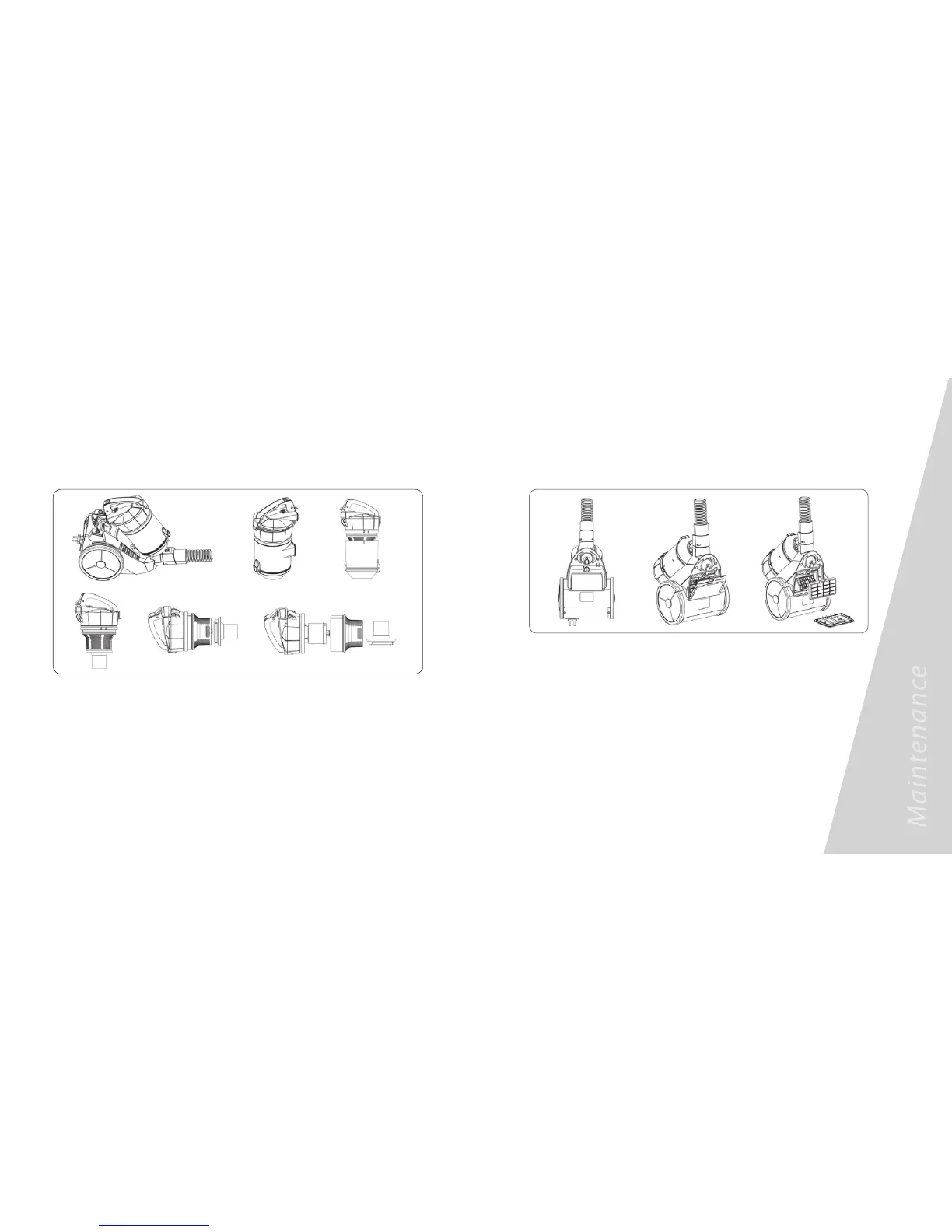
3. Changing the air outlet filter
a. Unlock the locking screw with the screw driver or a 20c coin.
b. Remove the air outlet filter to clean or change.
PLEASE NOTE: The sponge filter material in the dust bin will become dusty over time.
This is normal and will not affect the performance of the filter. If the sponge filter is so dusty
that suction does not return to 100%, then remove the filter, rinse under warm water and
allow to dry for 24 hours by airing the sponge filters when completely dry. This should be
done every 3 months or when suction appears to be reduced.
NOTE: The air inlet must be open, free of any obstructions at all times. Otherwise, the
motor will overheat and could become damaged.
2. Cleaning the dust bin
a. Remove the dust canister from the unit
b. Press the knob on low end of dust canister to open the dust canister cover.
c. Remove the central filter to clean.
Maintenance (continued)





 To Next Page