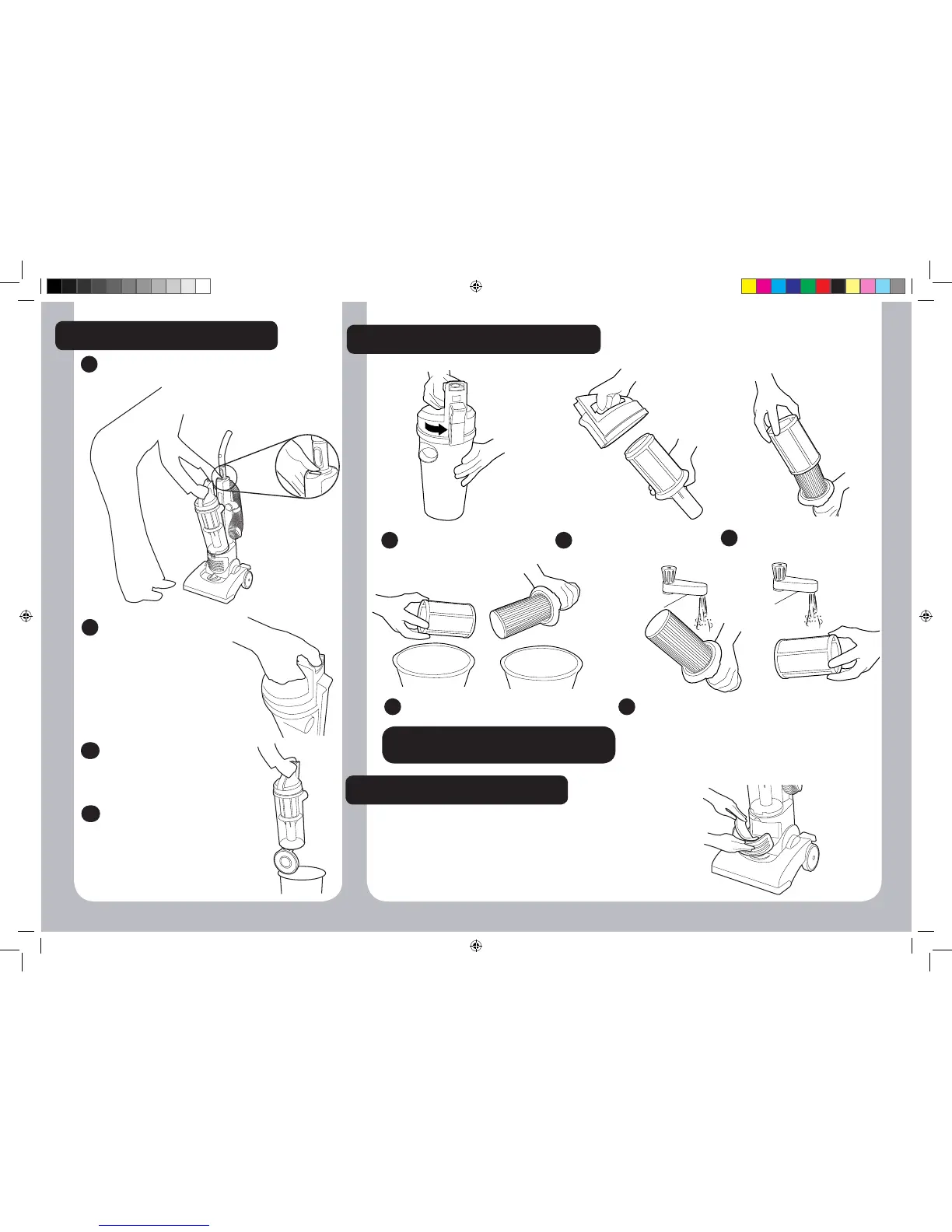
EMPTYING THE DUST BIN
Hold the container over
the bin and press the bin
open button .
The dust container door
will open and you can
empty with no contact
with the dust.
Once emptied, gently tap
or shake the container to
release any excess dust
from the filters.
2
43
44
To remove the dust container from the
cleaner press the bin release button.
1
CLEANING THE PRE MOTOR FILTERS
Rotate the upper part of the
dust bin to open.
1
Remove the lter assembly
from the upper part.
2
Remove the mesh lter from
the lter assembly.
3
Gently tap both lters to release any
excess dust.
4
Wash both lters under hand warm water until the
water runs clean. Remove excess water by shaking
and leave to dry for 24 hours.
When completely dry reassemble and refit filters to
cleaner.
5
CLEANING THE EXHAUST FILTER
The exhaust filter should be washed every month.
Press down on the latch to remove the exhaust cover.
Remove filter and wash with warm water.
Remove excess water by shaking and leave to dry for
24 hours. When completely dry refit filter.
!
IMPORTANT! Ensure the mesh sleeve is
reassembled to the hepa lter before use
!
- 6 -


 To Next Page