Horizon 202 User manual, 1991 year
– 4 –
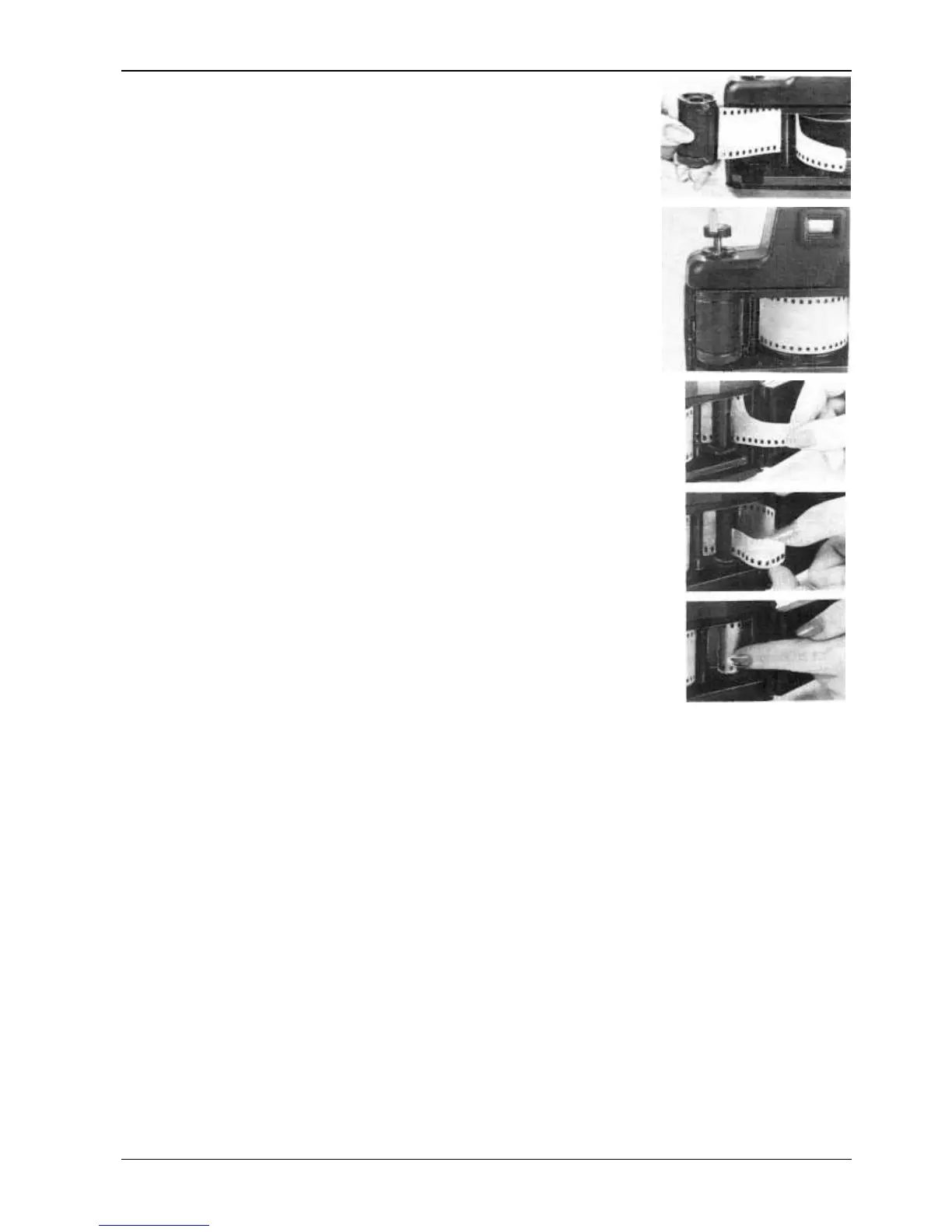
— Carefuly insert the film leader under guiding roller 15 and draw out
the film by about 12–15cm.
— Put a loaded cassette into socket 13 pulling out the rewind knob as
far as it will go.
— Return the film rewind knob completely home slightly turning it to
let spool guide 14 enter the cassette.
— Pass the film leader under sprocket 18 so that it appears from under
take-up spool 19. To make this process easier rotate the sprocket with your
fingers with button 21 pressed down.
— Insert the film leader into the slot of the take-up spool and draw the
film back on to the film gate. Make sure that the sprocket tooth engage a film
perforation hole. Reel the appear loop on the take-up spool rotating shutter
cocking lever 2. The film should be paced on film channel guides 16 without
skewing.
— Close the back door 20 tightly pressing it to make the lock latch. Cock
and fire the shutter.
— To transport a nonexposed portion of film to the film gate, cock and
fire the shutter once again. When cocking the shutter for the second time the
frame counter should be set at “1”, the latter being positioned approximately
in the center of exposure counter window 12. Now you are ready to shoot.
The shutter is cocked by turning smoothly lever 2 counter-clockwise to its
fullest extent and released by pressing release button 11. Should the film be
wound tightly in the cassette, the film rewind knob will rotate when the shutter is being cocked.
If the film is loose in the cassette, the rewind knob will fail to rotate at the first frames.
Automatic frame counter shows the number of the frame being positioned against the film gate.
Put the film box label with film speed indicated on it, into film check pocket 24.
4.2. Operating Mode Setting
4.2.1. Shutter Speed Setting
Turn operating mode selection switch 7 to set the required shutter speed range from 2 to 15 or 30 to
250. Set lever 9 against the required shutter speed value.
Each position of the lever is click-stopped.
4.2.2. Aperture setting
Set aperture setting lever 10 opposite to the required aperture value. Each position of the lever is
click-stopped.
At exposure determining to obtain pictures of higher quality the aperture should be smaller and
shutter speed longer. Shutter speed and aperture should be set only with the shutter cocked.
4.2.3. Depth of field of the lens
The OF-28P fixed built-in lens has no distance scale.
To determine the depth of field, make use of the table set forth below. For example, with aperture
set at 8, the depth of field will be from 2m to unfinity.


 To Next Page
 Loading...