EasyManua.ls Logo

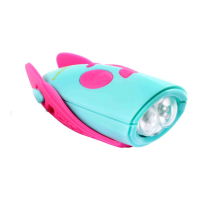
HORNIT Mini Hornit - User Manual

HORNIT Mini Hornit
2 pages
Print Icon
To Next Page IconTo Next Page
Loading...
INSTRUCTIONS
1 – press and hold to switch on/off (wait for beep)
1 – press briefly to change volume (loud, medium, quiet)
2 – press to scroll down through the 25 sounds
3 – press to scroll up through the 25 sounds
4 – press to scroll through white and green light settings
5 – press to play the selected sound
6 – press to reset to the bike bell sound (turns off light)
7 – press to play selected sound (mount on bicycle handlebar)
8 – insert plug into socket and turn to lock into place
9 – wings for fastening the Mini Hornit to handlebars
10 – rear fastening points, attach wings as shown
BICYCLE HANDLEBARS
FITTING AND REPLACING BATTERIES
The Mini Hornit uses 2 x AAA 1.5V batter-
ies. Unscrew the screws and lift the battery
cover. Replace the old batteries with two
new AAA batteries, ensuring correct polar-
ity. Replace the battery cover and tighten
screws.
IMPORTANT
ß Do not recharge non-rechargeable batteries.
ß Remove rechargeable batteries from product before recharging.
ß Only charge rechargeable batteries under adult supervision.
ß Do not mix different types of batteries or new and used batteries.
ß Only batteries of the same or equivalent type are to be used.
ß Batteries are to be inserted with the correct polarity.
ß Remove exhausted batteries from the toy.
ß Do not short circuit the supply terminals.
ß Remove batteries if the product is not used for some time.
ß Used batteries and broken electrical and electronic products must
be disposed of at an approved collection point. Such products must
not be thrown away with household refuse.
www.minihornit.com
1
6
5
3
4
7
8
9
10
2
Question and Answer IconNeed help?

Do you have a question about the HORNIT Mini Hornit and is the answer not in the manual?

Summary

OPERATING INSTRUCTIONS

Power On;Off and Volume Control

Press and hold to switch on/off (wait for beep); briefly press to change volume (loud, medium, quiet).

Sound Selection and Playback

Press to scroll through 25 sounds (up/down) and press to play the selected sound.

Light Settings and Reset

Scroll through white/green light settings and press to reset to bike bell sound (turns off light).

Mounting and Connectivity

Play sound on handlebar, insert plug into socket, and attach wings for handlebar fastening.

FITTING AND REPLACING BATTERIES

Battery Installation and Replacement

Replace 2 x AAA batteries, ensuring correct polarity and re-tightening screws after access.

IMPORTANT SAFETY AND USAGE NOTES

Battery Precautions and Handling

Do not recharge non-rechargeable batteries; remove rechargeables before charging; do not mix types or short circuit.

Product Disposal Guidelines

Dispose of used batteries and electronics at approved collection points, not household refuse.

USING THE MINI HORNIT

Water Ingress and IP Rating

Water can enter via lid/socket; IP33 rating withstands sprayed water/light rain from above only.

Sound Effects and Visibility

Sound effects are for fun, not safety. Lights improve visibility but don't guarantee others see you.

Supervision and Usage Advice

Adult supervision required. Avoid use near sensitive ears or animals. Ensure secure mounting.

WARNINGS

Child Safety Warnings

Remove packaging. Not for under 3 years. Contains small parts. Adult supervision essential for safe operation.

Water Exposure Warning

The Mini Hornit is NOT waterproof; do not submerge or get wet.

LIABILITY

Manufacturer Liability Limitation

Manufacturer accepts no liability for death, injury, or property damage except due to negligence.

WARRANTY INFORMATION

Product Warranty Terms

12-month warranty against defects in materials/workmanship, not for wear, accidents, misuse, or neglect.

HORNIT Mini Hornit Specifications

General IconGeneral
BrandHORNIT
ModelMini Hornit
CategoryBicycle Accessories
LanguageEnglish

Related product manuals