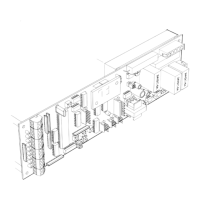
SERIES 2001 SLIDE DOOR OPERATOR
To get this operator up and running, do the following:
1.
Physically inspect the package you received.
a. The small red connector from the motor encoder should be plugged into connector CN1
on the control.
b. The motor should be plugged into connector CN8.
c. The close monitor switch assembly should be connected to terminal #10 and #11 of connector CN2, and should trip when
the door is fully closed.
with C2150 Control and Version 3 Software
(for light-duty industrial door operators)
SECTION 1: QUICK-START INSTRUCTIONS
d. A five-conductor cable should run between connector CN7 and the power supply. The power supply should be a C3925 (with
large rectangular transformer) for 120VAC operation. For 240VAC, it should be a C3926 (with round "donut" transformer).
2.
Check the incoming power for proper connections. Pin 1 of the power supply is to be wired to the HOT side of the AC line
(normally black-US or brown-international). Pin 2 of the power supply is for the NEUTRAL side of the AC line (normally
white-US or blue-international). Pin 3 of the power supply is frame ground (green-US or green/yellow-international).
3. If you do not plan to use a 3-button station or an emergency stop switch, a jumper
must
be present between pins 15 and 16
of CN2, the main input connector. Also, a toggle switch or jumper wire
must
be present between pins 8 and 9 of connector
CN2. This wiring is normally done for you at the factory.
4.
Set reversing sensitivity pot R10 fully counterclockwise. Do not
wire any motion detectors or other accessory devices at this
ti
me (the factory pre-wired safety beams, if present, may be left in place).
5.
Caution, door will move! Move the door manually to a position in mid-stroke. Insure that the toggle switch is turned on, and
apply AC power to the door package.
a.
The display should wink the version number in two parts (as in 3. then 03).
b.
The display should indicate FC (for first run - Finding Close stop), and the door should fully close at slow speed. [If the door
moves a short distance closed, then stops and the display indicates Pd, it means thatthe pre-wired safety beams are hanging
the door up and preventing the "learn" cycle; the yellow SAF BEAM indicator will be lit in this case.]
c.
When the door has fully closed, the yellow CLM (close monitor) indicator should come on. The display should show tS (total
Stroke), followed by the stroke found (in inches).
I
mportant note
:
The stroke displayed should match the door stroke as
installed, since each control is "taught" the stroke for the operator it ships in at the factory. If you need to change the stroke
for any reason, refer to question 1-1 in Section 3, COMMON QUESTIONS & ANSWERS.
d.
After the stroke displays, the display will switch to Id (Idle). [If the display switches to OS instead and the door refuses to
do anything else, look at the green TOG SW indicator on the left side of the control. It should be on. If it's off, check to insure
that the toggle switch is turned on, and that the SO magnets, if present, are closing the breakout magnetic reed switches
(these switches are in series with the toggle switch circuit).]
6.
Depressing the DOWN button on the C2150 control will now actuate the door to open at the factory selected default settings
for open speed, open check, braking, and time delay. Inspect for smooth operation, free of any binds, excessive noise, etc.
7. If any speeds or other settings need to be changed, follow this procedure:
a.
Turn the toggle switch
OFF.
The display will show OS (for Open Speed), the first parameter that can be adjusted.
b. Refer to the chart on page 3 and scroll through the parameter list using the UP and DOWN buttons until you find the parameter
you wish to change. When you've found it, press
and hold
the SET button. The display will now change to show the current
value or setting of the parameter. While holding the SET button down, press or hold UP or DOWN to modify the setting. When
the SET button is released, the display once again shows the parameter you just changed. You may then change another
parameter, or turn the toggle switch back on to check the change(s) you just made. The chart on page
3 also shows the
factory default settings for each parameter.
8. If you changed any adjustments, after you are satisfied with all control settings, insure that the toggle switch is ON. Press
and hold
the SET button on the control until dS (data Saved) displays. All of your settings are now stored in the control's
memory. You must
perform this step if you changed any settings, otherwise the control will go back to the factory default
settings after a power failurel
9. Set the reversing sensitivity as desired using adjustment R10. Do NOT leave this adjustment at minimum!!
10. Install accessory devices and wire them to CN2. Check all detectors for proper operation.
This concludes the electrical installation and set-up.


 To Next Page
 Loading...