Lock
monitor SW
Fail safe
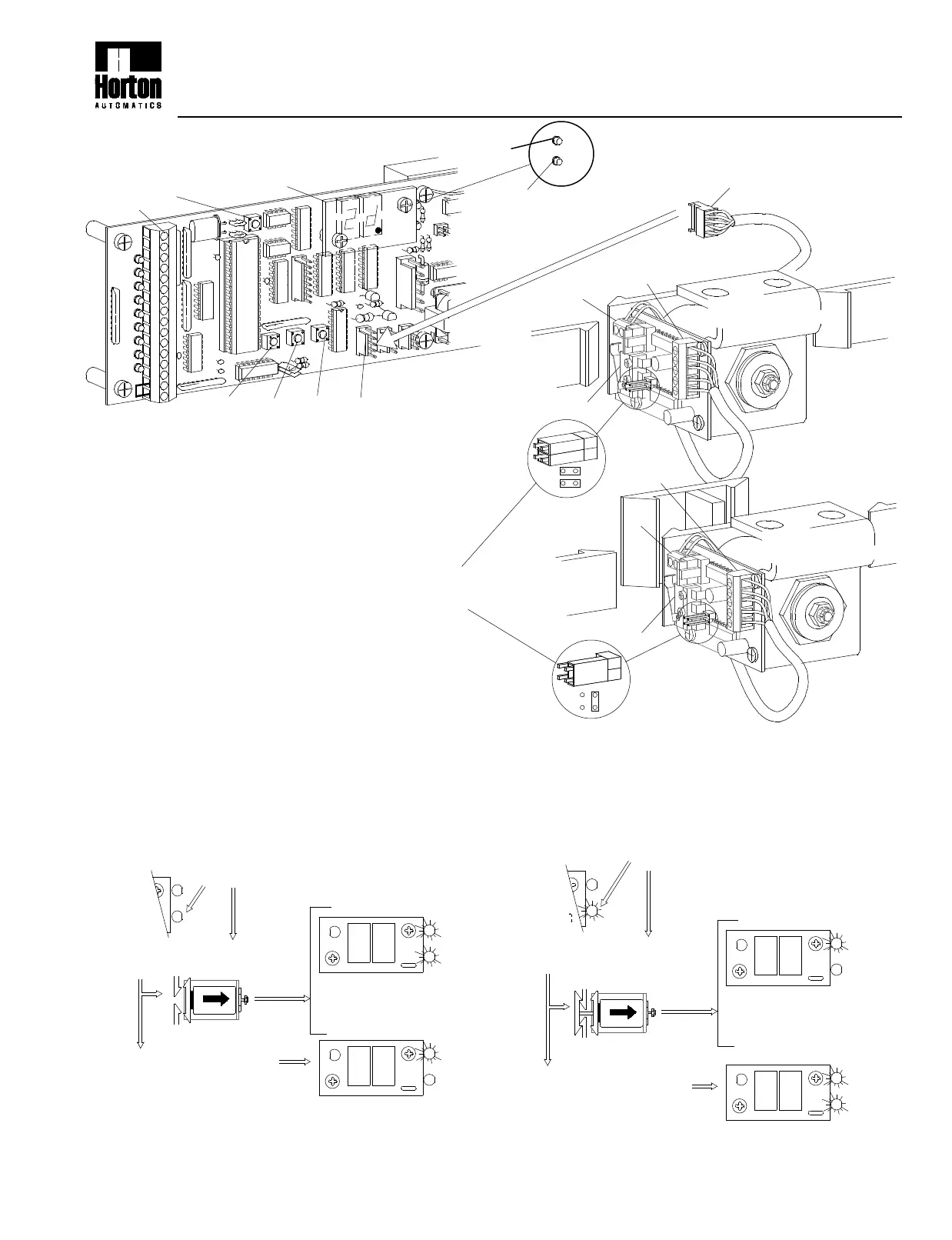
Press SET and RESET simultaneously, release
RESET, wait 5 seconds,then release SET - version
number will displayed.
During initialization the control clears all ports and
the solenoid becomes inactive.
NOTE: See H202 Rev. 9/99 for further information and trouble shooting Autolocks.
AUTOLOCK SET UP AND INITIALIZATION
O
LOCK
LOCK
MON
Y
+100
LOCK
LOCK
MON
LOCK
LOCK
MON
e
O
R
Y
O
+100
Y
If the yellow LED is off...
FAIL SECURE
s
SOLENOID
l
R
n
If there is no response it
knows there is no lock.
The control sends a pulse
to retract the solenoid...
If the control gets a
response back, it
knows there is a fail
secure lock.
The C2150 looks to see if there is a contact at the
lock port CN4 and if the yellow lock monitor LED
is off.
R
+100
LOCK
MON
LOCK
Y
O
LOCK
LOCK
MON
LOCK
LOCK
MON
ln
Y
as
If the yellow LED is on...
SOLENOID
O
+100
R
O
Y
FAIL SAFE
The control sends a pulse
to retract solenoid...
If there is no response it
knows there is no lock.
The C2150 looks to see if there is a contact at the
lock port CN4 and if the yellow lock monitor LED
is on.
If the control gets a
response back, it
knows there is a
fail safe lock.
2.208d
Autolock Setup & Initilization for 2001 & 2003 units
BELT DRIVE SUPPLEMENTAL INSTRUCTIONS
Set jumpers as shown
for fail secure or fail safe
Fail secure
(Orange)
LOCK
UP DOWN
SET
CN5
CN4
D1
RESET
1
1-800-531-3111
CODE
DISPLAY
FAIL SECURE
Remains lockedat power failure
TS 2
TS 1
Lock
monitor SW
5
1
Unlocks at power failure
FAIL SAFE
(Yellow)
TS 2
LOCK
MON
TS 1
Connect to CN 4
S200.3
10/99


 To Previous Page
 Loading...