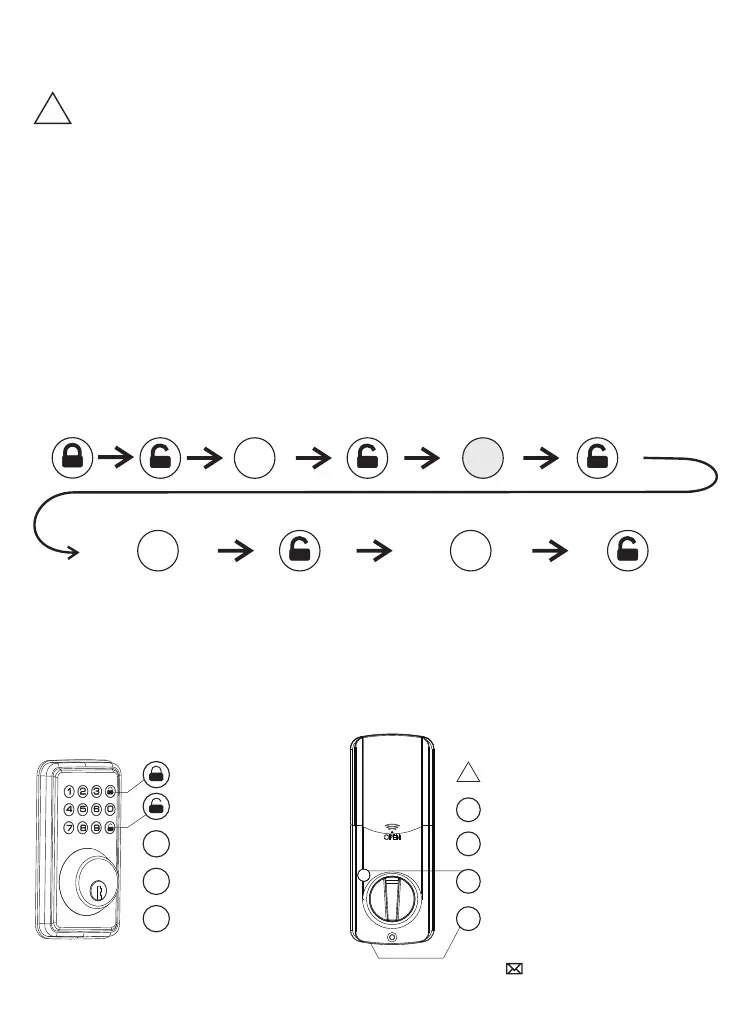
Preset code
Enter new programing code Reenter new programing code
Change Programming Code
!
1.For your safety, it is strongly recommended that you change and remember your
programming code in time.
2.When you enter the wrong button, the system will exit the programming mode, and
you can attempt programming procedure again.
3.If you do not enter any buttons within 5 seconds, the system will exit the programming
mode, and you can attempt programming procedure again.
If your lock is new, the factory preset code is: 123456
The new programming code must be 6 digits
If the operation is successful:the green light and beeps 1 second.
If the operation is wrong:the red light flashes 3 times with 3 beeps.
If you do not enter any buttons within 5 seconds:the red light flashes 3 times with 3
beeps,system will exit the programming mode.
!
Important tips for programming:
PC 4
PC PC
Programming Symbols Factory default settings
PC
UC
ID
PC
UC
ID
SET
Lock
Unlock / Programming
Programming Code
User Code (4-8Digits)
User ID (01-50) 2Digits
The lock is in experience mode
Programming Code:123456
User Code: 1234 or any 4-8Digits
Indoor unlock / lock button
Reset button
10
aftersale@hotata.com


 To Next Page