Advanced CT Laser Collimator Manual (V9.0 =OH=) Page 5 of 20
1.0. Setting Up the Laser Collimator on the Tripod
1.1. Where to setup the telescope and the collimator
Position both collimator and the telescope on solid ground (no carpeted, wooden floor, or other surface that will flex or vibrate).
Both telescope and collimator must be on the (same) ground floor.
1.2. Setup the collimator on the tripod
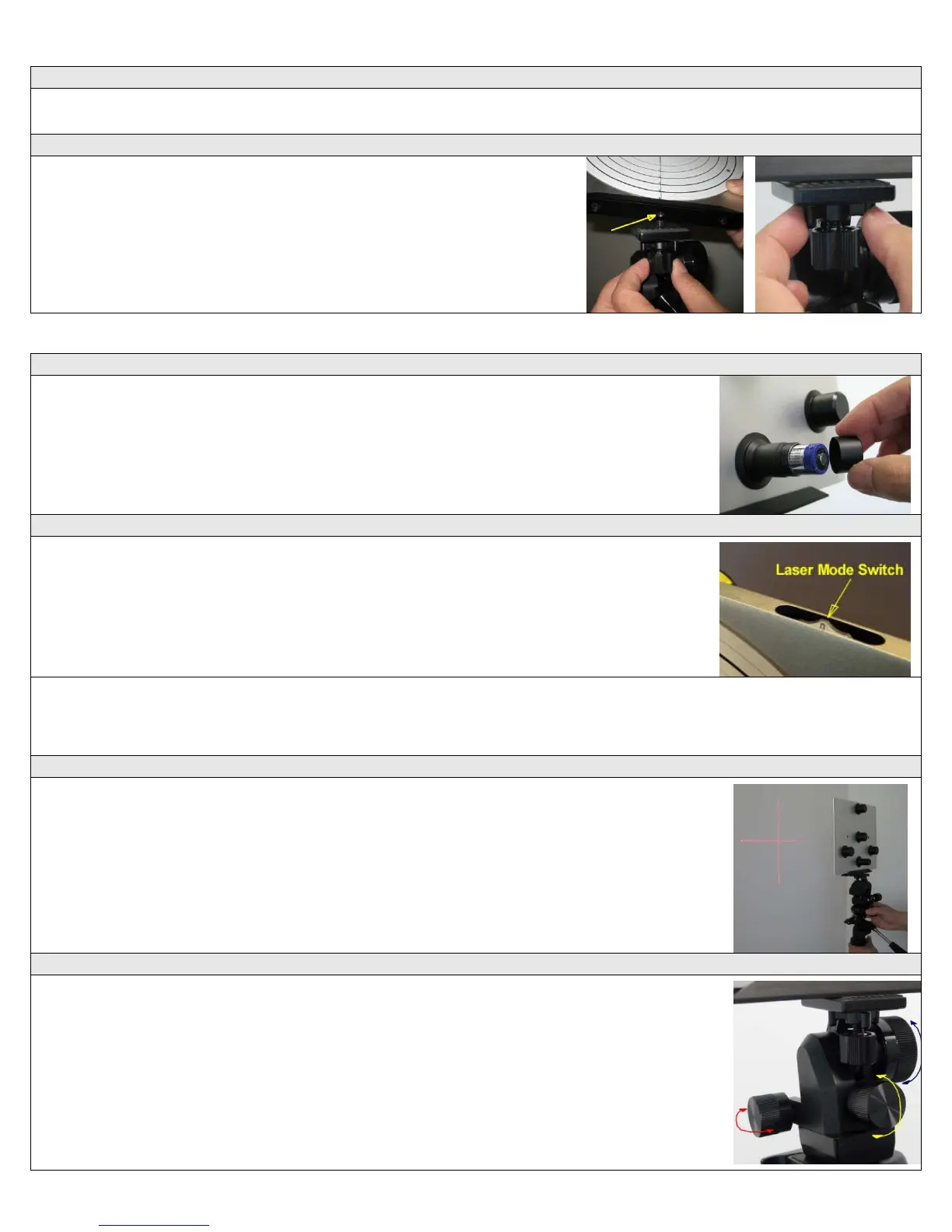
a. Attach the fine-adjuster to your tripod using the tripod's 1/4-20 bolt.
b. Attach the collimator to the fine-adjuster using the threaded knob on the
fine-adjuster and the ¼-20 screw hole on the bottom of the collimator.
c. Lock the collimator firmly in place with the lock-knob on the fine-
adjuster's 1/4-20 bolt.
2.0. Getting Familiar with the HOTECH Advance CT Collimator
2.1. Installing the battery
Unthread the battery compartment cap and insert the included CR123 lithium battery with the
positive side up (+ tip side toward the cap) and replace the battery cap.
2.2. Switching the laser to the proper mode
Position the collimator on a tripod about 4 feet from a white wall with the target side facing the
wall. Rotate the rotary knob on the top right corner of the Collimator to activate different laser
modes. You will see the projected laser patterns on the wall at various positions.
Mode 0: Unit off.
Mode 1: Crosshair laser ON.
Mode 2: Crosshair laser and three alignment lasers ON.
Mode 3: Crosshair laser, three alignment lasers, and target backlight ON for night use.
Other modes:
DT: Three alignment lasers ON. BL: Backlight ON.
1L: Crosshair laser and backlight ON. CL: Three alignment lasers and backlight ON.
Please use the recommended mode in each procedure for best result.
2.3. Rough adjustment
Switch the laser to mode 2, lift the tripod and move the collimator and tripod to various distances
from the wall to see how the crosshair expands and contracts in size at various distances.
2.4. Using the Fine-Adjuster
With collimator back on the ground, adjust the fine-adjustment stage as follows (In the Figure to
the right, the arrows indicate which way the Collimator face moves when the associated knob is
adjusted.):
Preparing the Fine-Adjuster:
• The Large Knob on right is for rough adjustment to make the collimator face approximately
square to the front of telescope. Loosen the large knob to adjust then tighten to lock the
large knob in place so that the forward small knob is ready for use.
Vertical Adjustment:
• The forward small knob is for fine adjustment in the vertical Up/Down (Up/Dn) direction.
Horizontal Adjustment:
• The left side small knob is for fine adjustment in the horizontal Left/Right (L/R) direction.



 To Next Page