
 Need help?
Do you have a question about the Hotline Huma-i HI-150 and is the answer not in the manual?
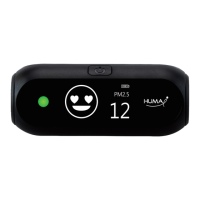
Overview of Huma-i black portable air quality monitor, its measurements, and benefits for real-time air quality assessment.
Details the core functionalities of the Huma-i black, including power management and mode selection.
Explains how to power the device on/off and cycle through different display modes using the selection button.
Describes the function of the status LED in indicating the levels of CO2, VOC, PM2.5, and PM10.
Details the indoor air quality index (iAQI) display, including figures, icons, and status LED color changes.
Explains the step-by-step graph display for viewing PM2.5, VOC, and CO2 air quality levels.
Describes the icon-based display for easily recognizing air quality states based on PM2.5 and PM10.
Covers individual display modes for PM, VOC, CO2, and Temperature/Humidity measurements.
Explains the icon used to indicate the remaining battery charge of the device.
Lists the technical details of the Huma-i black, including measurements, power, dimensions, and certifications.
Outlines the terms and conditions of the product's limited warranty and important usage precautions.
 General
| Product | Portable Air Quality Monitor |
|---|---|
| Model No | HI-150 |
| Certifications | CE FCC KC |
| VOC | 0.000 ~ 10.000ppm |
| CO2 | 400 ~ 10, 000ppm |
| PM2.5 & PM10 | 0 ~ 500㎍/㎥ |
| Power Supply | Li-Polymer Battery |
| Charge Mode | USB micro 5 Pin |
| Operating Temperature | 0 ~ 40℃ (32 ~ 104℉) |
| Storage Temperature | -20 ~ 60℃ (-4 ~ 140℉) |
 Weight and Dimensions
| Dimension | 91 X 41 X 37mm (3.6 X 1.6 X 1.5 inches) |
|---|---|
| Weight | 60g (0.13 pound) |

 To Next Page