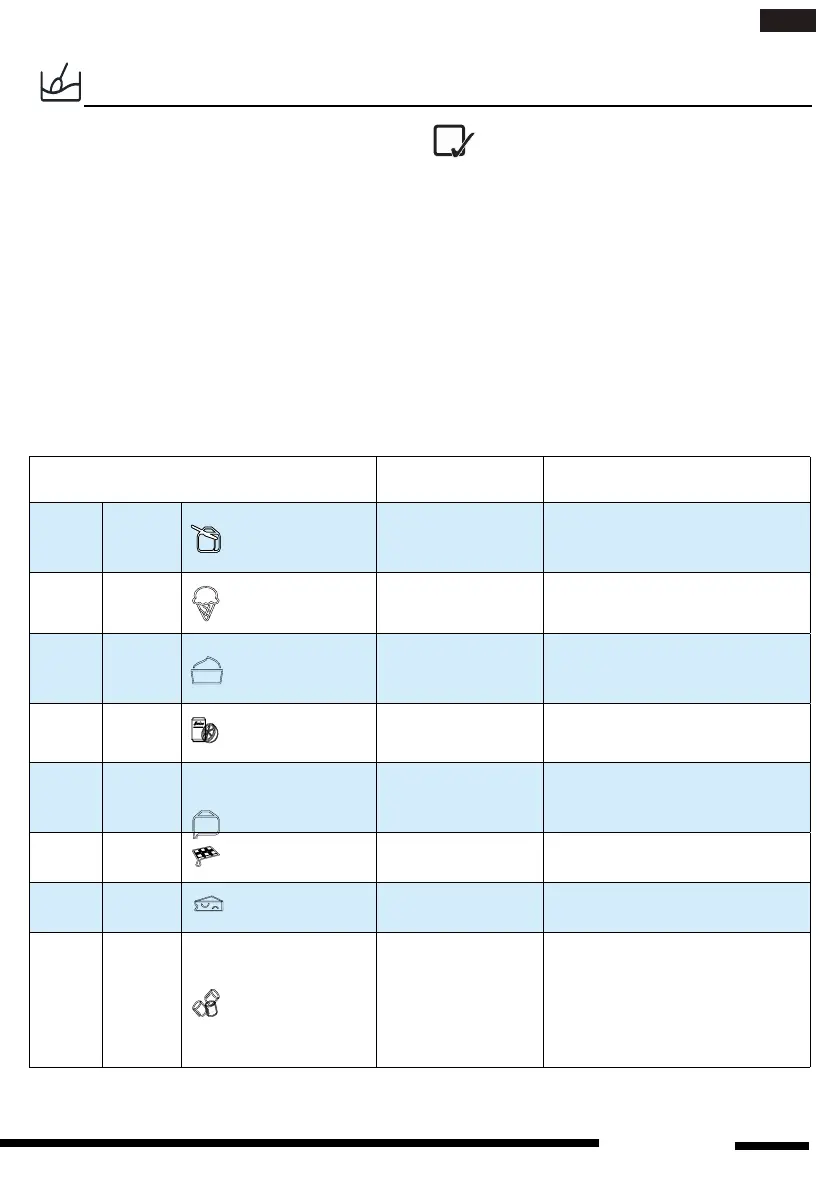
SOFT/MELT
A selection of automatic recipes with preset
values to offer optimal cooking results.
1. Press the Soft/Melt button.
2. Press Soft/Melt button repeatly or press
+/- button to select the desired recipe (see the
table below).
3. Press the JET START button to confirm
the recipe and press +/- button to select the
weight when there is a weight range in the ta-
ble.
4. Press the JET START button.The function
will start.
The cooking recipe will be confirmed
once you leave the function button for 3
Seconds,press the function key again to change
the recipe type.
FOOD TYPE WEIGHT HINT
p 1
Soften
Butter 50g - 500g/50g
From refrigerator state, unwrap
and place in microwave safe
dish
p 2
Soften
Ice Cream 50g - 1000g/50g
Fromfrozenstate,placeice
cream container on turntable.
p 3
Soften
Cream Cheese
50g - 500g/50g
From refrigerator state, unwrap
and place in microwave safe
dish
p 4
Soften
FrozenJuice 250g - 1000g/250g
Fromfrozenstate,removelid
from container.
p 5
Melting
Butter 50g - 500g/50g
From refrigerator state, unwrap
and place in microwave safe
dish
p 6
Melting
Chocolate 100g - 500g/50g
From room temperature, place
in microwave safe dish.
p 7
Melting
Cheese 50g - 500g/50g
From refrigerator state,place in
microwave safe dish.
p 8
Melting
Marshmellows 50g - 500g/50g
From room temperature, place
in microwave safe dish.The
dish should be at least double
volume with the marshmellows
since they are expanded during
cooking.
1111
en
hotpoint.co.uk




 To Next Page