CLOCK AND TIMER
(on wme models)
F
O
11
OW
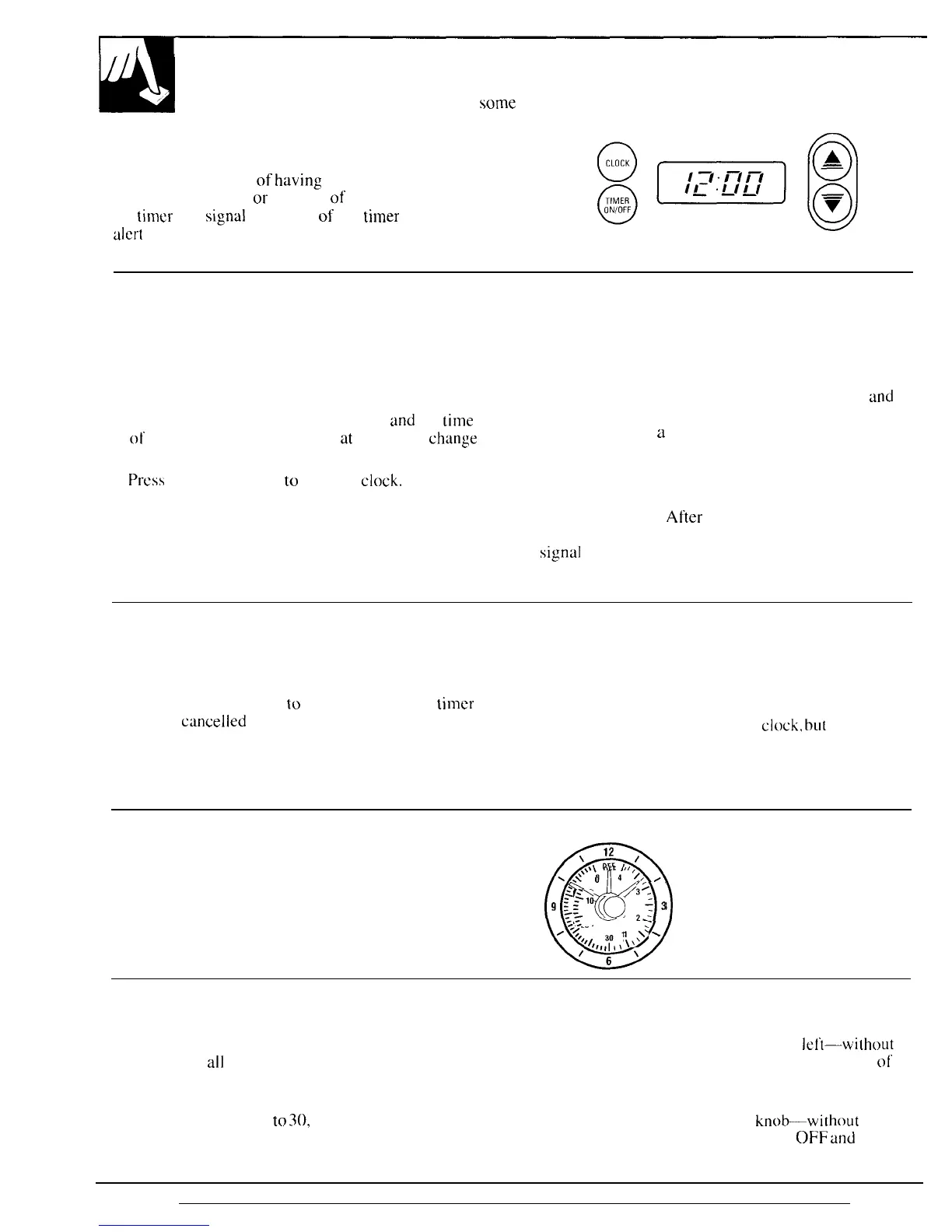
the directions below if your range has the
clock and timer shown at the right.
You have the choice
of
having
the timer show the
time counting down
or
the time of day. In either case,
$@@
the timer will
signal
at the
end
of
the
thmer
period to
alert
you that
the time is up.
(Appearance may vary)
To Set the Clock
NOTE: When you first plug in the range or after a
power failure, the entire Clock/Timer display will
light up.
1.
Press the CLOCK pad.
2. Press and hold the UP or DOWN pad
and
the
tilme
of day will change 10 minutes
at
a time. To
change
the time by single minutes, give the pads short taps.
3.
Press
the CLOCK pad
to
start the
clock.
To Set the Timer
1. Press the TIMER ON/OFF pad.
2. Use the UP and DOWN pads to set the timer.
Short taps on the UP or DOWN pad change the
timer’s setting one minute at a time. Pressing
and
continuing to hold the UP pad increases the setting
ten minutes at
a
time.
3. Once you have set your timer, press the TIMER
ON/OFF pad to start timing.
As the timer counts down, a signal will indicate when
one minute is left.
After
this signal, the display will
count down in seconds. When time runs out, a final
signal
wi II sound. Press the TIMER ON/OFF pad to
stop the signal.
To Change or Cancel the Timer Setting
To Display the Clock While the
When the timer is counting down, use the UP and
Timer Is Operating
DOWN pad to change the remaining time, or press
Pressing the CLOCK pad while the timer is operating
the TIMER ON/OFF pad
to
stop the timer. The
tilmer
will not interfere with the timer’s operation; the
cannot be
cwwelled
unless you have fully completed
display will change to show the
clock.
bul
the timer
“set timer” instructions above.
will continue to count down and will still signal when
time is up. Press the TIMER ON/OFF pad again to
change the display back to show the timer.
Clock
Follow these directions if your range has the clock
and timer shown at the right. To set tbe clock, push
in the knob and turn it to the right. Let the knob out
when the clock hands reach the correct time. Continue
turning the knob to OFF.
Q
\
12 ,
\.\\\
OFF
I
I
,
*
\.\
o
4 /, /
,
;10
(-J
::,
.-,
20
.
.
/<
~,
30
(,,1’
‘
‘/1,,,1
, \ \
/
6
Timer
The Timer has been combined with the range clock.
To set the Timer, turn the knob to the
Ieft-wilhout
Use it to time
all
your precise cooking operations.
pushing in—until the pointer reaches the number
ol’
You’ll recognize the Timer as the pointer that is minutes or hours you want to time.
different in color than the clock hands.
At the end of the set time, a buzzer sounds
Minutes are marked up
to
30,
and hours are marked
to tell you time is up. Turn the
knob-without
up to 4 on the center of the clock. pushing in—until the pointer reaches
OFF
and
the
8
buzzer stops.



 To Next Page