31
Light Bulb Replacement
1
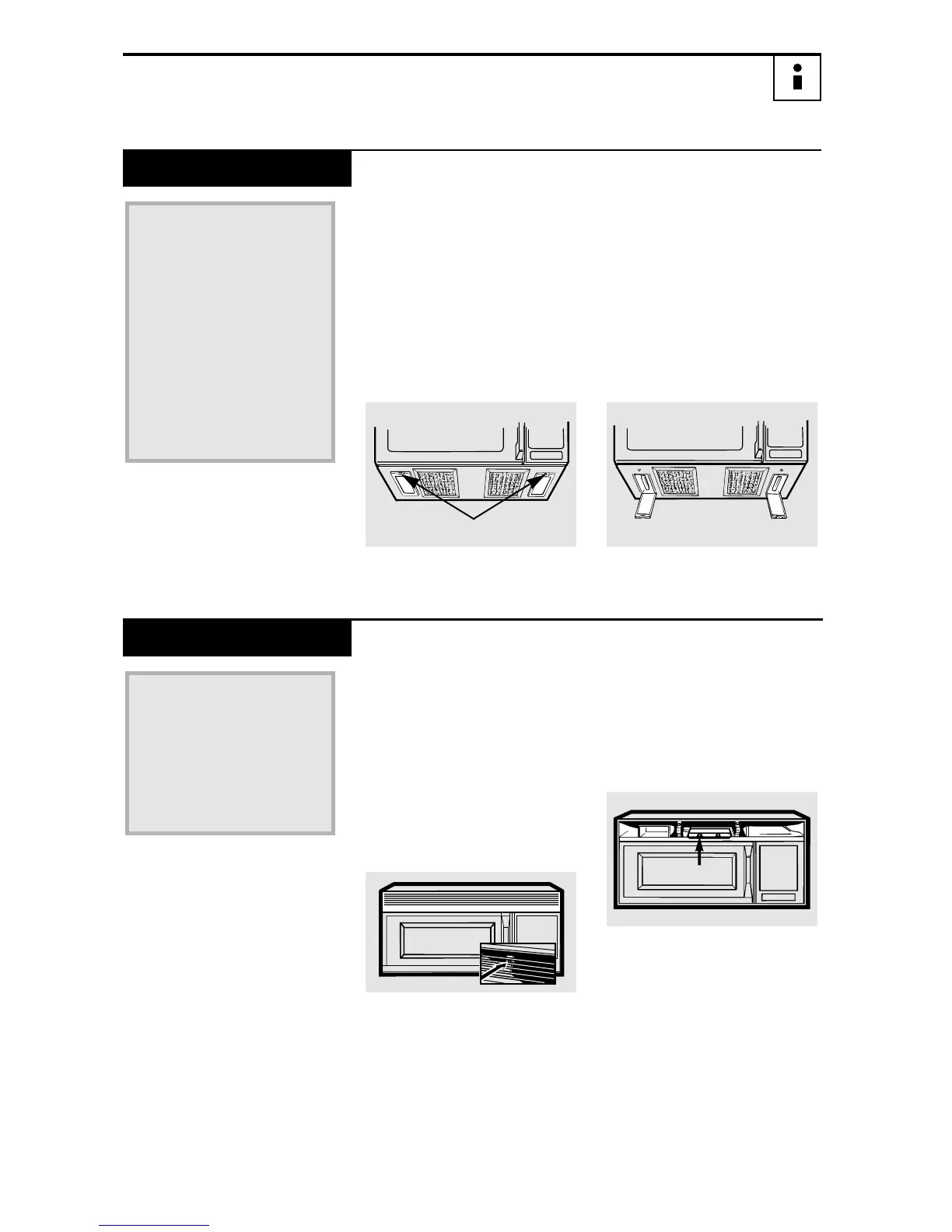
To replace the bulb(s),
first disconnect the power
at the main fuse or circuit
breaker panel or pull the
plug.
2
Remove the screw at the
front of the light cover
and lower the cover.
3
Be sure the bulb(s) to be
replaced are cool before
removing. After breaking
the adhesive seal, remove
the bulb by gently turning.
4
Replace the screw.
Connect electrical power
to the oven.
Replace with 40-watt
tubular bulbs. Order
WB36X936 from your
Hotpoint supplier.
Tubular 40-watt bulbs
(40T6
1
/
2
/
2), available in
supermarkets and
hardware stores,
may also be used
for replacements.
Cooktop Light
1
To replace the oven light,
first disconnect the power
at the main fuse or circuit
breaker panel or pull the
plug.
2
Remove the top grille by
taking out the 2 screws
that hold it in place.
3
Next, remove the screw
located above the door
near the center of the
oven that secures the
light housing.
4
Replace the screw.
Connect electrical power
to the oven.
Replace the burned-out
bulb with a 30-watt
incandescent bulb
(WB02X4235), available
from your Hotpoint
supplier.
Oven Light
REMOVE SCREWS
164D3370P038




 To Next Page