Light Bulb Replacement
incandescent bulb !
(WB36XIO003), available
froth your Hotpoin t
supplier.
1 "Ib replace tile bulb, first
discom/ect the power at
the main fl_se or cir( uit
breaker panel or pull
the t)lug.
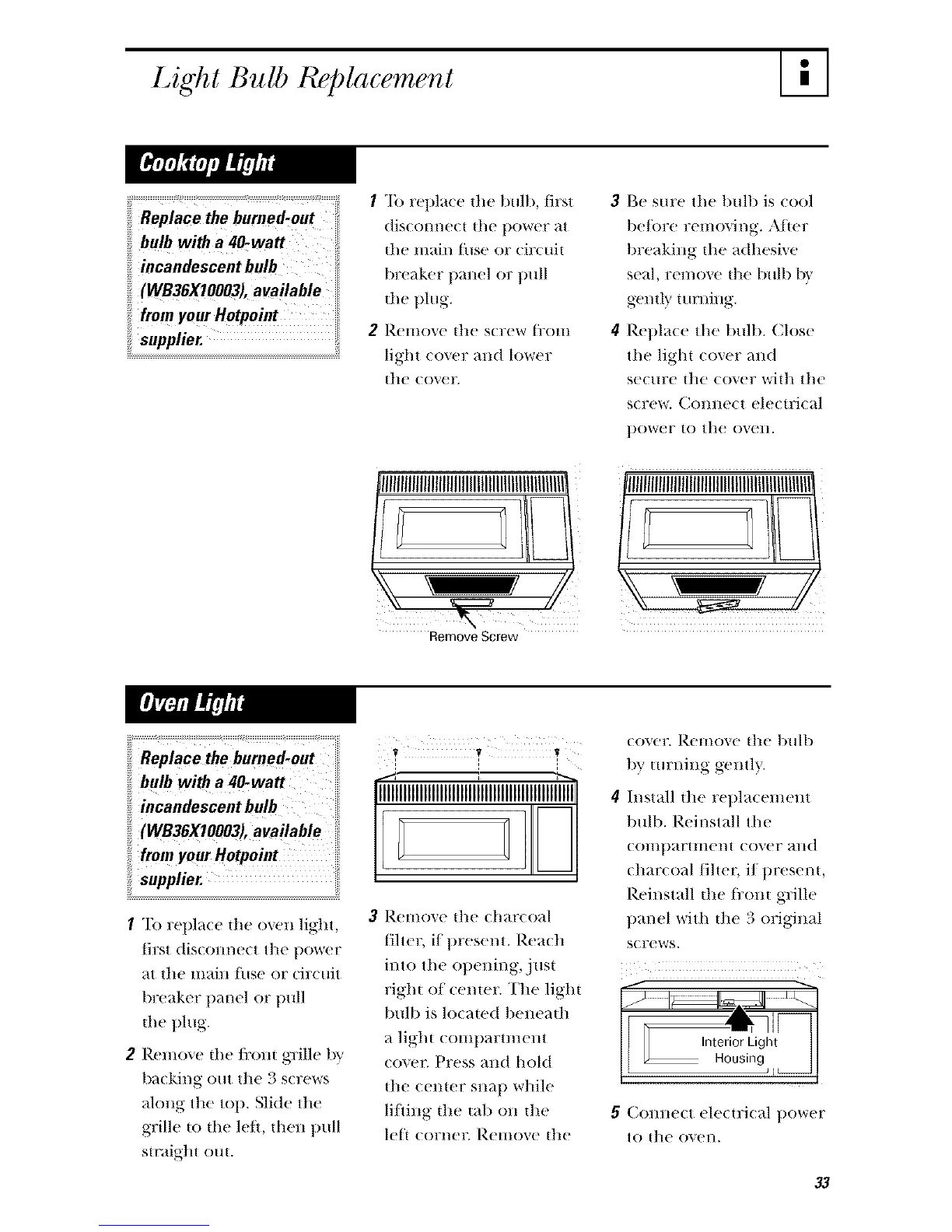
2 Remove tile s(rew tl'()lll
light cover and lower
tile eoveE
Remove Screw
3 Be sure tile bulb is cool
be/ore removing. Afer
breakil_,g the adhesive
seal, remove tile bulb 1)',
g-entl} turning.
4 Replace the bull). Close
tile light cover and
secm:e tile (over witll the
screw. Colmect electrical
power to the ovelL
NIIIIIIIIIIItlIIItlIIIIIIIIIIlilIIIIIIIIIIII/
Replace the burned-out
bulb with a 40-watt
incandescent bulb
(WB36X10003), available
from your Hotpoint
supplier.
1 "Ib repla(e dw oxen ligllt,
first dislOlll/ect tile t)ower
at tile main ttlse or (Jr( uit
breaker llanel or tlull
the t)lug.
2 Remove the fi:om grille by
balking out tile 3 screws
ahmg tile toll. Sli(te tile
grille to the lef, then pull
straigtlt out.
V I' V
l l :
3 Remove tile charcoal
filter, if present. Reacll
into tile opening, just
right of ceme_: Tile light
bulb is locawd beneath
a light comllarm_eln
c()_e_: Press and hold
tile (enter sl_ap wllile
li/ling tile tab on tile
lef corneg Remove tile
cover. Remove tile bulb
tU tm:ning geHtl}.
4+h/stall tile repla(emeln
bulb. Reinstall tile
(Omtlartmem (over and
(har(oal/iltet; i/present,
Reinstall tile I_'oIJ,t grille
panel with tile 3 original
screws.
5 COllllelt ele/trital ])()_r(?r
t() tile OVel/.
33




 To Next Page