FAILURE TO FOLLOW ANY OF THE FOLLOWING SAFETY PRECAUTIONS
CAN AND MAY LEAD TO DAMAGE TO YOUR MAVERICK, VOID YOUR
MANUFACTURER WARRANTY, LEAD TO PROPERTY DAMAGE, CAUSE
SERIOUS BODILY INJURY, AND CAN LEAD TO DEATH.
Before using your Maverick, be sure to familiarize yourself with the
operating procedures.
OPERATING YOUR MAVERICK
Make sure the Maverick is fully charged before initial use. For
charging instructions, please follow details under CHARGING YOUR
MAVERICK.
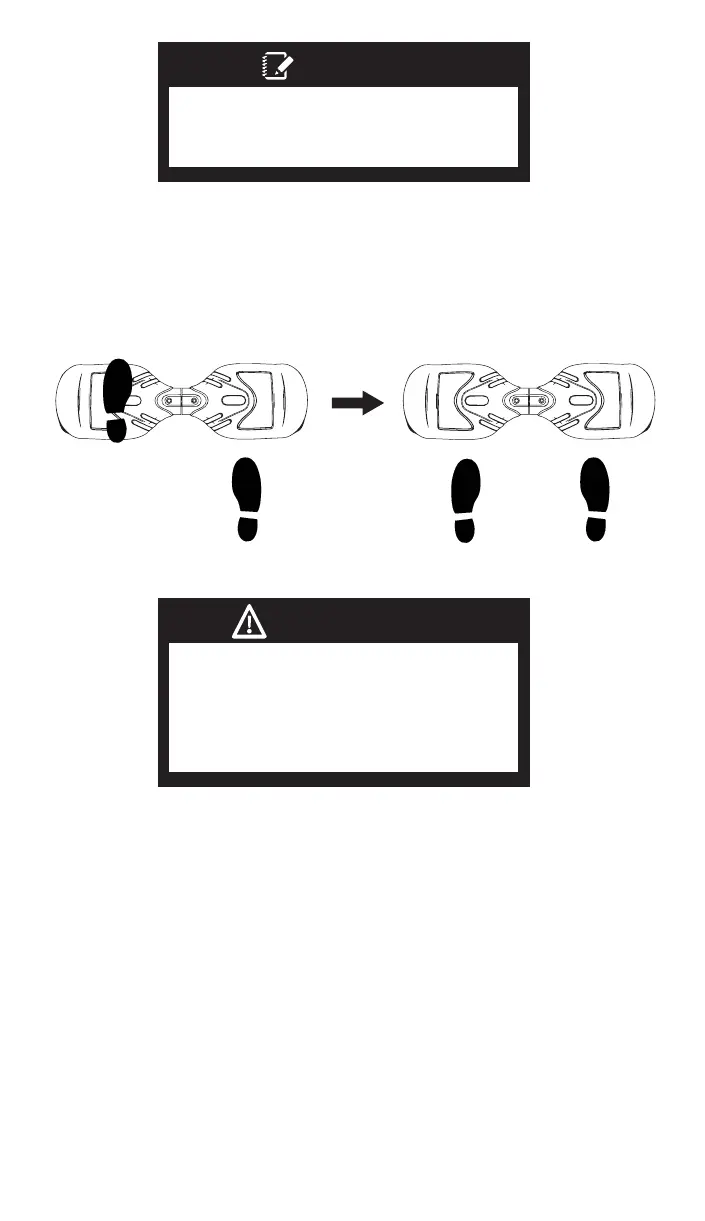
Stand directly behind your Maverick and place one foot on the
corresponding foot mat (as described in the diagram below). Keep
your weight on the foot which is still on the ground, otherwise the
Maverick may begin to move or vibrate, making it difficult to step on
evenly with your other foot. When you are ready, shift your weight to
the foot already placed on the Maverick and step on with your
second foot quickly and evenly (as described in the diagram
below).
Find your center of gravity. If your weight is distributed correctly on
the foot mats and your center of gravity is level, you should be able
to stand on your Maverick just as if you were standing on the
ground.
On average, it takes 3-5 minutes just to get comfortable standing on
your Maverick and maintaining proper balance. Having a spotter
will help you feel more secure. The Maverick is an incredibly intuitive
device; it senses even the slightest bit of motion, so having any
anxiety or reservation about stepping on may cause you to panic
and trigger unwanted movement.
When you first begin using your Maverick, the fastest way to move in
your desired direction is to focus in that direction. You will notice that
just thinking about which way you would like to go will shift your
center of gravity, and that subtle movement will propel you in that
direction.
Your center of gravity determines which direction you move,
accelerate, decelerate, and come to a complete stop. As
described in the diagram below, tilt your center of gravity in the
direction you wish to move.
To turn, focus on the direction you wish to turn and stay relaxed.
As you get comfortable on the Maverick, you will notice it becomes
easier to maneuver. Remember at higher speeds, it is necessary to
shift your weight to overcome the centrifugal force.
Bend your knees if you encounter bumps or uneven surfaces, then
dismount and carry your Maverick to a safe operating surface.
Dismounting your Maverick can be one of the easiest steps, yet
when done incorrectly, may cause you to fall. To properly dismount,
from a stopped position, lift one leg up and set your foot back down
on the ground (STEPPING BACK). Then step off completely as
described in the following diagram.
WEIGHT AND SPEED LIMITATIONS
Speed and weight limits are set for your own safety. Please do not
exceed the limits listed here in the manual.
• Maximum Weight: 160 lbs
• Minimum Weight: 44 lbs
• Maximum Speed: Up to 7 mph
OPERATING RANGE
The Maverick can travel a distance up to 3 miles on a fully charged
battery in ideal conditions. The following are some of the major
factors that will affect the operating range of your Maverick.
• Terrain: Riding distance is highest when riding on a smooth, flat
surface. Riding uphill and/or on rough terrain will reduce distance
significantly.
• Weight: A lighter user will have further range than a heavier user.
• Ambient temperature: Please ride and store the Maverick under
recommended temperatures, which will increase riding distance,
battery life, and overall performance of your Maverick.
• Speed and Riding Style: Maintaining a moderate and consistent
speed while riding produces maximum distance. Traveling at high
speeds for extended periods, frequent starts and stops, idling and
frequent acceleration or deceleration will decrease overall
distance.
If your Maverick is unbalanced, vibrating, or not turning properly,
you can follow the below steps to calibrate it.
• First, place the Maverick on a flat, horizontal surface such as the
floor or a table. The foot mats should be even with each other and
not tilted forward or backward.Make sure the charger is not
plugged in and the board is turned off.
• Press and hold the ON/OFF button for a total of 15 seconds. The
scooter will turn on, lighting the battery indicator on the board.
• After the light flashes 5 times consecutively you may release the
ON/OFF button.
• Turn the board off and then turn the board back on. Calibration
will now be completed.
14
WARNING
Make sure to lift your feet completely off
the foot mat to clear the Maverick
when stepping back to dismount.
Failure to do so may send the Maverick
into a tailspin.
Try staying relaxed and focus on finding
your center of gravity to maintain full
control of your Maverick.
NOTES:


 To Next Page
 Loading...