MODEL 645553
OPERATING INSTRUCTIONS
BUTTON FUNCTIONS
Normal Time Mode: Press to change to Alarm Mode
[MODE] All Modes: Press to change to Normal ‘Time Mode.
[TIMER] Press to change the display to Countdown Timer Mode.
[SET] Press to enter setting modes and to select items for setting.
Normal Time Mode: Press to change to 12-hour
or
24-hour
time display format.
[UP] Set Mode: Press to increase values.
Alarm Mode: Press to activate and deactivate the alarm and
snooze
functions.
Normal ‘Time Mode: Press to change temperature
display to degrees Fahrenheit (F)
or
Celsius (C).
[DOWN] Set Mode: Press to decrease values.
Alarm Mode: Press to activate and deactivate the alarm
and
snooze
functions.
‘In the Normal Time Mode the clock will display the current time, month, date, day
of the week and temperature. "TIME" will appear in the top of the display.
STARTING
1. Remove the plastic insulator extending out of the battery
cover
on
the back of
the clock.
2. The alarm melody will play when the batteries
are
first installed
or
activated.
Press any button to silence the alarm.
TIME and DATE SETTING
1. In the Normal TIME Mode Press the [SET] button to enter the setting mode.
‘‘TIME’‘ and the hour will flash in the display.
2. The setting sequence is: Hour
>
Minutes
>
Year
>
Month
>
Date
>
Exit. Use
the [SET] button to advance through the settings and
use
the [UP] and
[DOWN] buttons to make adjustments. Press and hold the buttons for fast
setting.
ALARM SETTING
1. Press the [MODE] button to enter the Alarm Mode. A bell icon will apear in the
display.
2. The setting sequence is: Hour
>
Minutes
>
Snooze Minutes (1-60 minutes)
>
Alarm Melody
>
Exit. Use the [SET] button to advance through the settings and
use
the [UP] and [down] buttons to make adjustments.
3 When finished, press the [MODE] button to return to the TIME mode.
USING THE ALARM
1. Press the [MODE] button to enter the Alarm Mode.
2. Press the [UP] and [DOWN] buttons to activate the alarm function.
3. When the alarm is on, the alarm, icon, (((-I))
,
will appear in the display.
4. The alarm will sound at the set alann time each day for
one
minute. Press any
button to silence the alarm before then.

 Need help?
 General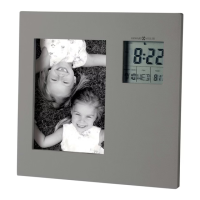

 To Next Page