6
Adjust your settings
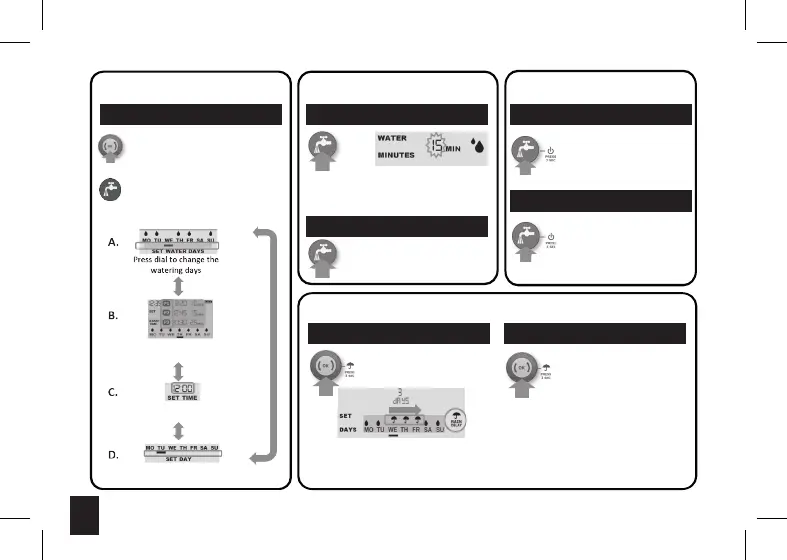
1 : To adjust your settings
After you have set up your timer you might
need to make changes. Press the dial (short
press). Rotate the dial left or right and press
to select the settings you want to change.
There are four sections to the menu (see
A – D below).
You can press the Water Now button to quit
making changes to your settings.
To Water Now Turn OFF the timer
Set a RAIN DELAY
1 : Press the Water Now button
2 : To CANCEL a Water Now
1 : Turn the timer OFF
2 : Turn the timer ON
1 : Set a RAIN DELAY (pause) 2 : Cancel a RAIN DELAY
Press the Water Now button once (short press).
Adjust the minutes (1 -199 mins) and press dial to
confirm. If you do not confirm the time it will quit
out after 10 sec.
Press the Water Now button or the
dial (short press) to cancel watering
at any time.
Hold down the button for 3 sec to
turn off the timer. All watering will
stop and “OFF” will appear on the
screen. Note: You can perform A
Water Now when the timer is OFF.
Hold down the button for 3 sec to
turn the timer back on again.
All your set programs are stored in
the timers memory and will continue
to run again.
Hold down the dial for 3 seconds.
You can now set the number of
days to pause watering (max 7
days).
Rotate the dial clockwise to increase the length of
the Rain Delay. Days with no watering are shown
with an umbrella symbol above them. The Rain
Delay Icon appears on the right when a Rain Delay is
active. Press the dial to confirm your delay.
Hold down the dial for 3 seconds
then rotate the dial to “OFF”.
Press the dial to confirm.
The Rain Delay has been cancelled. Any programs
that you have set up will continue to run
automatically.
Note: The current day will always be the first day
(Day 1) when setting a Rain Delay. Any programs
due to start later on the same current day will be
cancelled.
Press dial to change the Start
Times and Durations
Press dial to change the
Clock time
Press dial to change the
current day of the week







 To Next Page