5
Set up – first use
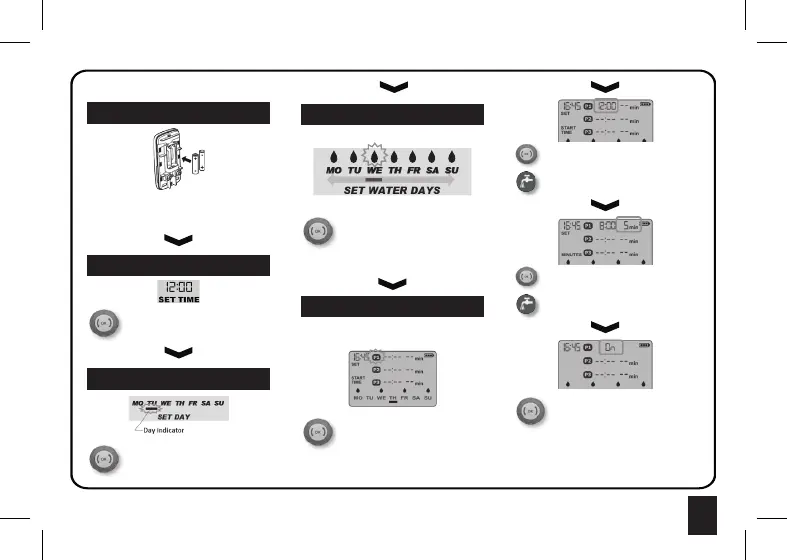
Remove the front panel and Insert 2x AA 1.5V (LR6)
batteries. Only use Alkaline or Lithium type batteries.
Push the panel back onto the valve. The valve will
rotate to the closed position.
Press to set the clock time. Rotate the
dial and press to confirm the hours and
minutes. Clock is 24hr format.
1 : Insert Batteries
2 : Set the clock
3 : Set today’s day
Rotate the dial until the indicator line is
underneath the current day of the week.
Press the dial to confirm.
You must now chose the days that you want to water.
Rotate the dial and press to toggle
watering days on and off. A small droplet
will appear over the days that watering
will occur.
Rotate dial slowly to the right to finish setting the
watering days.
4 : Choose watering days
5 : Set the START TIMES
You must now set the Start Time and Duration for
each watering event. There are 3 start times called
P1, P2 and P3.
The first Start Time P1 will start to flash
on the screen.
Press the dial to begin.
Note: If you do not want to use all three
start times you can skip past them when the icons
are flashing.
Rotate the dial to adjust the hour and
minutes. Press the dial to confirm
them.
Use the Water Now button to go back a
step if you make a mistake.
Rotate the dial to adjust the watering
duration (1 -199mins). Press the dial
to confirm.
Use the Water Now button to go back a
step if you make an error.
Next choose to turn this Start Time
ON or OFF. Only the programs that are
turned ON will open the valve at the set
time of day.
Repeat for P2 and P3.
Note: The timer will rearrange the programs into
chronological order after you have completed
programming. Programs that have not been set will
appear as OFF.







 To Next Page