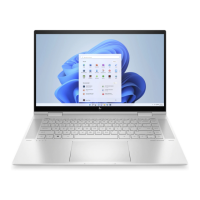
This document is a Maintenance and Service Guide for the HP ENVY x360 15.6 inch 2-in-1 Laptop PC, with model numbers 15-ew0XXX and 15t-ew0xxx. It provides comprehensive information on product components, specifications, removal and replacement procedures for parts, security features, and maintenance guidelines.
Function Description:
The HP ENVY x360 15.6 inch 2-in-1 Laptop PC is a versatile computing device designed for various uses, including productivity, entertainment, and creative tasks. Its 2-in-1 design allows it to function as both a laptop and a tablet, offering flexibility in usage modes. The device supports an optional HP (Zenvo) digital pen for enhanced interaction and creative input. It features a comprehensive set of ports for connectivity, including USB Type-C with Thunderbolt™ support, HDMI, and USB SuperSpeed. The integrated HP True Vision Camera with a sliding shutter provides privacy and supports video chat, recording, and facial recognition logon. Dual-array microphones with beam-forming and noise-suppression software enhance audio quality for communication. The laptop also includes HP Hubs Launcher for quick access to HP applications like HP Command Center, OMEN Gaming Hub, myHP, and HP Palette, catering to system control, gaming customization, and creative tools.
Important Technical Specifications:
- Processors: Intel™ Core® i7-1260P (12 cores, 18 MB Smart Cache, 28 W), Intel Core i7-1255U (10 cores, 12 MB Smart Cache, 15 W), Intel Core i5-1240P (12 cores, 12 MB Smart Cache, 28 W), Intel Core i5-1235U (10 cores, 12 MB Smart Cache, 15 W).
- Chipset: Intel integrated solder-on-circuit (SoC).
- Display:
- 39.6 cm (15.6 in) QHD (2560 x 1440) LCD, LBL, antiglare, UWVA, sRGB, 100% CG, eDP 1.4 + PSR 2, bent, TOP, narrow bezel; typical brightness: 300 nits.
- 39.6 cm (15.6 in) FHD (1920 × 1080) OLED + LBL, brightview, UWVA, DCI-P3, 100% CG, eDP 1.4 + PSR 2, bent, TOP, narrow bezel; typical brightness: 400 nits.
- 39.6 cm (15.6 in) FHD (1920 × 1080) WLED, antiglare, UWVA, sRGB, 100% CG, eDP 1.4 + PSR 2, LP, bent, TOP, narrow bezel; typical brightness: 400 nits.
- 39.6 cm (15.6 in) FHD (1920 × 1080) WLED, antiglare, UWVA, 45% CG, eDP 1.2 without PSR, bent, TOP, narrow bezel; typical brightness: 250 nits.
- Graphics Controller: Intel Iris® Xe.
- Memory: Two customer-accessible SODIMM slots, supporting up to 16 GB DDR4-3200 RAM (configurations: 16 GB (8x2), 12 GB (8x1+4x1), 8 GB (4x2)).
- Storage: Solid-state drives (2280 PCIe NVMe) ranging from 256 GB to 1 TB, with options for TLC, value, and Secure Seal (SS) types.
- Audio: BANG and OLUFSEN brand, dual speakers, HP Audio Boost 2.0, support for Alexa, Far Field Cortana, Speaker Swap, and XiaoWei.
- Wireless: Intel AX211 Wi-Fi® 6e + Bluetooth® 5.2 M.2 2230 160 MHz CNVi WW WLAN, or Mediatek MT7921 Wi-Fi 6 + Bluetooth 5.2 M.2 2230 PCI-e + USB WW WLAN module.
- Ports: Audio-out/Audio-in combo jack, HDMI, Smart card reader, USB SuperSpeed 10 Gbps (with/without HP Sleep and Charge), USB Type-C power connector with SuperSpeed 10 Gbps, HP Sleep and Charge, and DisplayPort output (2), USB Type-C power connector with Thunderbolt™ ports, HP Sleep and Charge, and DisplayPort™ output (2).
- Battery: 3 cell, 51 Whr, polymer, HP Long Life, with HP Fast Charge Technology.
- AC Adapter: 90 W or 65 W USB Type-C straight barrel.
- Sensors: Accelerometer (x2), Ambient light sensor, Gyroscope/E-compass/Accelerometer + Magnetometer, Infrared thermal sensor, Sensor hub.
- Dimensions: Width 35.9 cm (14.13 in), Depth 22.9 cm (9.02 in), Height 1.86 cm (0.73 in).
- Weight: 1784 g (3.9 lb) for non-OLED, 1669 g (3.7 lb) for OLED.
- Operating System: Windows® 11 Home 64 (various regional versions) or Windows 11 Pro 64.
Usage Features:
- 2-in-1 Design: Allows for flexible use as a laptop, stand, tent, or tablet.
- Touchpad: Features a clickpad with image sensor, multitouch gestures, and Precision touchpad support. Taps are enabled by default.
- Low Blue Light Mode: Shipped from the factory in low blue light mode for improved eye comfort and safety, automatically adjusting emissions at night or for reading.
- Wake-on-Touch: Quickly brings the computer out of Sleep state by double-tapping the touchscreen (available in stand, tent, and tablet modes, not in clamshell or Hibernation).
- Special Keys: Includes an
esc key for system information (with fn), fn key for specific functions, Windows key, action keys (f1-f12), camera privacy key, and power button.
- HP Hubs Launcher: Accessible via f12, provides quick access to HP Command Center, OMEN Gaming Hub (for system control and GlamCam), myHP, and HP Palette.
- Memory Card Reader: Supports multiformat digital media cards for storing, managing, sharing, and accessing information.
- BIOS/UEFI: Computer Setup (BIOS) controls system devices, startup sequence, and memory. HP PC Hardware Diagnostics (Windows and UEFI versions) allow for hardware testing and troubleshooting. HP Sure Start monitors and restores BIOS from attacks or corruption. TPM BIOS settings enhance security.
- Recovery Tools: Windows tools for backup and restore, HP Cloud Recovery Download Tool for creating recovery media, and HP Sure Recover for OS recovery.
Maintenance Features:
- Component Replacement Procedures: Detailed instructions for authorized service providers on removing and replacing parts such as the bottom cover, battery, solid-state drive, memory modules, WLAN module, infrared cable, system fan, display assembly (including subcomponents like display panel, hinges, webcam/microphone module, and wireless antenna), heat sink, system board, speakers, touchpad cable, and touchpad.
- Tools Required: Nonconductive pry tool, Phillips P0 and P1 screwdrivers, suction cups, Torx5 screwdriver, and tweezers.
- Service Considerations: Emphasizes careful handling of plastic parts, cables, and connectors to prevent damage.
- Electrostatic Discharge (ESD) Information: Provides guidelines for preventing ESD damage, including personal grounding methods (wrist straps, heel straps) and recommended materials/equipment (antistatic tape, smocks, bins, foam, workstations, field service kits).
- Cleaning Guidelines: Instructions for safely cleaning external surfaces, including enabling HP Easy Clean to disable input during cleaning. Recommends using disposable gloves, microfiber cloths, and a 70% isopropyl alcohol solution for disinfection. Advises against abrasive cloths, sprays, and certain chemicals.
- Wood Veneer Care: Specific instructions for products with wood veneer, recommending dry static-free microfiber cloth and avoiding certain cleaning products, prolonged sun/moisture exposure, and sharp objects.
- Nonvolatile Memory Management: Information on memory volatility and steps to restore BIOS settings to factory defaults and securely erase data from drives using Disk Sanitizer or Secure Erase.
- Power Cord Requirements: Specifies power cord length, current capacity, voltage rating, and appliance coupler type, with country-specific requirements.
- Recycling Information: Guidance on proper disposal of batteries and electronic hardware, directing users to local laws and HP's recycling website.

 Need help?





 To Next Page
 General