- 14 -
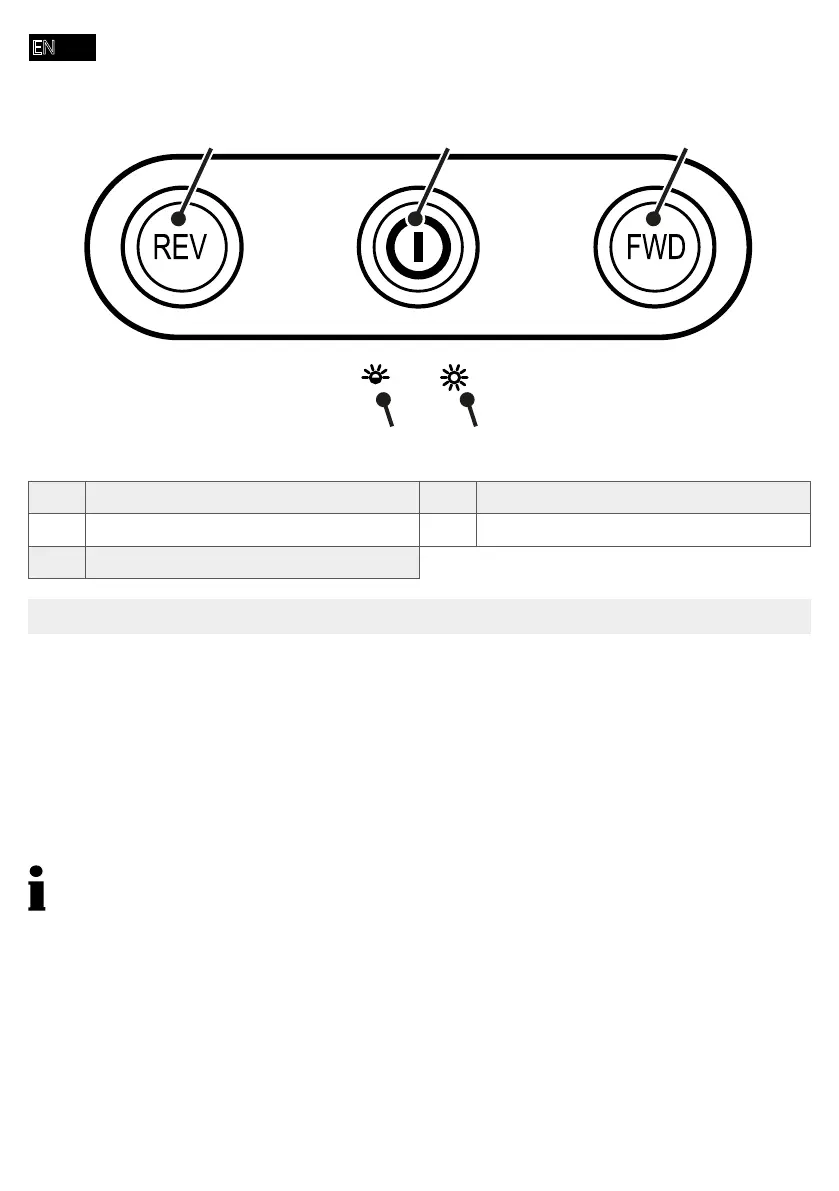
overload-red ashing
overheat-red on
stand by-blue on
1 Reverse running 4 Overheating
2 button 5 Overloading
3 Forward running
Positioning the Shredder and Starting It Up
near any sources of heat and maintain a distance of at least 10 cm to walls. This ensures the
1 Set the shredder down on a stable, level, horizontal surface and in the vicinity of an easily
accessible power socket.
2 Mount the shredder attachment on the waste bin. The shredder attachment latches audibly in
be switched on.
Only use the power cable supplied.
3 Connect the power cable to the device.
4 Connect the power plug to a power socket.
5 Switch the device on by pressing the button.
Î The status indicator lights up blue.
Î You have put the shredder into operation.



 To Next Page