EasyManua.ls Logo

HP 3335A - System Operation and Environment; HP-IB System Description; Operating Environment and Cooling; Installation for Bench or Rack Mounting

HP 3335A
38 pages
Print Icon
To Next Page IconTo Next Page
To Previous Page IconTo Previous Page
Loading...
Mode!
3335A
designated
(5...
1)which
are
used
to
select
the
listen
address.
Instructions
for
changing
the
listen
address
are
provided
in
Section
III
of
this
manual
along
with
3335A
programming
codes.
2-17.
HP-IB
Descriptions.
2-18.
A
description
of
the
HP-IB
is
provided
in
Section
IH
of
this
manual.
A
study
of
this
information
is
necessary
if
you
are
not
familiar
with
the
HP-IB
concept.
Additional
information
concerning
the
design
criteria
and
operation
of
the
bus
is
available
in
IEEE
Standard
488-1975
titled
“IEEE
Standard
Digital
Interface
for
Programmable
Instru-
mentation”.
2-19,
OPERATING
ENVIRONMENT.
WARNING
§
To
prevent
potential
electrical
or
fire
hazard,
do
not
expose
equipment
to
rain
or
moisture.
2-20.
Operating
and
Storage
Temperature.
2-21.
In
order
for
the
3335A
to
meet
the
specifications
listed
in
Table
1-1,
the
operating
environment
must
be
within
the
following
limits:
Temperature.
4.4
eae
ed
es
0
to
+
55°C
Humidity.
aaau
oe
cee
eae
oo
<
85%
relative
Altitude.,
wo
we
Sodreth
aes
ltacs
<
15,000
feet
2-22.
Cooling
System.
2-23.
A
forced
air
cooling
system
is
used
to
maintain
the
operating
temperature
required
by
the
instrument.
The
cooling
fan
is
located
on
the
right
side
of
the
instrument
drawing
air
through
the
filtered
side
panel.
When
operating
the
instrument,
choose
a
location
that
provides
at
least
three
inches
of
clearance
at
the
rear
and
at
least
one
inch
for
each
side.
Failure
to
provide
adequate
air
clearance
will
result
in
excessive
internal
temperature
reducing
instrument
reliability.
The
clearances
provided
by
the
plastic
feet
in
bench
stacking
and
the
filler
strip
in
rack
mounting
allow
air
passage
across
the
top
and
bottom
cabinet
surfaces.
NOTE
Rack
Mount
side
slide
assemblies
cannot
be
used
with
the
3335A.
These
assemblies
block
air
passage
to
the
fan
and
will
cause
overheat-
ing.
2-24.
Thermal
Cuteut
Switch.
2-25.
The
3335A
is
equipped
with
a
thermal
cutout
switch
which
automatically
removes
line
voltage
when
the
internal
temperature
becomes
excessive.
The
switch
resets
auto-
Section
I]
matically
when
the
instrument
cools.
If
a
thermal
cutout
occurs,
check
for
an
inoperative
fan,
clogged
fan
parts
or
filter
and
other
conditions
that
could
obstruct
air
flow.
To
clean
the
fan
filter,
the
side
panel/filter
assembly
must
be
removed.
Flush
the
filter
with
soapy
water,
rinse
clean
and
air
dry.
2-26,
Bench
Operation.
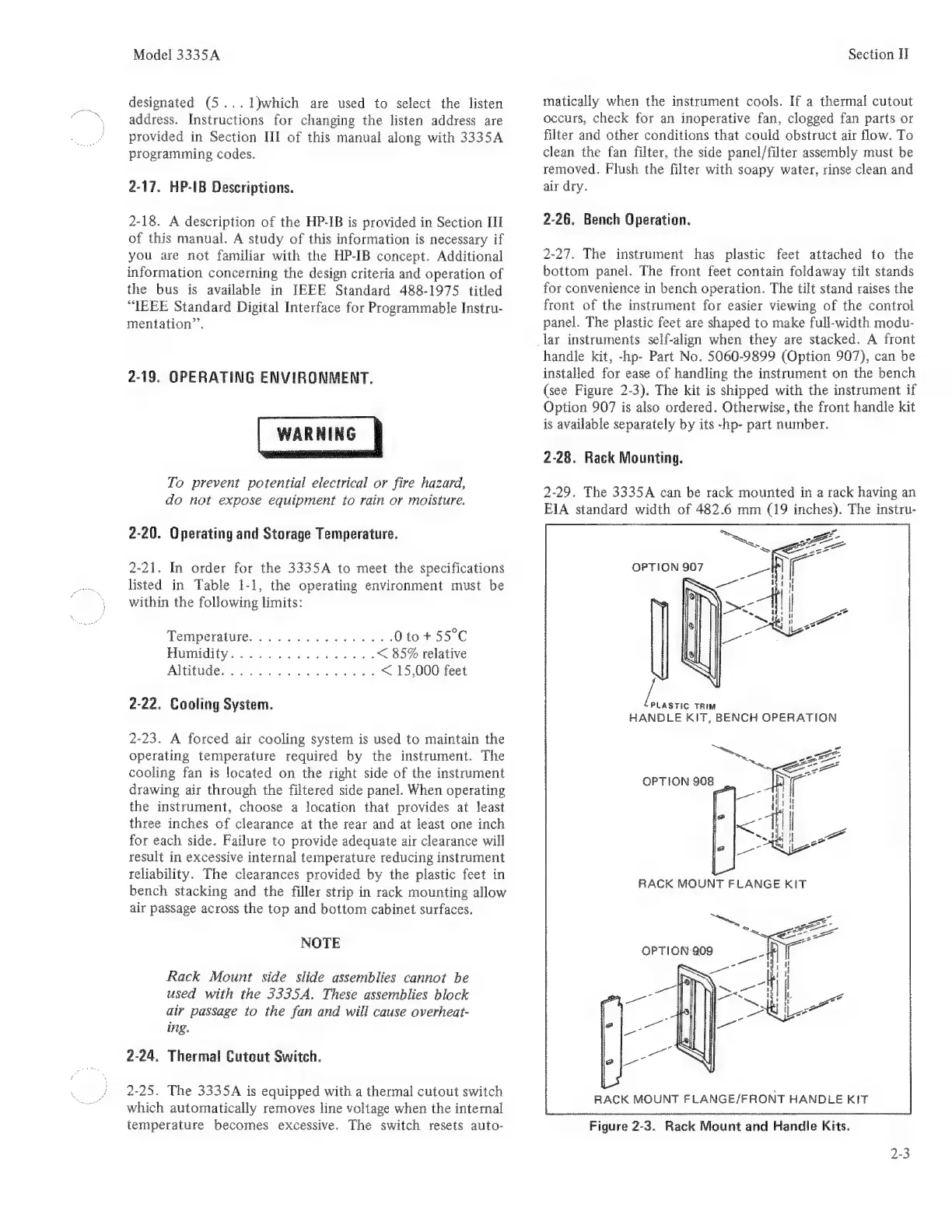
2-27.
The
instrument
has
plastic
feet
attached
to
the
bottom
panel.
The
front
feet
contain
foldaway
tilt
stands
for
convenience
in
bench
operation.
The
tilt
stand
raises
the
front
of
the
instrument
for
easier
viewing
of
the
control
panel.
The
plastic
feet
are
shaped
to
make
full-width
modu-
lar
instruments
self-align
when
they
are
stacked.
A
front
handle
kit,
-hp-
Part
No.
5060-9899
(Option
907),
can
be
installed
for
ease
of
handling
the
instrument
on
the
bench
(see
Figure
2-3).
The
kit
is
shipped
with
the
instrument
if
Option
907
is
also
ordered.
Otherwise,
the
front
handle
kit
is
available
separately
by
its
-hp-
part
number.
2-28.
Rack
Mounting.
2-29,
The
3335A
can
be
rack
mounted
in
a
rack
having
an
EIA
standard
width
of
482.6
mm
(19
inches).
The
instru-
a
TRIM
HANDLE
KIT,
BENCH
OPERATION
bee
sA
OPTION
908
RACK
MOUNT
FLANGE/FRONT
HANDLE
KIT
Figure
2-3.
Rack
Mount
and
Handle
Kits.
2-3

Related product manuals