EasyManua.ls Logo

HP 3335A - Front Panel Controls (Continued); Increment (INCR) Keys; Frequency Control Keys

HP 3335A
38 pages
Print Icon
To Next Page IconTo Next Page
To Previous Page IconTo Previous Page
Loading...
Model
3335A
e,%,7%,¢
Poeg?
Gd
%
Se
&
9,0
osteta
eces
AC
Line
input
Connector.
AC
Line
Fuse.
Line
Voltage
Selection
Switches.
Used
to
sefect
the
ac
line
input
for
the
voltage
of
the
power
source,
HP-IB
Connector.
Used
to
interface
the
instrument
with
the
HP-!B
for
remote
operation.
HP-iB
Listen
Address
Selection
Switches.
Used
to
set
the
instrument
listen
address.
10
MHz
OUTPUT
Connector.
Provides
a
10
MHz
external
reference
signal
generated
by
the
instrument’s
reference
section,
©
®
®
®@®&
40/N
MHz
REF
INPUT
Connector.
Provides
the
input
to
the
reference
section
sampling
detector
to
phase-iock
the
master
oscillator.
The
notation
40/N
MHz
means
this
input
must
be
a
subharmonic
of
40
MHz,
The
input
can
be
the
in-
®©
Option
002/004:
Front
Panel.
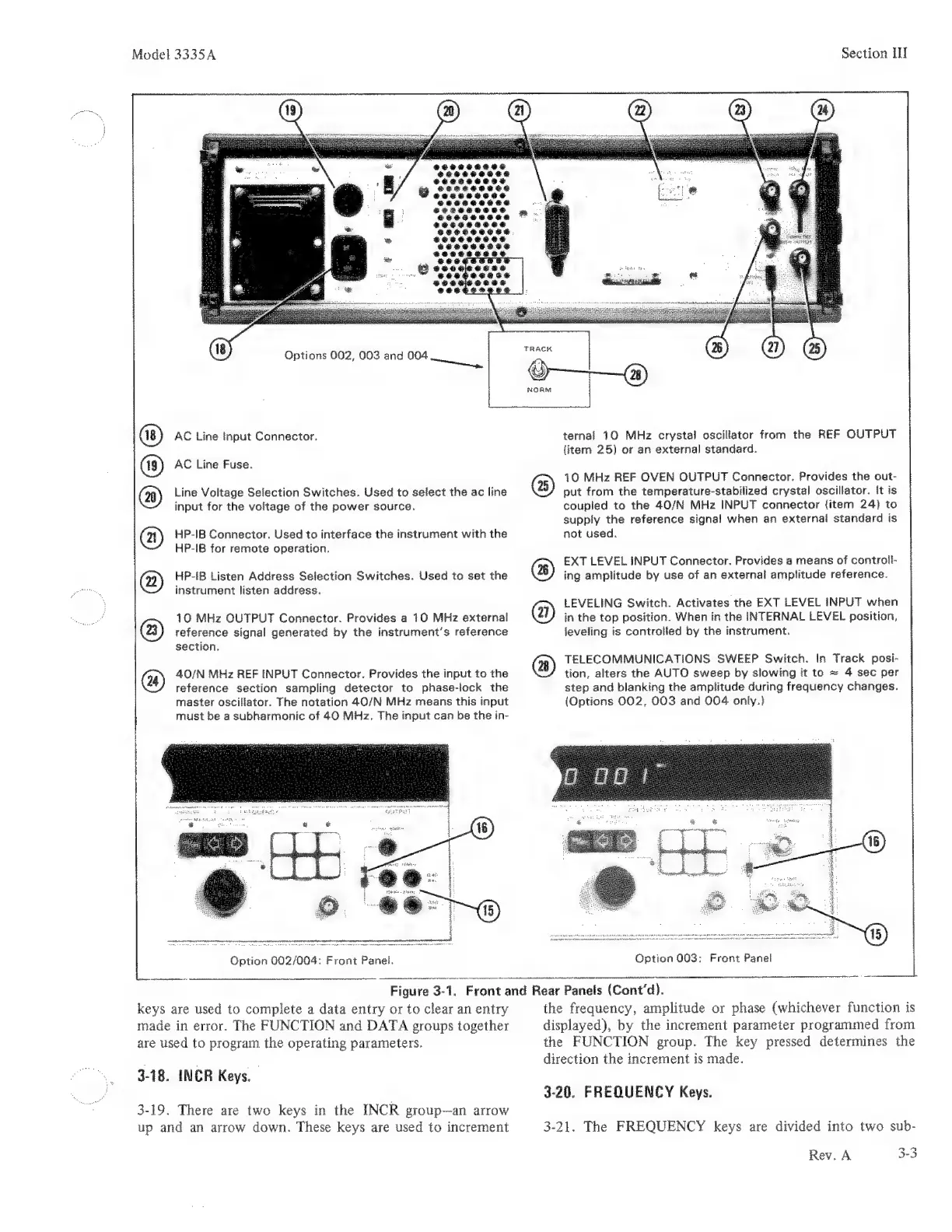
Figure
3-1.
Front
and
Rear
Panels
(Cont'd).
keys
are
used
to
complete
a
data
entry
or
to
clear
an
entry
made
in
error.
The
FUNCTION
and
DATA
groups
together
are
used
to
program
the
operating
parameters.
3-18.
INCR
Keys.
3-19.
There
are
two
keys
in
the
INCR
group—an
arrow
up
and
an
arrow
down.
These
keys
are
used
to
increment
©
©
®
Section
IH
ternal
10
MHz
crystal
oscillator
from
the
REF
OUTPUT
item
25)
or
an
external
standard.
©
10
MHz
REF
OVEN
OUTPUT
Connector.
Provides
the
out-
put
from
the
temperature-stabilized
crystal
oscillator.
it
is
coupled
to
the
40/N
MHz
INPUT
connector
{item
24}
to
supply
the
reference
signal
when
an
external
standard
is
not
used.
EXT
LEVEL
INPUT
Connector.
Provides
a
means
of
controli-
ing
amplitude
by
use
of
an
external
amplitude
reference.
LEVELING
Switch.
Activates
the
EXT
LEVEL
INPUT
when
in
the
top
position.
When
in
the
INTERNAL
LEVEL
position,
leveling
is
controlied
by
the
instrument.
TELECOMMUNICATIONS
SWEEP
Switch.
In
Track
posi-
tion,
alters
the
AUTO
sweep
by
slowing
it
to
~
4
sec
per
step
and
blanking
the
amplitude
during
frequency
changes.
(Options
002,
003
and
004
only.)
Option
003:
the
frequency,
amplitude
or
phase
(whichever
function
is
displayed),
by
the
increment
parameter
programmed
from
the
FUNCTION
group.
The
key
pressed
determines
the
direction
the
increment
is
made.
3-20.
FREQUENCY
Keys.
3-21.
The
FREQUENCY
keys
are
divided
into
two
sub-
Rev.
A
3-3

Related product manuals