EasyManua.ls Logo

HP 3335A - HP-IB Addressing and Control; Addressing to Listen and Listener Function; Changing and Unaddressing Listen Address

HP 3335A
38 pages
Print Icon
To Next Page IconTo Next Page
To Previous Page IconTo Previous Page
Loading...
Model
3335A
REMOTE
mode
of
operation,
it
can
be
unaddressed,
and
it
will
remain
in
REMOTE
operation
until
the
REN
line
is
released
or
the
LOCAL
key
is
pressed.
3.73.When
the
REN
line
is
low
and
the
3335A
is
addressed,
the
instrument
goes
into
the
REMOTE
mode
and
the
following
things
take
place.
a.
The
front
panel
REMOTE
annunciator
lights.
b.
The
front
panel
controls
(ex.ept
POWER
and
the
impedance
switch)
are
disabled.
When
addressed
to
listen,
the
3335A
will
accept
REMOTE
instructions.
c.
The
output
parameters
established
by
keyboard
con-
trol
in
the
LOCAL
mode
are
retained
in
the
REMOTE
mode
until
remotely
changed.
3-74.
When
the
HP-IB
system
controller
releases
the
REN
line,
the
following
things
take
place:
a.
The
front
panel
REMOTE
annunciator
goes
out
and
the
3335A
output
parameters
remain
as
last
programmed
in
the
REMOTE
mode
of
operation.
b.
The
3335A
will
no
longer
respond
to
remote
instruc-
.
tions.
It
will
respond
to
its
listen
address
and
the
unlisten
command.
3-75.
Addressing
to
Listen.
All
instruments
using
the
HP-1B.
share
a
common
set
of
data
and
control
lines
because
they
are
connected
in
parallel.
Since
the
system
controller
must
be
able
to
communicate
with
individual
instruments
on
the
bus,
each
instrument
is
given
a
unique
address.
The
address
is
a
7-bit
ASCII
character
(byte)
which
a
given
instrument
recognizes
and
responds
to.
3-76.
When
addressing
instruments,
the
system
controller
pulls
the
ATN
line
low
to
get
the
attention
of
all
instru-
ments
on
the
bus.
It
then
gives
the
ASCU
coded
address
for
one
of
the
instruments
on
the
bus.
When
the
addressed
instrument
acknowledges
receipt
of
the
address
by
the
“handshake”
sequence,
the
controller
clears
the
address
code
and
addresses
another
instrument
if
more
than
one
is
to
receive
the
same
data.
When
the
last
addressed
instru-
ment
acknowledges
receipt
of
its
address,
the
controller
releases
the
ATN
line
and
clears
the
last
address
code.
With
the
ATN
line
released,
the
HP-IB
is
in
the
data
mode.
The
addressed
instruments
respond
by
accepting
data
placed
on
the
bus
using
the
“handshake”
sequence.
This
data
programs
the
functions
of
the
instruments.
3-77.
The
3335A
functions
only
as
a
listener
on
the
HP-IB.
It
accepts
instructions
from
the
controller
and
responds
by
establishing
the
output
parameters
programmed.
The
3335A
can
be
addressed
(or
unaddressed)
in
either
the
LOCAL
or
REMOTE
control
mode.
Note
that
the
3335A
will
not
go
to
Remote
unless
it is
addressed
to
listen
and
the
REN
line
is
low.
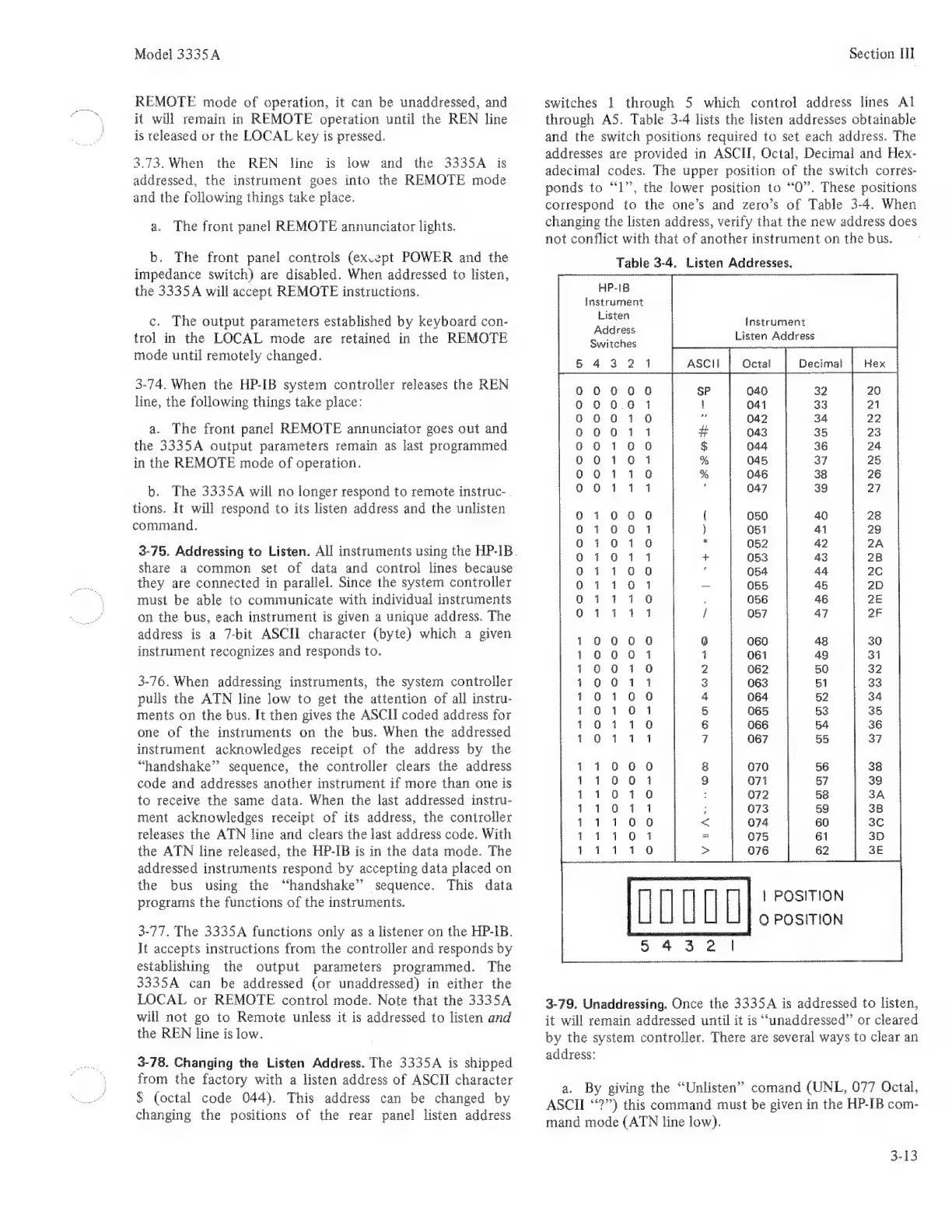
3-78.
Changing
the
Listen
Address.
The
3335A
is
shipped
from
the
factory
with
a
listen
address
of
ASCII
character
$
(octal
code
044).
This
address
can
be
changed
by
changing
the
positions
of
the
rear
panel
listen
address
Section
HI
switches
1
through
5
which
control
address
lines
Al
through
A5,
Table
3-4
lists
the
listen
addresses
obtainable
and
the
switch
positions
required
to
set
each
address.
The
addresses
are
provided
in
ASCII,
Octal,
Decimal
and
Hex-
adecimal
codes.
The
upper
position
of
the
switch
corres-
ponds
to
“1”,
the
lower
position
to
“0”.
These
positions
correspond
to
the
one’s
and
zero’s
of
Table
3-4.
When
changing
the
listen
address,
verify
that
the
new
address
does
not
conflict
with
that
of
another
instrument
on
the
bus.
Table
3-4.
Listen
Addresses.
HP-18
instrument
Listen
Address
Switches
43
2
instrument
Listen
Address
asci
SP 32
20
040
|
041
t
042
#
043
$
044
%
045
OPoOONoeoQ0
coco
oeoO
em
RP
eRe BKB
OOo
oS
Ba
DOmm
OO
~OmOnmO-o
%
4
0
0
0
0
Q
0
0
0
tt
md
A
OOOO
~2002300
~AOl2O070+0
w
e
eococ0cooo
~2a
22
OO00
SAO
Ooo
=-O+0"0-70
NWOORWN-e@
+
OM
SS
à
d i
a
‘d
ad ab
ab
b
ok
->=
0000
m
O
Omm
OO
O
moO
0m0
|
POSITION
O
POSITION
3-79.
Unaddressing.
Once
the
3335A
is
addressed
to
listen,
it
will
remain
addressed
until
it
is
“unaddressed”
or
cleared
by
the
system
controller.
There
are
several
ways
to
clear
an
address:
a.
By
giving
the
“Unlisten”
comand
(UNL,
077
Octal,
ASCH
“?”)
this
command
must
be
given
in
the
HP-IB
com-
mand
mode
(ATN
line
low).
3-13

Related product manuals