EasyManua.ls Logo

HP 3335A - Page 35

HP 3335A
38 pages
Print Icon
To Next Page IconTo Next Page
To Previous Page IconTo Previous Page
Loading...
Modej
3335A
Section
HI
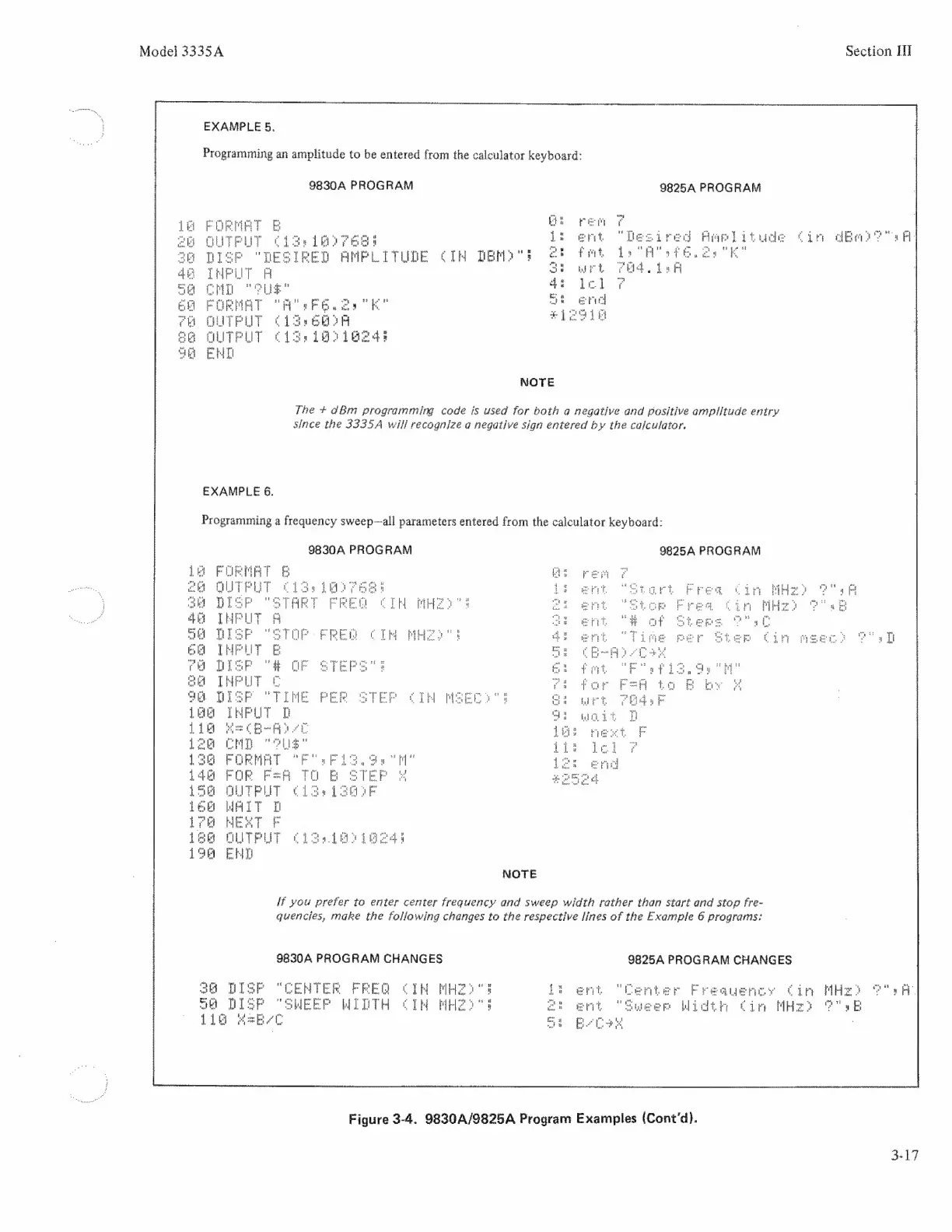
EXAMPLE
5,
Programming
an
amplitude
to
be
entered
from
the
calculator
keyboard:
9830A
PROGRAM
9825A
PROGRAM
Ls
ent
Hamelitude
Cin
dee
aA
CIH
Tero
ss
ef
fet
ga
RK”
"Fb
wt
"aes
E
K
13
CER
EEG
SOIREE
EEEE
NOTE
The
+
dBm
programming
code
is
used
for
both
a
negative
and
positive
amplitude
entry
since
the
3335A
will
recognize
a
negative
sign
entered
by
the
calculator.
EXAMPLE
6.
Programming
a
frequency
sweep~all
parameters
entered
from
the
calculator
keyboard:
9830A
PROGRAM
9825A
PROGRAM
F
Le
FORME
=i
ei
HoH
eo"
4
ALTEN
i
l
SP
O'S
T
p
i
th
ee
SP
iH
HS
i
a
TMPUT
wis
df
fet.
EMD
FORMAT
ye
Fep
Laa
IT
LET
teg
WAIT
T
rE
HEST
F
A
PLUTERLT
ciga
gaapi
4
EHH
NOTE
if
you
prefer
to
enter
center
frequency
and
sweep
width
rather
than
start
and
stop
fre-
quencies,
make
the
following
changes
to
the
respective
fines
of
the
Example
6
programs:
98304
PROGRAM
CHANGES
9825A
PROGRAM
CHANGES
IW
PHZ“
1:
Freauenigy
Cir
MHz
ea
A
TR
ARS
et
Widtir
tim
MHz
oF"
rE
Figure
3-4.
9830A4/9825A
Program
Examples
(Cont'd).
3-17

Related product manuals