EasyManua.ls Logo

HP 3455A - Page 195

HP 3455A
249 pages
Print Icon
To Next Page IconTo Next Page
To Previous Page IconTo Previous Page
Loading...
NOTE 1
f
The
Signature Analyzer
Controls
Should Be Set
Follows For This
Test:
LINE ON (IN)
START.
"V
(IN)
STOP
y(OUT)
CLOCK. J~(OUT)
HOLD OFF (OUT)
SELFTEST
OFF(OUT)
NOTE
2
The Following
Is A
List Of Components
Which Are Connected To The Output
Data
Bus.
Schematic
8
Schematics Schematic 10
AiU23
AWiI AWSi
A1U24 AWI8 AW54
AW25
AW19 AiU63
AW29
A1U20 AW64
AIU3I A1U26
AiU65
A1U34
AIU66
A1U3S A1U67
A1U36
AiU6S
AW37
AIU69
A1U42
AW70
A1U43
Start
Be Certain That The
Test
Jumper On The
A3
Assem-
bly Is
Disconnected,
The
Plug Is
Disconnected From
A1J7 And All HP-18
Address Switches
Are Set
To The
"9"
Position. Torn
Instrument ON.
I
Connect
The Signature
Analyzer START and
STOP Inputs To
A3TP1.
Connect The
CLOCK
Input
To A3TP5 And
The
GNO To
The Chassis. (See
NOTE 1
For Signature
Analyzer
Control Settings,)
I
Use The Signature Anal- I
zer
To
Check The RAM
Output Signatures At The
Following
Points:
Location
Signature
A1U34
Pin
2
184P
Pins
7FPH
Pin
9
AFOP
Pin 12 UHUC
A1U42
Pin
2
P6PH
Pin
5
P961
Pin
9
PH16
Pin
12
8CPA
The
RAM Circuits Are Operating Cor-
rectly.
i
Go
To
The ALU Trouble-
shooting
Procedure.
3455
-
8-20
1
Check The Signatures At
The
Following Points:
Location
Signature
: A1U44
Pin
9
AFOP
Pin
10
184P
Pin 11 UHUC
Pin
12
7FPH
A1 U45
Pin 9 PH16
Pin
10
8CPA
Pin 11 P961
Pin 12 P6PH
Go To The
Device Select
Troubleshooting Proced-
ure.
Turn The Instrument
OFF
And Carefully Remove
A1U44 And U45. Turn
The Instrument
ON,
Output
Buffer A1U35 Or
AIU43.
I
Check
The Signatures At
The Following
Points:
Location
Signature
A1U44
Socket
Pin
1
93AF
Pin
2
U6FF
Pin 3
OHAH
Pin 4 AACA
Pin
5
1UFP
Pine
FF11
Pin
7
671
F
Pin 16 143A
Go
To
The Device Select
Troubleshooting
Proced-
ure.
1
Turn The Instrument OFF.
Connect A 10
kO Resistor
Between The -t-B V Test
Point On The A1 Assembly
Artd The
Probe
Tip
Of The
Signature
Analyzer Turn
The Instrument ON.
i
'
Check
The
Signatures At
The Following
Points:
Location
Signature
A1U44
Socket
Pin
9
7078
Pin
10
97C6
Pin 11
F757
Pin 12
15FU
A1U46
Socket
Pin
9
62PP
Pin 10
P2F8
Pin 11
H3FH
Pin 12 3A9C
Presettable Counter
A1U36 Or U37.
Data Bus
Output Buffers
A1U34 or U42.
A
Signature Of
0 0
0
0
Indicates The Output Data
Bus
Line
Is
Being Held
Low.
Troubleshoot
The
Components
Which
Are
Connected To
This Line,
(Sea
Note
2.)
In Most
Cases,
A
High
Resolution Voltmeter
(1
pV
Resolution)
May
Be
Used To
Determine The
Bed
Component. In
Gen-
erel.
The Component Hold-
ing The Line Low
Will
Have
The Lowest Voltage
Reeding. When Trouble-
shooting The Data Bus,
The A3
Assembly Should
Be
Removed From The
Instrument.
NOTE 3
Be Sure To Remove The 10
Resistor Connected
Between The
Signature
Analyzer Probe Tip And
The +S V
Test
Point.
Replace
A
1U44 And A 1 U4S.
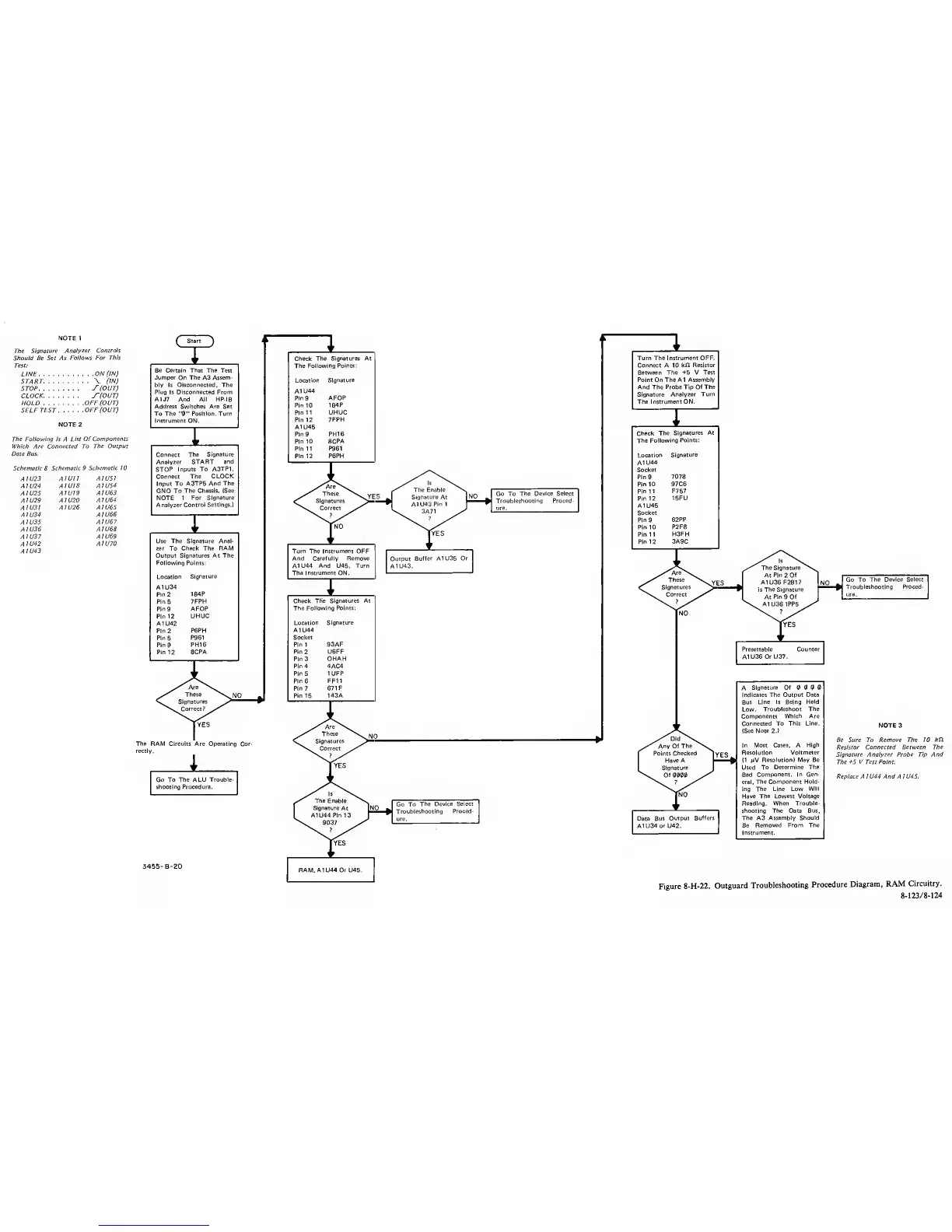
Figure 8-H-22.
Outguard
Troubleshooting
Procedure
Diagram, RAM
Circuitry.
8-123/8-124