Model
3455A Appendix
A
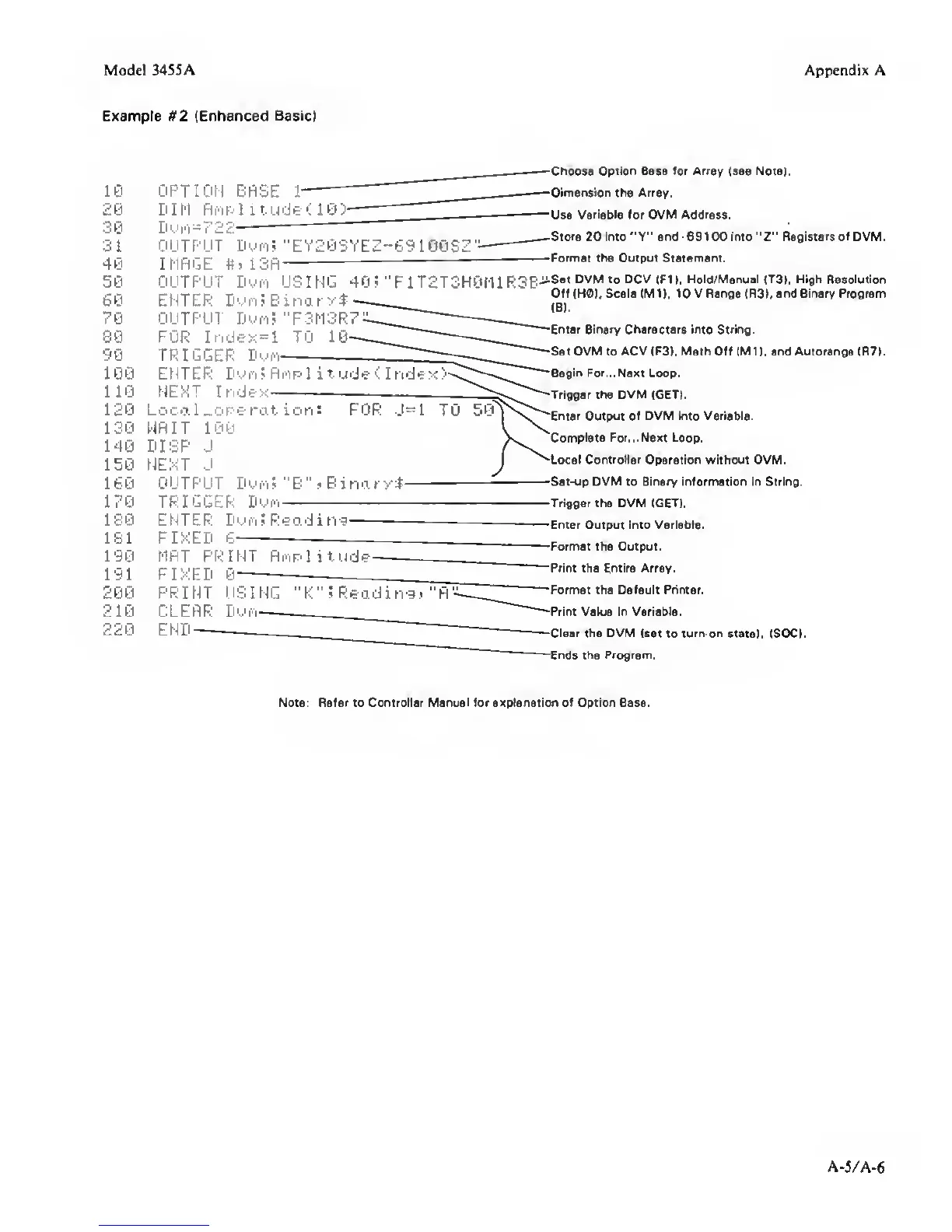
Example M2 (Enhanced
Basic!
10
20
30
31
40
50
60
70
80
90
100
110
120
130
140
150
160
170
180
181
190
191
200
210
220
OPTION
BRSE
1
DIM Ri-ipI itudt < 1 0)
D 's' I'l
-
7
22^
OUTPUT Dyro; "EY20SYEZ-69100S2
-
IMAGE
#»13R^
ChoOM Option Baia for Array (a«e Note).
Dimension the Array.
Use
Variable
for OVM
Address.
Store 20 into"Y" and
-69
100 into
"2"
Registers
of DVM.
Format the
Output
Statement.
OUTPUT
DuM using 40; "FlT2T3H0t11R3B-^®«»
OVM
to
OCV
(FII.
Hold/MenuaUTSl. High Resolution
ENTER
Dt'i^
J B i no r
VT
-
Off IHOI. Scale
(MD.
IOV Range
IRSI,
and Binary Program
OUTPUT DufflS ‘•F3M3R7:2
.
o-
FOR Index=l TO
____J~Ent«
Binary character. .ntoStr.ng.
TRIGGER P
'
II
^
Set DVM to ACV (F3). Math Off (MU. and Auiorange IR7).
ENTER
fli'lpl ilude<
Index
—
-Begin For,. ,Ne«t Loop.
NEXT Index
Locol-operation; FOR
J=1 TO 50
Y^e„,^
Output of dvm into variable.
I
V.
Complete For.. .Next Loop.
NEXT J
i
^Local Controller
Operation without OVM.
OUTPUT Dui'i 5
"
B
“
> Bi no. ry$
'
-Set-up DVM to Binary information in String.
TRIGGER Dwr'l
Trigger the DVM (GET).
ENTER Dui'i 5 Reo.di n-g-
FIXED
6
MAT PRINT Rnplitude-
FIXED
PRINT USING "K'‘
5
Reading! "H-
CLEAR DL-'h-
END-
Enter Output into Variable.
Format the Output.
Print the Entire Array.
Format the Default Primer.
Print Value in Variable.
Clear the OVM
(set to
tum-on
state), (SDCI.
Ertds the Program.
Note; Refer to Controller Manual for explanation of Option Base.
A-5/A-6



 To Previous Page