SECTION III
3-3. PANEL FEATURES
3-4.
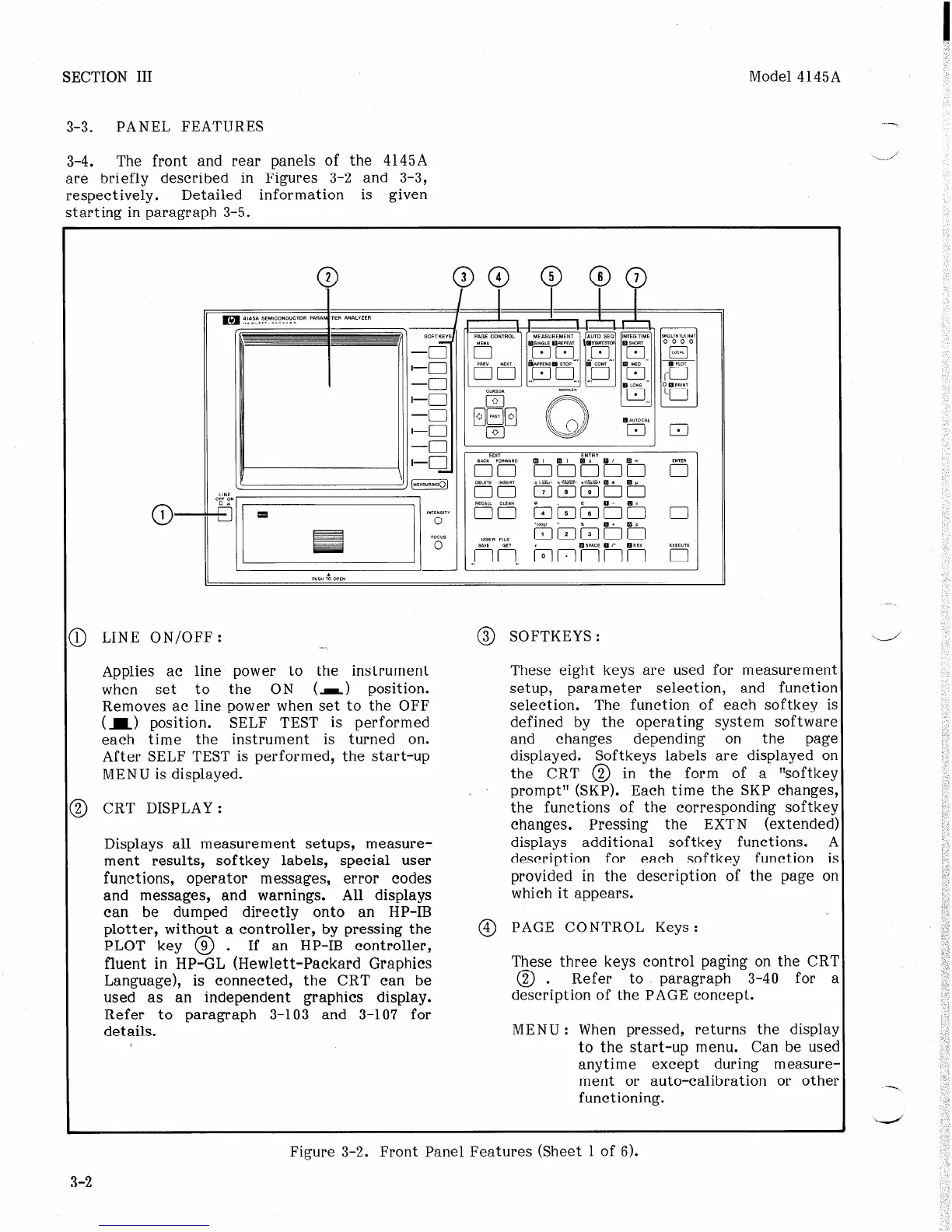
The front and rear panels of the 4145A
are briefly described in Figures 3-2 and 3-3,
respectively. Detailed information is given
starting in paragraph 3-5.
Model 4145A
D LINE ON/OFF:
_,
Applies ac line power to the instrument
when set to the ON (I) position.
Removes ac line power when set to the OFF
(I> position. SELF TEST is performed
each time the instrument is turned on.
After SELF TEST is performed, the start-up
MENU is displayed.
3 CRT DISPLAY:
Displays all measurement setups, measure-
ment results, softkey labels, special user
functions, operator messages, error codes
and messages, and warnings. All displays
can be dumped directly onto an HP-IB
plotter, without a controller, by pressing the
PLOT key @ .
If an HP-IB controller,
fluent in HP-GL (Hewlett-Packard Graphics
Language), is connected, the CRT can be
used as an independent graphics display.
Refer to paragraph 3-103 and 3-107 for
details.
0
3 SOFTKEYS :
These eight keys are used for measuremen’
setup, parameter selection, and functior
selection. The function of each softkey i!
defined by the operating system software
and changes depending on the
Pagt
displayed. Softkeys labels are displayed or
the CRT @ in the form of a “softke:
prompt” (SKP). Each time the SKP changes
the functions of the corresponding softke!
changes. Pressing the EXTN (extended
displays additional softkey functions. I
description for each softkey function i:
provided in the description of the page 01
which it appears.
@ PAGE CONTROL Keys:
These three keys control paging on the CR’
0
2 . Refer to paragraph 3-40 for z
description of the PAGE concept.
MENU : When pressed, returns the displa:
to the start-up menu. Can be usec
anytime except during measure
ment or auto-calibration or othe
functioning.
-1
i/’
-
---.
Figure 3-2. Front Panel Features (Sheet 1 of 6).
3-2
h;cc -.-___
-- -- -_ --



 To Next Page