Press
NNNNNNNNNNNNNN
LOAD
when you want to use the load function. The message
Enter record number to LOAD
will be displayed on the system
message line.
5. Enter the record number using the numeric entry keys and
4
ENTER
5
to store the current control settings, or load the control settings.
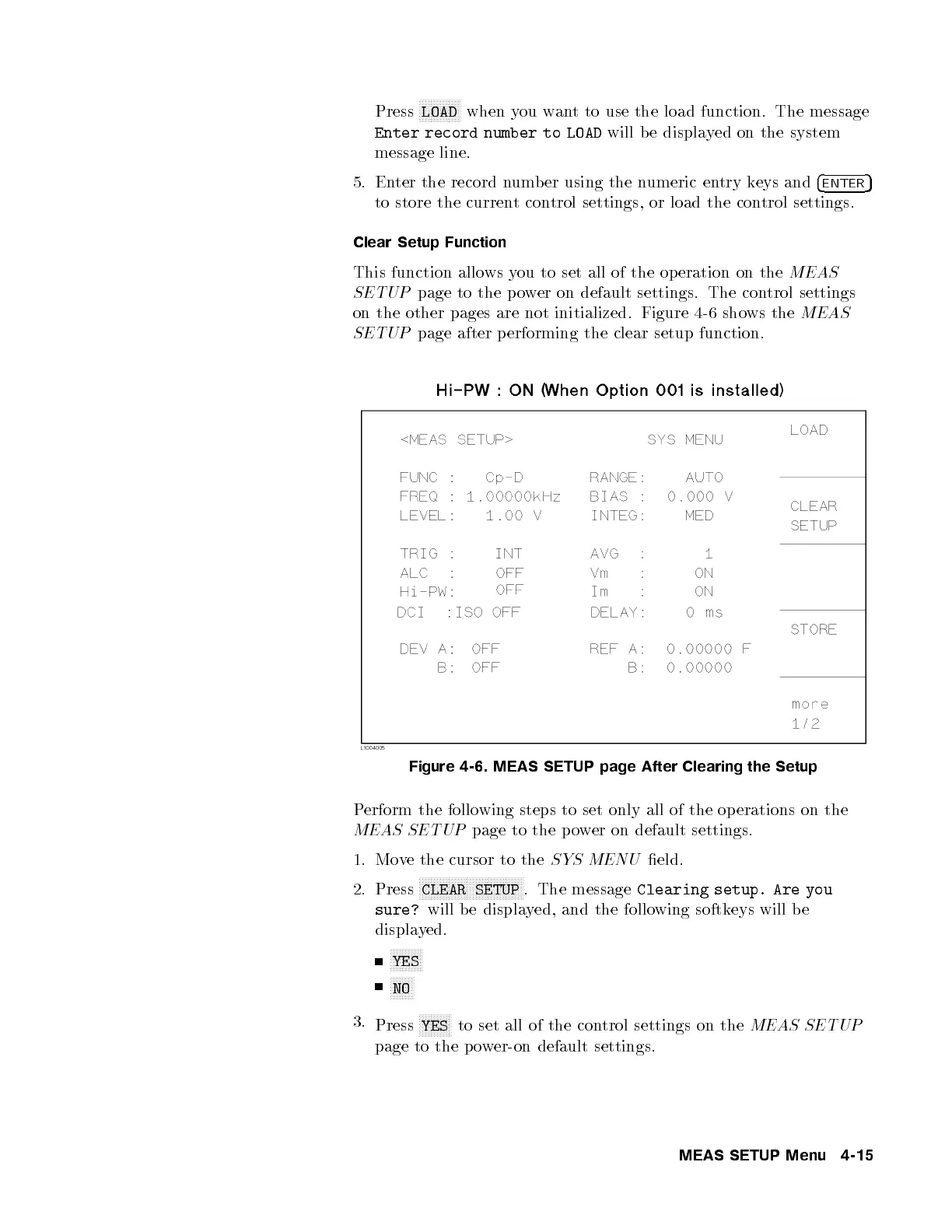
Clear Setup Function
This function allows you to set all of the op eration on the
MEAS
SETUP
page to the power on default settings. The control settings
on the other pages are not initialized. Figure 4-6 shows the
MEAS
SETUP
page after p erforming the clear setup function.
Figure 4-6. MEAS SETUP page After Clearing the Setup
Perform the following steps to set only all of the op erations on the
MEAS SETUP
page to the power on default settings.
1. Move the cursor to the
SYS MENU
eld.
2. Press
NNNNNNNNNNNNNNNNNNNNNNNNNNNNNNNNNNN
CLEAR SETUP
. The message
Clearing setup. Are you
sure?
will be displayed, and the following softkeys will b e
displayed.
NNNNNNNNNNN
YES
NNNNNNNN
NO
3.
Press
NNNNNNNNNNN
YES
to set all of the control settings on the
MEAS SETUP
page to the p ower-on default settings.
MEAS SETUP Menu 4-15



 To Next Page