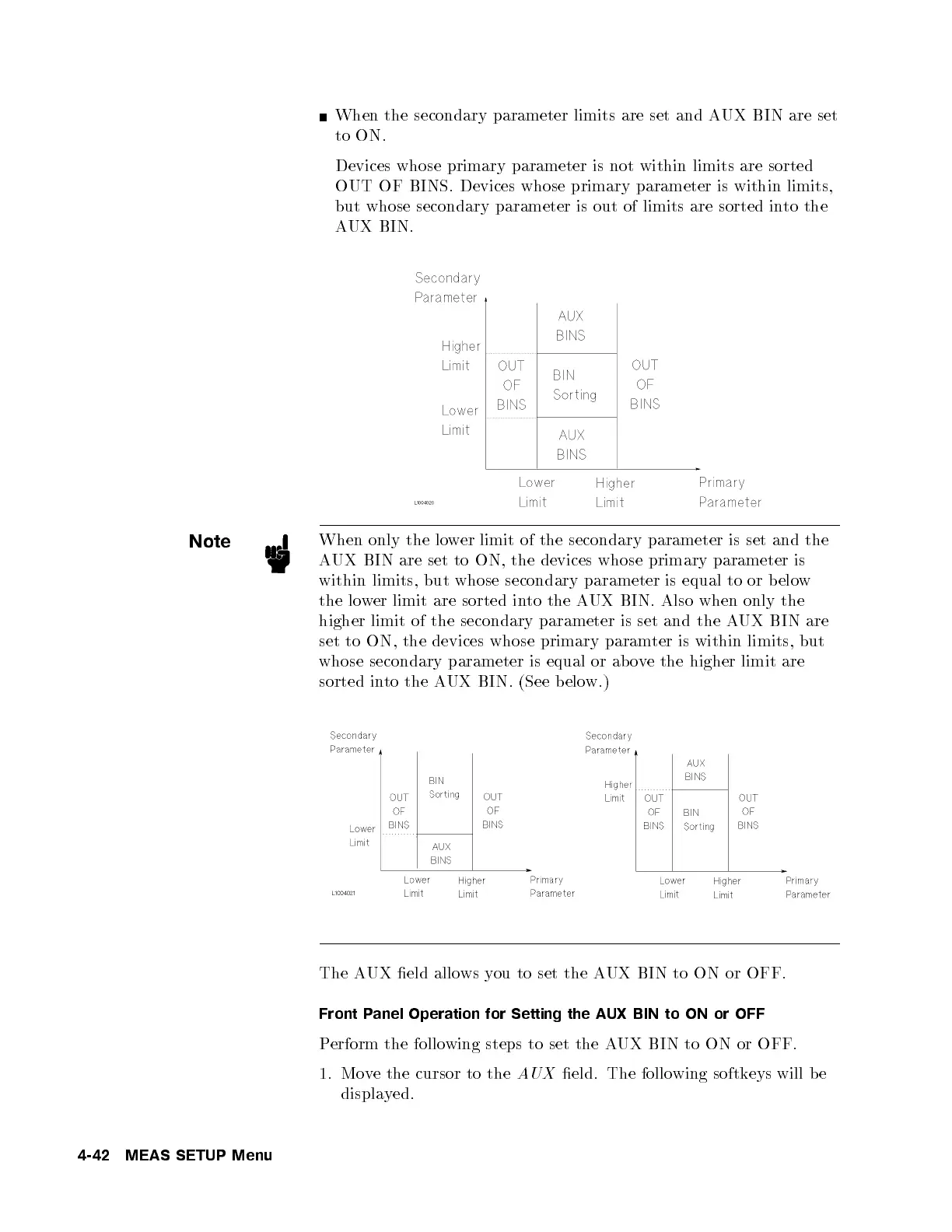
When the secondary parameter limits are set and AUX BIN are set
to ON.
Devices whose primary parameter is not within limits are sorted
OUT OF BINS. Devices whose primary parameter is within limits,
but whose secondary parameter is out of limits are sorted into the
AUX BIN.
Note
When only the lower limit of the secondary parameter is set and the
AUX BIN are set to ON, the devices whose primary parameter is
within limits, but whose secondary parameter is equal to or b elo
w
the lower limit are sorted into the AUX BIN. Also when only the
higher limit of the secondary parameter is set and the A
UX BIN are
set to ON, the devices whose primary paramter is within limits, but
whose secondary parameter is equal or ab ove the higher limit are
sorted into the AUX BIN. (See b elow.)
The AUX eld allo ws you to set the AUX BIN to ON or OFF.
Front Panel Operation for Setting the AUX BIN to ON or OFF
Perform the following steps to set the AUX BIN to ON or OFF.
1. Move the cursor to the
AUX
eld. The following softkeys will be
displayed.
4-42 MEAS SETUP Menu



 To Next Page